®
TV 450/455 Clearing stored data
59
Keys in dialog for confirmation to clear results in selected location:
HELP
Deletes all results in selected location.
MEM
Exits back to delete results menu without changes.
Function selectors /
TEST
Exits back to main function menu without changes.
6.5.3 Clearing individual measurements
Select DELETE RESULTS in MEMORY menu.
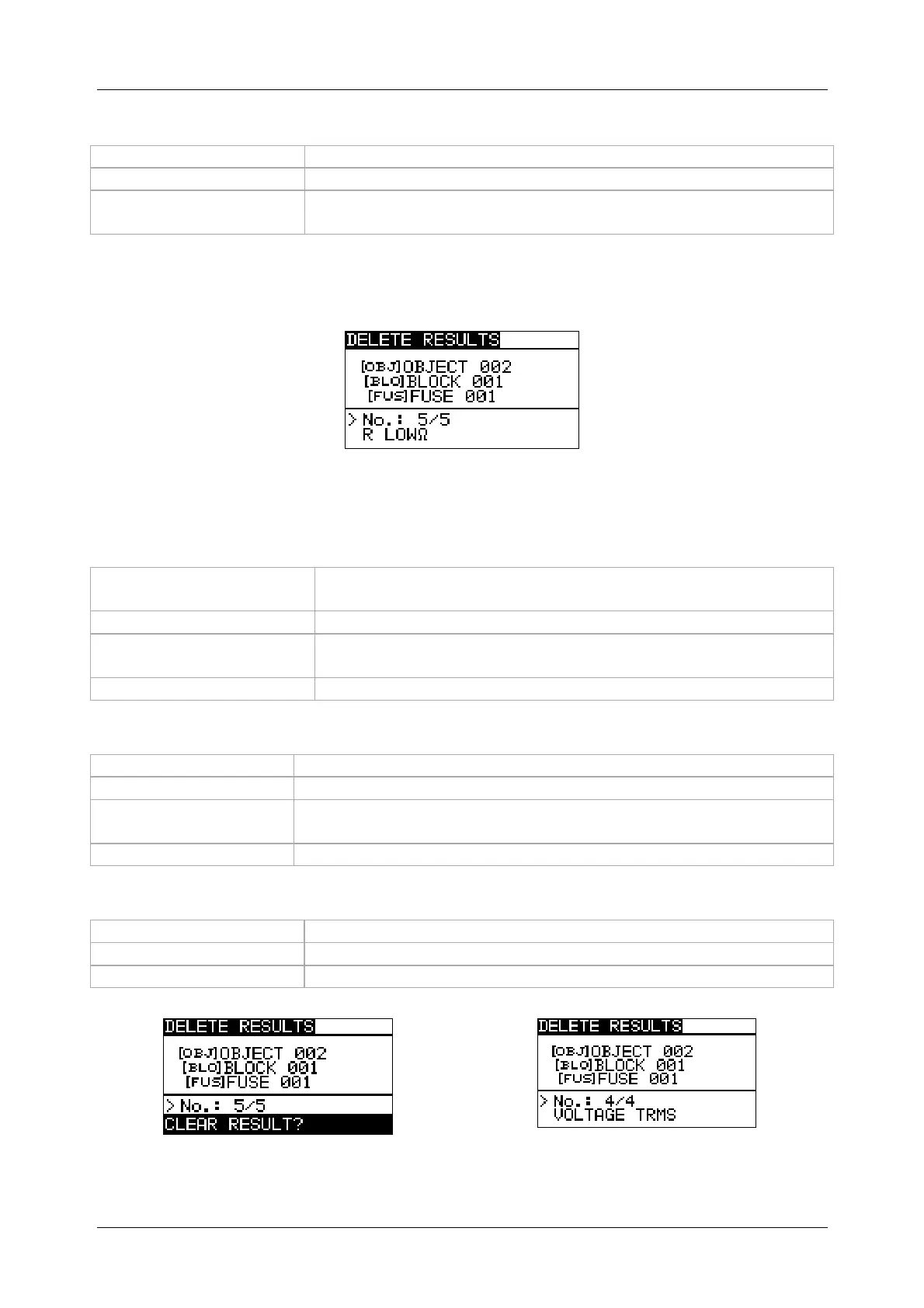
Figure 6.9: Menu for clearing individual measurement (installation structure field
selected)
Keys in delete results menu (installation structure field selected):
TAB
Selects the location element (Object / D. Board / Circuit or
Bonding or Electrode).
UP / DOWN
Selects the location element in selected level.
Function selector /
TEST
Exits back to main function menu.
MEM
Enters measurements field.
Keys in delete results menu (measurements field selected):
TAB
Returns to installation structure field.
UP / DOWN
Selects measurement.
HELP
Opens dialog box for confirmation to clear selected
measurement.
Function selector
Exits back to main function menu without changes.
Keys in dialog for confirmation to clear selected result(s):
HELP
Deletes selected measurement result.
MEM
Exits back to measurements field without changes.
Function selector
Exits back to main function menu without changes.
Figure 6.10: Dialog for confirmation
Figure 6.11: Display after measurement
was cleared


 To Next Page