®
TV 450/455 Communication
61
6.6 Communication
Stored results can be transferred to a PC. A special communication program on the PC
automatically identifies the instrument and enables data transfer between the instrument
and the PC.
There are two communication interfaces available on the instrument: USB or RS 232.
The instrument automatically selects the communication mode according to detected
interface. USB interface has priority.
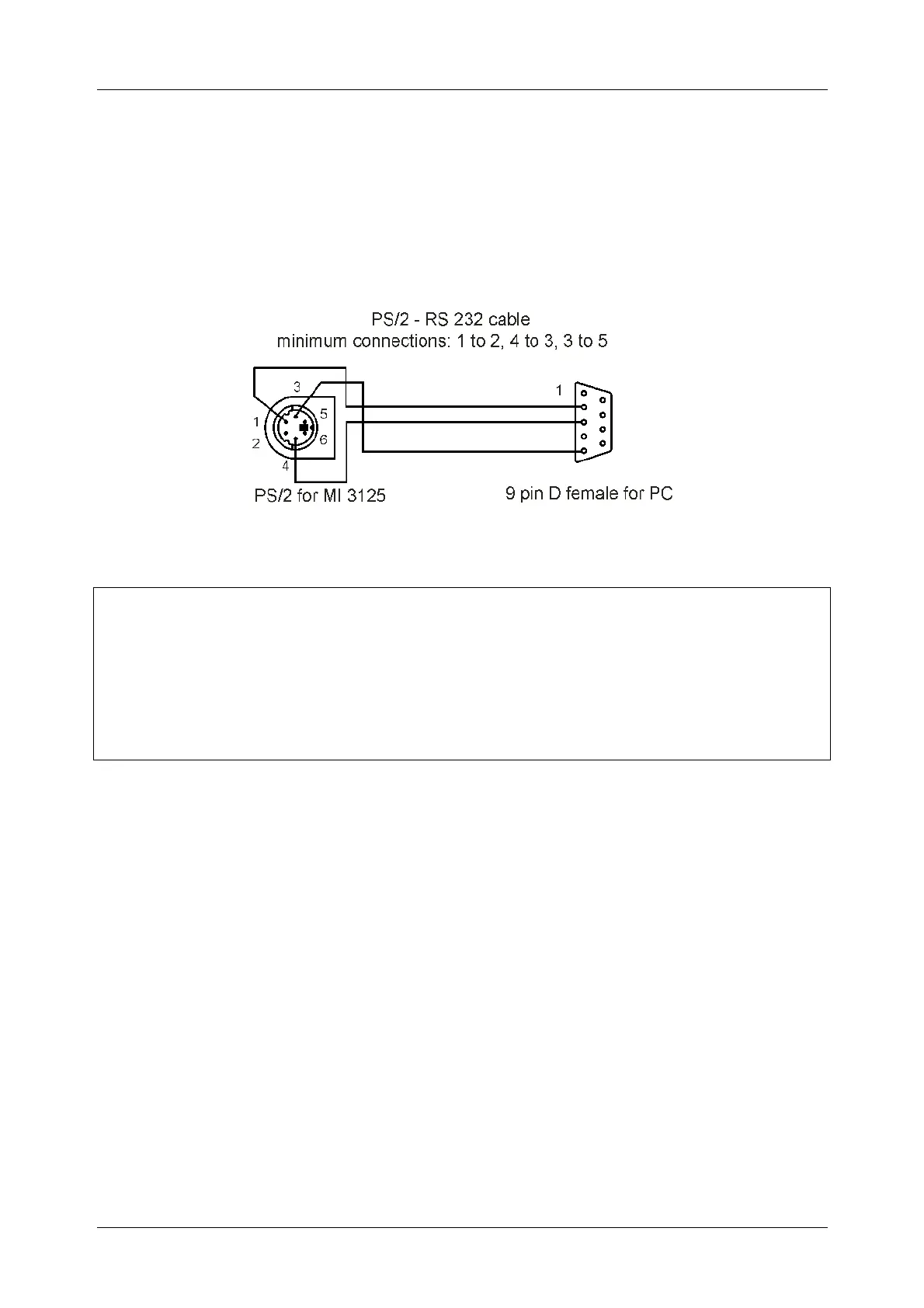
Figure 6.13: Interface connection for data transfer over PC COM port
How to transfer stored data:
RS 232 communication: connect a PC COM port to the instrument PS/2
connector using the PS/2 - RS232 serial communication cable;
USB communication selected: connect a PC USB port to the instrument USB
connector using the USB interface cable.
Switch on the PC and the instrument.
Run the PC SW TV 450 program.
The PC and the instrument will automatically recognize each other.
The instrument is prepared to download data to the PC.
The program PC SW TV 450 is a PC software running on Windows 95/98, Windows NT,
Windows 2000, Windows XP, Windows Vista. Read the file README_EuroLink.txt on
CD for instructions about installing and running the program.
Note:
USB drivers should be installed on PC before using the USB interface. Refer to
USB installation instructions available on installation CD.


 To Next Page