5 First steps
17
- New upper limit value is applied.
> Carry out further settings in the configuration menu or quit the
configuration menu with [].
Pos: 53 /TD/Erst e Schritte/testo 275/ Hold-Funktion (test o 275) @ 15\mod_1407409349 521_79.docx @ 194484 @ 4 @ 1
5.2.2.3. Hold function
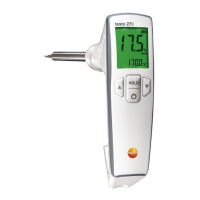
Measured values can be held manually.
Requirement: Sensor is in the oil.
1. Briefly press [Hold] (< 1 sec).
- Hold appears in the display.
- Readings are held.
2. To switch to the measuring mode: Briefly press [Hold] (<
1 sec).
- Hold function is deactivated.
- Current readings are displayed.
Pos: 54 /TD/Erst e Schritte/testo 275/A uto-Hold Funktion (te sto 275) @ 16\mod_1408003 188527_79.docx @ 196826 @ 4 @ 1
5.2.2.4. Auto-Hold function
When the Auto-Hold function is activated, the measured values
are automatically held by the instrument after the equalization
period.
To activate/deactivate the Auto-Hold function, see Carrying out the
configuration, page 18
Pos: 55 /TD/Erst e Schritte/testo 275/A uto off Funktion (tes to 275) @ 16\mod_1408003278359 _79.docx @ 196861 @ 4 @ 1
5.2.2.5. Auto-off function
When the Auto-off function is activated, the instrument
automatically switches off after a certain time
• If the instrument is in measuring mode: automatic switch-off
after 2 mins.
• If the instrument is in hold or configuration mode: automatic
switch-off after 10 mins.
To activate/deactivate the Auto-off function, see Configuring the
instrument, page 18
Pos: 56 /TD/Erst e Schritte/testo 275/ Batteriekapazitä t (testo 275) @ 16\mod_14080 02874610_79.doc x @ 196791 @ 4 @ 1
5.2.2.6. Battery capacity
With decreasing battery capacity, a symbol lights up in the display (
). If the empty battery symbol ( ) flashes in the display, the
remaining capacity is only approx. 30 min.
If the battery voltage is too low, the instrument automatically
switches off.
> Change batteries, see Changing batteries, page 26


 To Next Page