15
EN
15sec.
INSTRUCTIONS FOR USE
STARTING THE SYSTEM
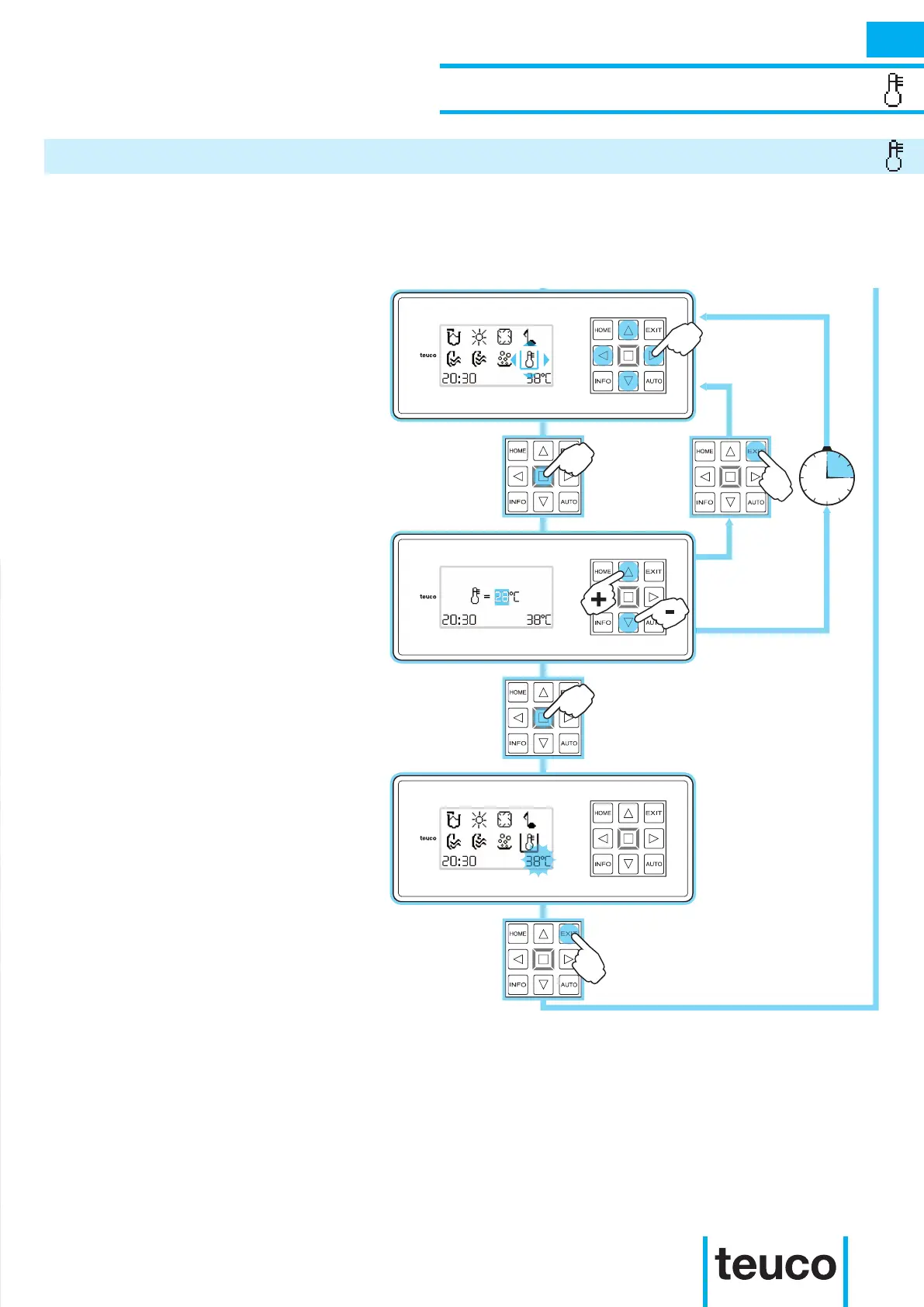
TEMPERATURE SETTING
- From the READY MENU select the
TEMPERATURE icon, using the arrows
to move the cursor and pressing OK to
conrm.
- Set the value for the required
temperature (min. 15°C - max. 40°C)
using the UP- DOWN arrowsx. The
heater will start; press OK to return to
the READY MENU
- If no buttons are pressed for 15 seconds
the panel will return to the READY MENU
mode.
- To cancel the operation, press EXIT.
- When the temperature value ashes,
this indicates that the heater is switched
on.
- When the required temperature has
been reached, the icon will stop ashing.
- To return to the main menu press EXIT.
With this product it is possible to set the desired water temperature. If the temperature of the water in the
tub is lower than the required level, the heater will start.



 To Next Page