29
EN
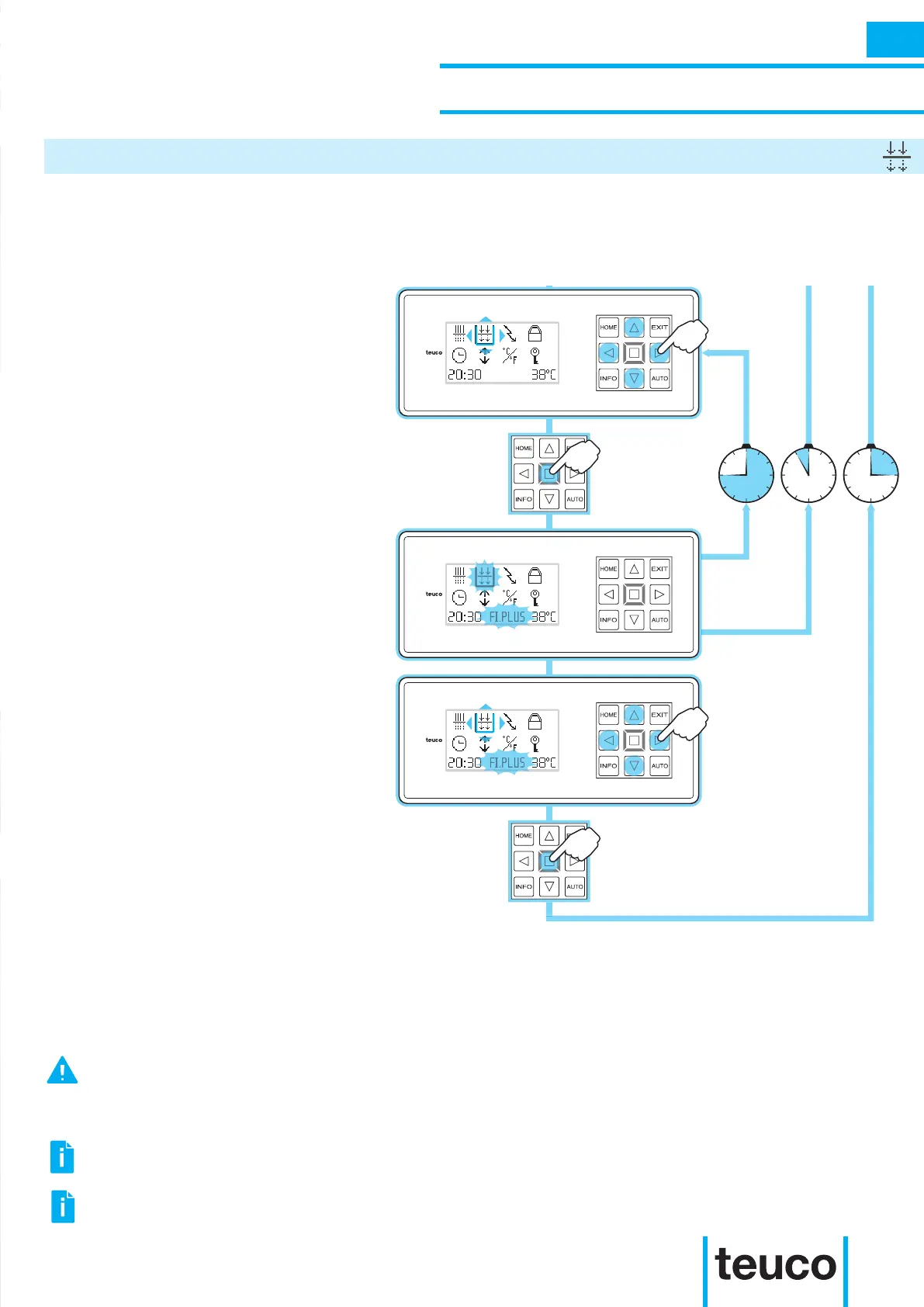
45min. 5sec. 15sec.
- From the INFO MENU select the
FILTER PLUS icon, using the arrows to
move the cursor.
- Press OK to conrm.
- The FILTER PLUS function will start.
- The ashing icon and the message
FI.PLUS indicate that the function is
operating.
- After 45 minutes, the FILTER PLUS
function will stop automatically.
- To switch off the function before it
automatically nishes, select the FILTER
PLUS icon using the arrow keys to shift
the cursor. Press the OK key to conrm.
- The FILTER PLUS function will stop.
- If no buttons are pressed for 15 seconds
the panel will return to READY MENU
mode.
When the FILTER PLUS function is manually switched on by the user, all water massages are activated
and last for approximately 45 minutes (the length of time may change under specic operating conditions).
This operation is useful after intensive product use or to mix in water treatment products quickly.
INSTRUCTIONS FOR USE
SECONDARY FUNCTIONS
FILTER PLUS
INFO
SWITCHING ON THE MASSAGE, BLOWER, UNDERWATER SPOTLIGHT OR CHROMOTHERAPY WHILST THE
“FILTER PLUS” FUNCTION IS OPERATING CAUSES THE FUNCTION TO STOP.
DURING THE “FILTER PLUS” FUNCTIONS, THE USER SETTINGS FOR THE SPRING FUNCTION ARE
TEMPORARILY DISABLED.
DO NOT SWITCH OFF THE “FILTER PLUS” FUNCTION BEFORE IT HAS FINISHED ITS CYCLE. IF ONE OR MORE
WATER PUMPS ARE STILL FUNCTIONING, SWITCH ON THE FUNCTION AGAIN FOR A FEW MINUTES TO OBTAIN
A MINIMUM LEVEL OF REMIXING OF THE WATER. ANYWAY, IT IS POSSIBLE TO MANUALLY DEACTIVATE THE
PUMPS.



 To Next Page