34
EN
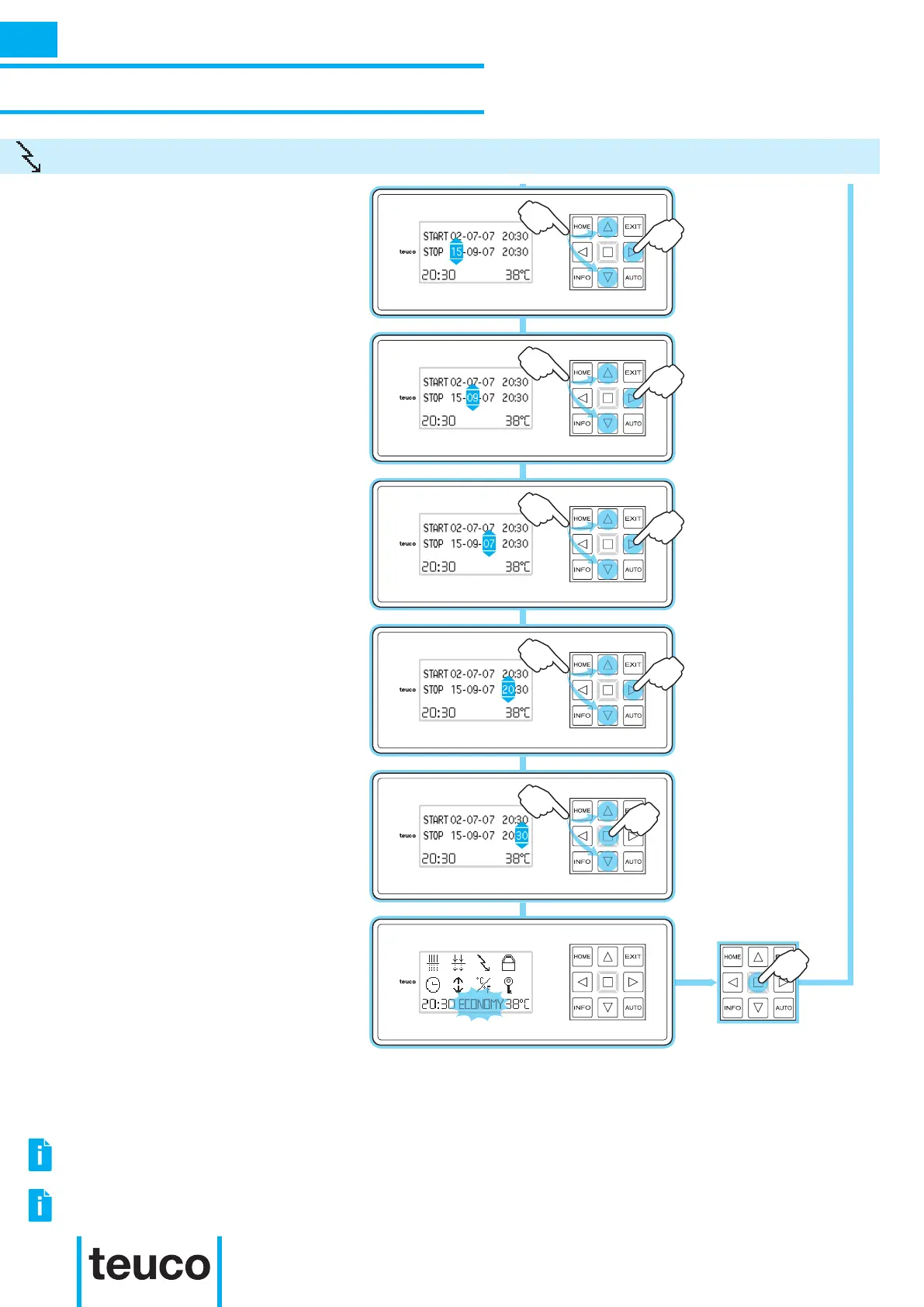
- Use the UP-DOWN arrows to set the
month for switching off.
- Press RIGHT to pass to the year setting.
- Use the UP-DOWN arrows to set the
year for switching off.
- Press RIGHT to pass to the hour
setting.
- Use the UP-DOWN arrows to set the
hour for switching off.
- Press RIGHT to pass to the minutes
setting.
- Use the UP-DOWN arrows to set the
minutes.
- Press OK to conrm and return to the
INFO MENU.
- Use the UP-DOWN arrows to set the
hour for switching off.
- Press RIGHT to pass to the minutes
setting.
- To cancel the operation, press EXIT.
- If no buttons are pressed for 15 seconds
the panel will return to READY MENU
mode.
- The word ECONOMY indicates that the
function is switched on.
.
ACTIVATING THE MASSAGE OR BLOWER FUNCTIONS WILL TEMPORARILY SUSPEND THE ECONOMY
FUNCTION.
TO CUT DOWN ON OPERATING COSTS, SET THE TIMER RECIRCULATION TO OPERATE TOGETHER WITH THE
ECONOMY FUNCTION.
INSTRUCTIONS FOR USE
SECONDARY FUNCTIONS
ECONOMY
INFO



 To Next Page