Section 6: Vectors Name
Date
Fundamental Topics in Science © 2001 Texas Instruments
Try-It!™ 6-1
6: Vectors Try-It!™ on Your TI83 Plus
Solve a vector problem by hand
A ship heads due east with speed of 10 kilometers per hour with respect to the water. The
current is 30 degrees south of east at 3 kilometers per hour. Sketch the vectors and find the
actual course and speed of this ship with respect to the ground. Show your work.
#
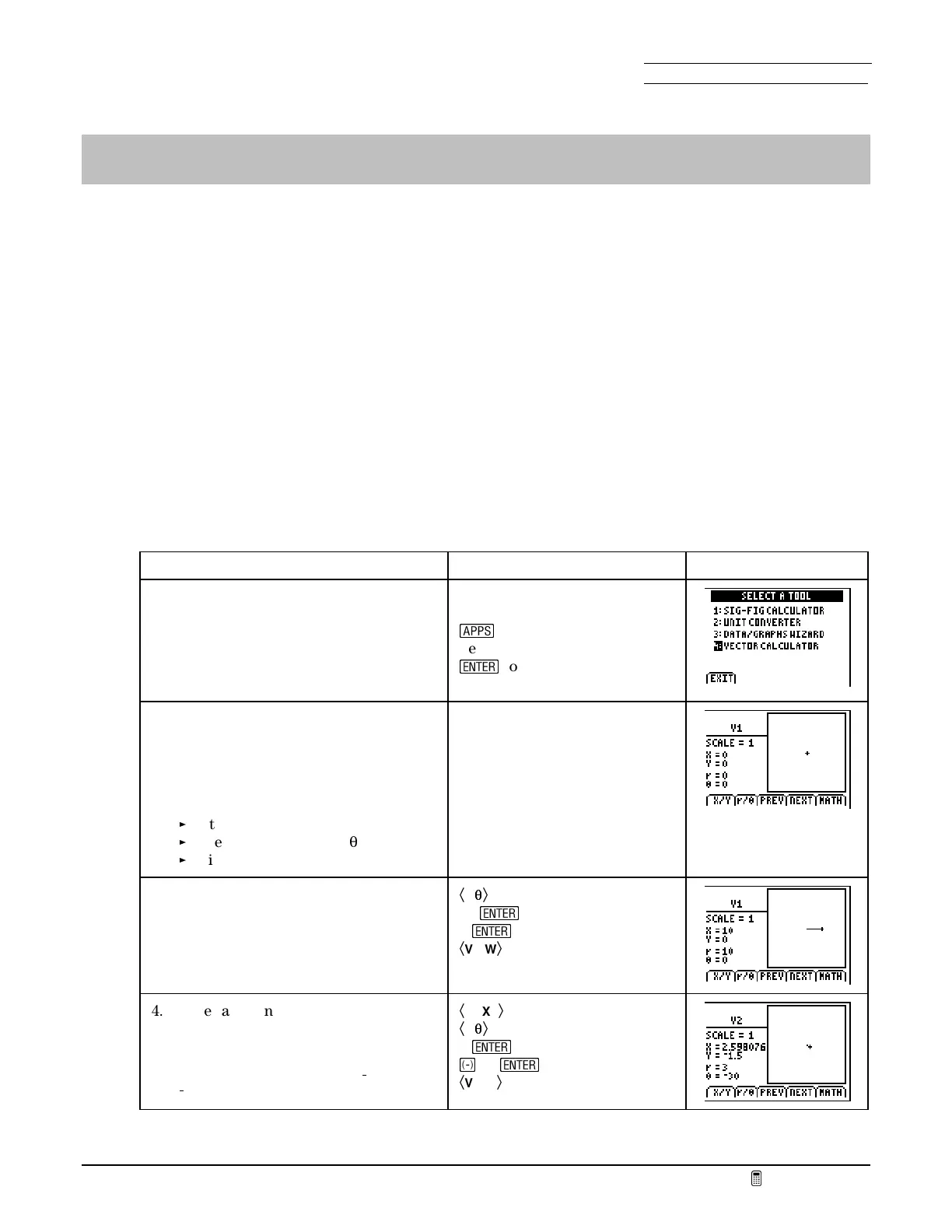
Define vectors in the Vector Calculator
Now use the
VECTOR CALCULATOR
to explore the same problem.
To Do This Press Display
1. Display the
SCIENCE TOOLS
menu.
Note:
You also can access the
SCIENCE
TOOLS
menu from the
SCIENCE
CHAPTERS
menu.
If necessary, exit
FunSci
n
Select
SciTools
¯
to leave the title page
2. Display the
VECTOR CALCULATOR
screen.
On this screen, the tail of the vector
is positioned at point (0,0). You may
create or edit a vector in three ways:
Entering the head as (x,y).
Entering the head as (r,
T
).
Using the cursor keys.
4:VECTOR CALCULATOR
3. Enter a vector,
V1
, describing the
ship’s initial speed and course
heading.
Ã
r/
T
T
Ä
10
¯
0
¯
Ã
VIEW
Ä
4. Enter a second vector,
V2
, describing
the current.
Note:
Angles in the fourth and third
quadrants are designated as
/
1 through
/
180.
Ã
NEXT
Ä
Ã
r/
T
T
Ä
3
¯
®
30
¯
Ã
VIEW
Ä



 To Next Page
 Loading...













