Section 3: Scientific Notation Name
Date
Fundamental Topics in Science © 2001 Texas Instruments
Try-It!™ 3-1
3: Scientific Notation Try-It!™ on Your TI83 Plus
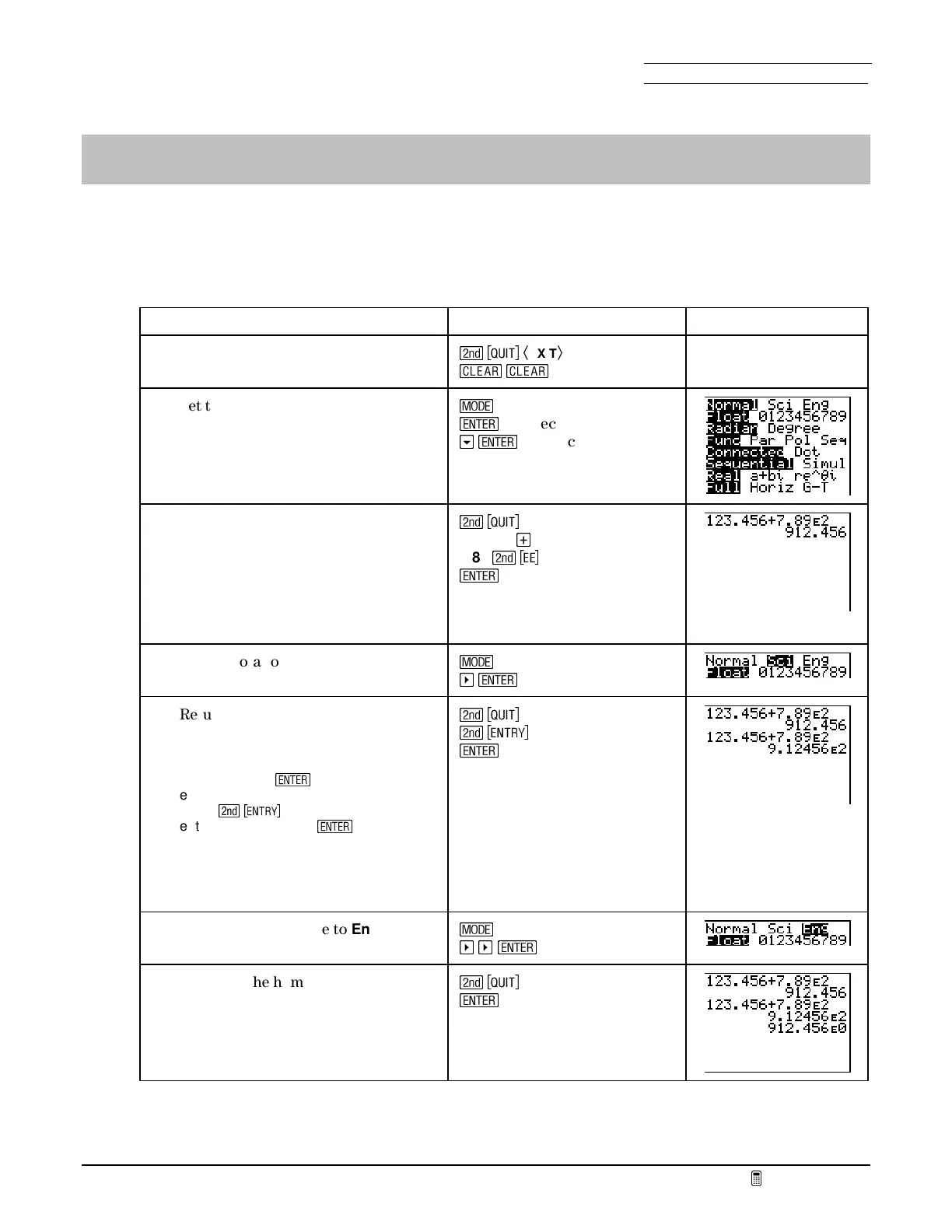
Notation formats on the home screen
Enter the mixed-format problem
123.456+7.89
E
2
on the home screen and display the result in all
three formats: Decimal (
Normal
), Scientific Notation (
Sci
), and Engineering (
Eng
).
To Do This Press Display
1. Exit Fundamental Topics in Science.
Clear the home screen.
\
Ã
EXIT
Ä
s
s
2. Set the notation mode to
Normal
,
with floating digits.
]
¯
to select
Normal
h
¯
to select
Float
3. Return to the home screen. Enter and
evaluate the expression
123.456+7.89
E
2
.
The format of the entry line is not
changed. The result appears in
Normal
(decimal) format.
\
123.456
¥
7.89
\
'
2
¯
4. Set the notation mode to
Sci
.
]
a
¯
to select
Sci
5. Return to the home screen and
re-evaluate the expression.
Note:
There are two ways to re-evaluate
an expression.
¯
alone automatically
executes the previous home screen
entry.
\
>
pastes the previous
entry onto a new line.
¯
executes it.
The format of the entry line is not
changed. The result appears in
Sci
(scientific notation) format.
\
\
>
¯
6. Set the notation mode to
Eng
.
]
a
a
¯
to select
Eng
7. Return to the home screen and
re-evaluate the expression.
The result appears in
Eng
(engineering) format.
\
¯



 To Next Page
 Loading...













