Pagina 43 di 48
STDITR01ADP2090EV TECNOFRIGO TUSCANY srl
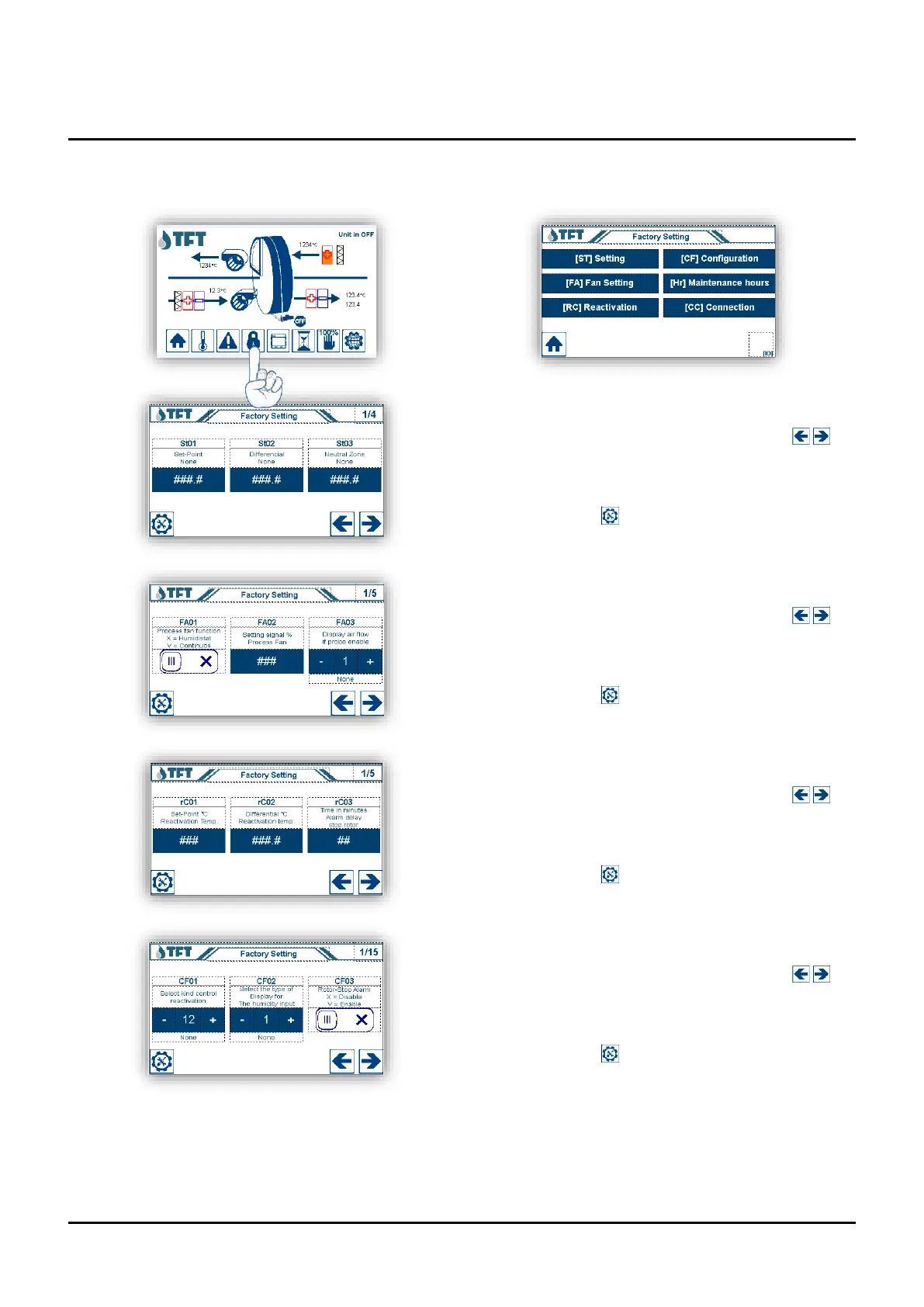
Factory Settings Menu.
Parameter setting “St” (Set-point)
Scroll through the parameters with the arrow keys ,
to change the setting, press the number to change, a
keypad will appear to enter the desired value, confirm the
value set with the [ENTER] key. To return to the settings
menu, press the key .
Parameter setting “FA” (Fans)
Scroll through the parameters with the arrow keys ,
to change the setting, press the number to change, a
keypad will appear to enter the desired value, confirm the
value set with the [ENTER] key. To return to the settings
menu, press the key .
Parameter setting “rC” (Regeneration)
Scroll through the parameters with the arrow keys ,
to change the setting, press the number to change, a
keypad will appear to enter the desired value, confirm the
value set with the [ENTER] key. To return to the settings
menu, press the key .
Parameter setting “CF” (Unit configuration)
Scroll through the parameters with the arrow keys ,
to change the setting, press the number to change, a
keypad will appear to enter the desired value, confirm the
value set with the [ENTER] key. To return to the settings
menu, press the key .


 To Next Page