32
LCD Error Messages and Descriptions
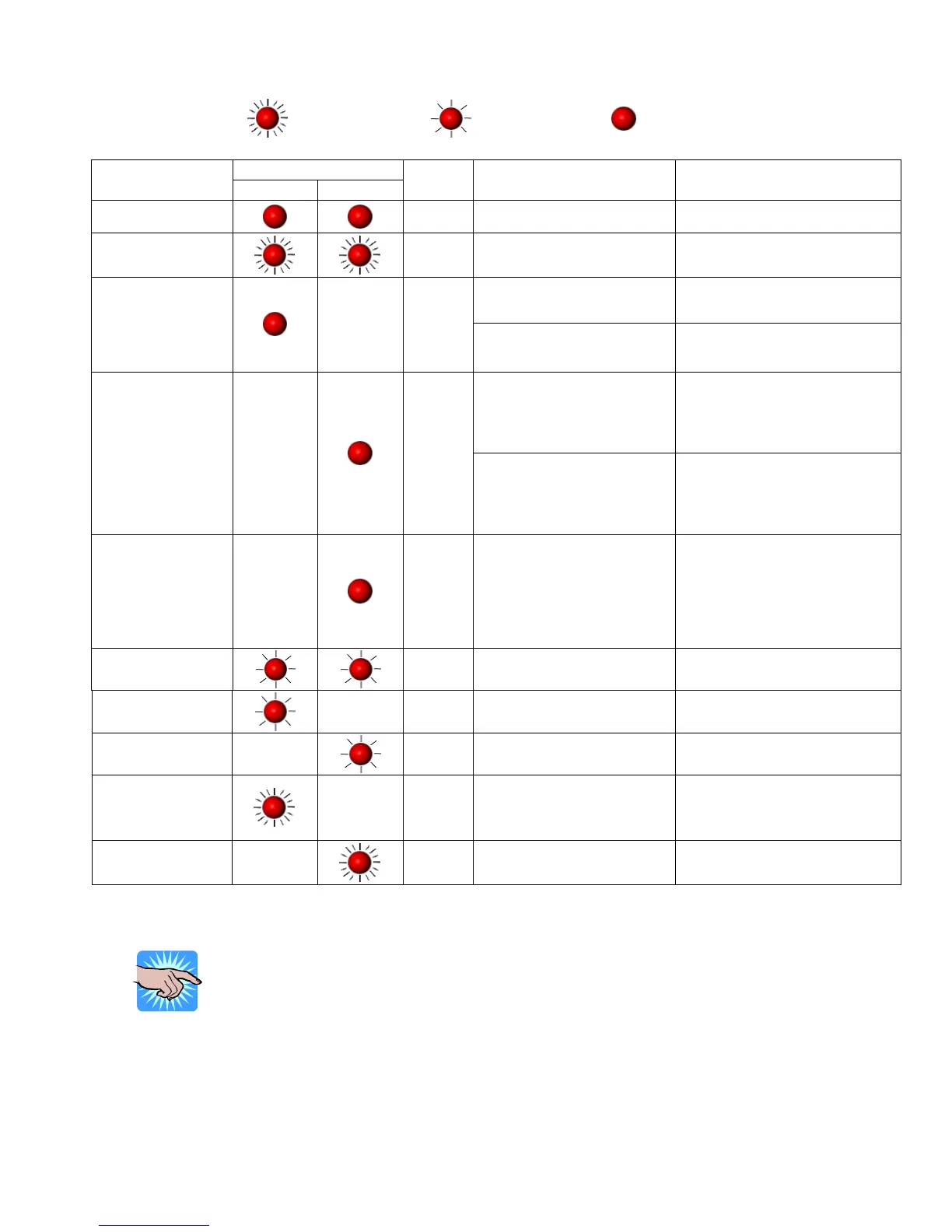
Blinking
Quickly
Blinking Slowly
Steady
LED Lights
LCD
Message
Ribbon Media
Beep
Description Solution
Printhead is
opened
4
The Printhead not firmly
locked in place.
Re-open the Printhead and make
sure it closes tightly.
Entering the
Cooling Process
Printhead temperature is too
high.
Printer goes back to standby
mode after cooling.
No ribbon is installed and
using Direct Thermal stock.
Make sure the Printer is in Direct
Thermal mode. Out of ribbon or
check ribbon
sensor
3
The ribbon is used up or the
Ribbon Supply Shaft is not
moving.
Replace with new ribbon roll.
The moveable sensor is
unable to detect paper.
Make sure the movable sensor
mark is at the correct position. If
the sensor is still unable to detect
the paper, then go through the
Auto Sensing steps again.
Out of media or
check media gap
sensor
1
The label stock is used up or
label sensor can’t detect
paper.
Replace with new roll of labels. If
the moveable sensor is still not
able to detect the paper, then go
through the Auto Sensing steps
again.
Check paper
setting
1 Improper paper feed.
Possible causes:
1. Media falling into the gap
behind the platen roller.
2. Can’t find label gap/black
mark. Perform Auto
Sensing procedure.
3. Black mark paper out.
CF Card not found
2
CF Card is not installed or
installed incorrectly.
Install the CF Card correctly.
Memory Full
2 Memory is full.
Delete unnecessary data in the
memory.
Rewinder Full
2 The Rewind is full.
Remove the labels from the
Rewind.
Filename cannot be
found
2 Cannot find the file.
Use “~X4” command to print out
all the files and check whether
the file exists and if the name is
correct.
Filename repeated
2
Another file with this name
exists.
Change the file name and
download again.
NOTICE!
The Printer repeats all warning beeps. For example when the Printer’s
Printhead is opened, the Printer will beep four times, pause, and then beep
four more times.


 To Next Page