— 15 —
Operation
Auto Tune® Advanced Settings
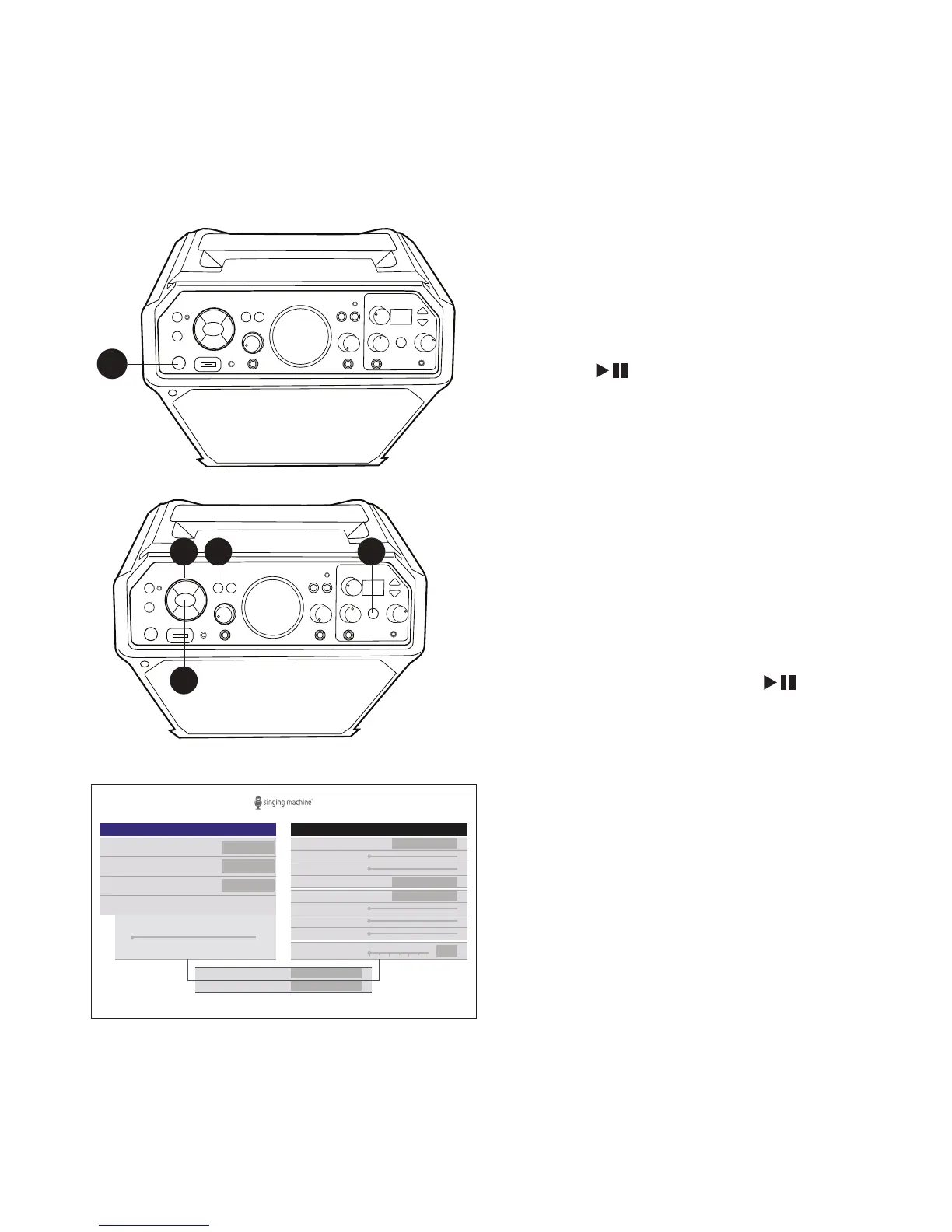
The Auto Tune® Advanced Settings will allow you to create custom presets and make
adjustments as desired.
1
2 2 2
2
1
Connect the unit to a TV as described
previously. Press the STANDBY/ON
button to turn the unit ON.
2
Press the
Navigation Right or
Left
button to select the Auto-Tune®
Advanced Settings, then press the
ENTER button; the Function
indicator will light purple. You can also
repeatedly press the FUNCTION
button or press and hold the AUTO-
TUNE® control button to select the
Auto-Tune® Advanced Settings.
You can also press and hold the
microphone’s MENU button to go into
AT advanced settings menu.
3
While on this screen you can make
adjustments to the following Auto-
Tune® and Vocal Effect Settings using
the
Navigation
and ENTER buttons
(see note on next page for more control
options)
:
AUTO-TUNE®: Turn on or off.
KEY/SCALE: When Auto-Tune® is turned
on, set the desired key.
AUTO-TUNE® LEVEL: Set the slider
for a more Natural or Extreme sound or
anywhere in between.
REVERB: Select from available reverb
options or turn off.
MIX LEVEL, ROOMS SIZE: When Reverb is
on, set sliders as desired.
MIC 2 EFFECTS: Set the desired effect for
microphone 2.
DELAY FX: Select from available Delay
options or turn off.
MIX LEVEL, DELAY, FEEDBACK: When
Delay Fx is turned on, set sliders as desired.
BEATS PER MINUTE: Set the slider for the
desired beats per minute.
AUTO-TUNE® LEVEL
SCALE
KEY
AUTO-TUNE®
Auto-Tune®
C
Major
SAVE AS PRESET
ADELETE PRESET
Off
Natural Extreme
Vocal Effects
ROOM SIZE
MIX LEVEL
MIC 2 EFFECTS
REVERB
DELAY
MIX LEVEL
FEEDBACK
DELAY FX
Off
None
Off
50
BEATS PER MINUTE
10050 150 200
Off











 To Next Page