— 17 —
Operation
Playing Songs from the USB
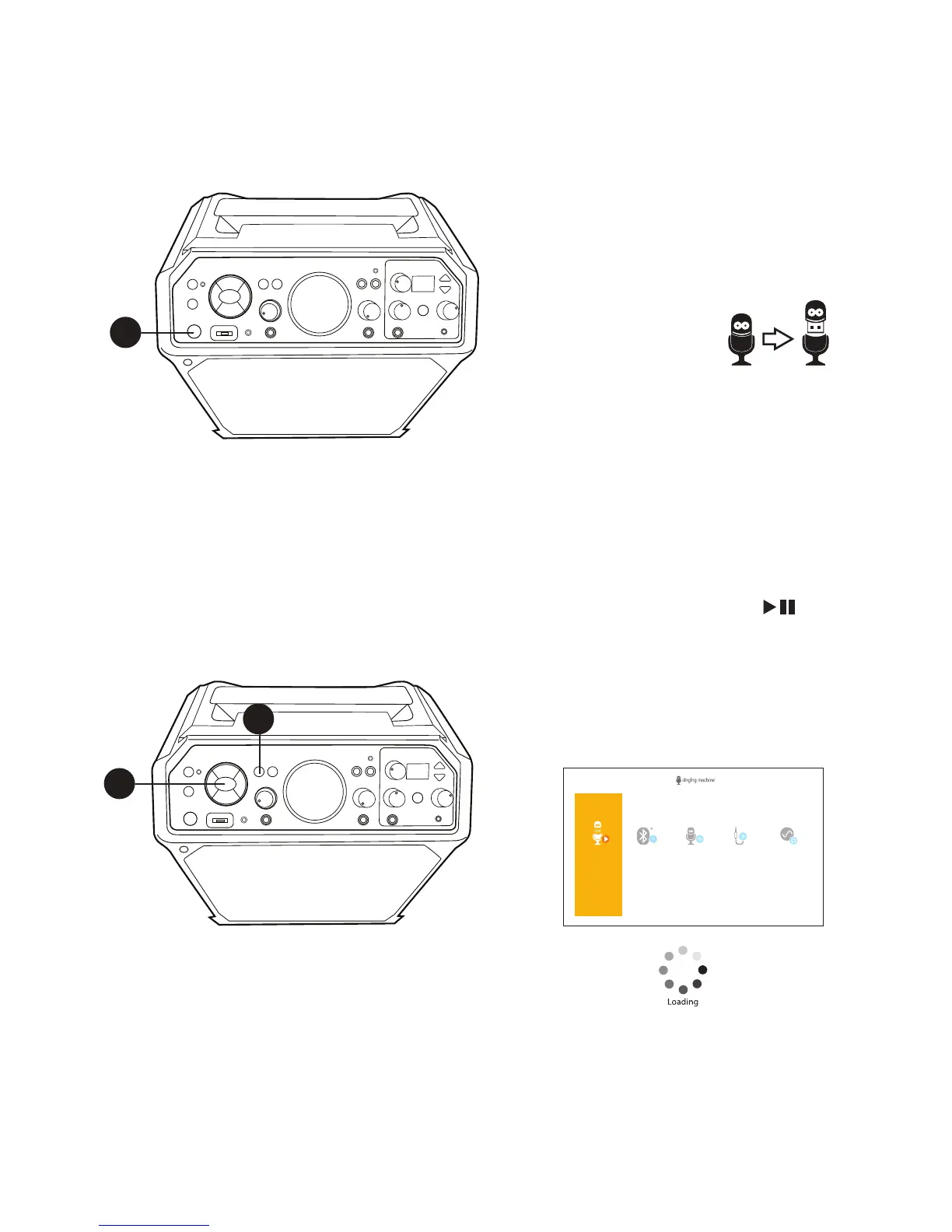
1
Connect the unit as described
previously. Press the STANDBY/ON
button to turn the unit ON.
2
Remove the provided Singing
Machine flash
drive from its
stand to reveal
the USB plug.
Insert it into the USB slot on the unit
so it faces upward.
Note:
The Singing Machine flash drive has an
8GB capacity (the actual capacity may
vary slightly).
3
The USB mode will be selected by
default; press the ENTER button
to enter the USB mode; the Function
indicator will light orange. You can
also repeatedly press the FUNCTION
button until the Function indicator
lights orange to select the USB mode.
1
3
3
USB
Sing your
Karaoke Songs
BLUETOOTH®
Listen
to Music
RECORDINGS
Play your
Recordings
AUTO-TUNE®
Advanced
Settings
LINE-IN
Playback
your Music
• A loading icon will appear on
the TV when the system is loading the
songs.
• The USB mode cannot be accessed
until a flash drive is inserted.
• Unit must be connected to a TV to
access the USB song list. Songs will not
display on this unit’s mini display.











 To Next Page