Page 10 of 21
8 Making the Connections
8.1 Connecting Power
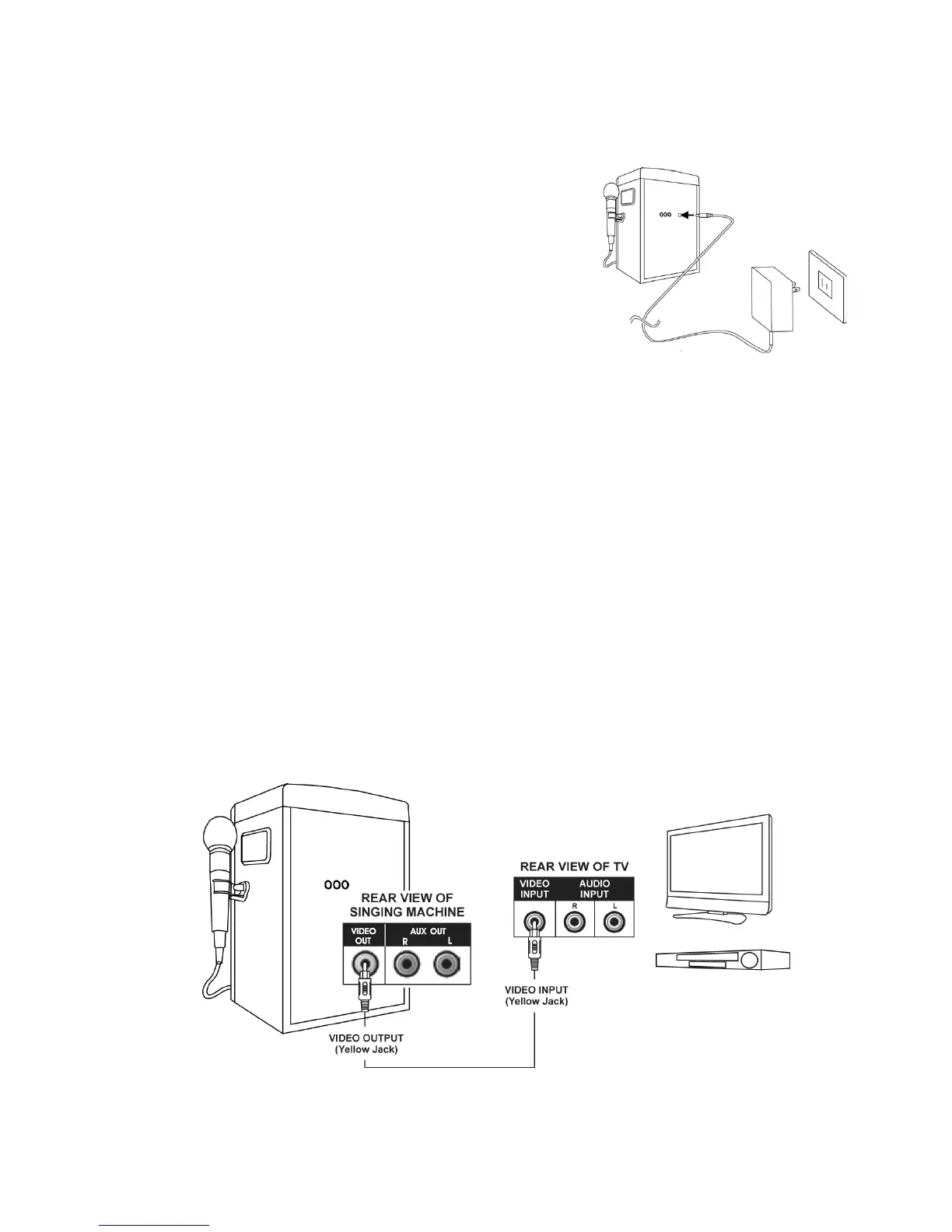
Insert the DC plug of the power adaptor into the
DC5.8V power jack on the back of the unit.
You can power the system from a standard AC outlet
by using the supplied Power Adapter (The adapter
operates on 110 – 240Va.c. 50 / 60Hz).
CAUTION: - The included AC adaptor is for use with
this unit only. Do not use it with other equipment or
use any other power adaptor with this unit.
When the adaptor is plugged in the apparatus is not completely disconnected from
the mains even when the power button on the unit is turned off.
8.2 Connecting to your TV or DVD Player
Your Singing Machine is designed to connect to your TV the same way you would
connect most video cameras, DVD players or video game consoles
We have provided RCA cables to connect your unit to a TV, DVD player, video
device or an external audio/sound system. The RCA cables have three connections
at each end (white and red are for left and right audio connections and the yellow is
for video connection).
Please follow the steps below to display CD+G lyrics on the TV screen:
1 Locate the multi-coloured RCA patch cables
2. Connect video cable (yellow) to the video out of the back of the Singing Machine
3. Connect the other end of the video cable (yellow) to the video input on your TV
or DVD Player











 To Next Page