Therm-App MD User Manual
-------------------------------------------------------------------------------------------------------------------------------------------------------------------------
------------------------------------------------------------------------------------------------------------------------------------------------------------
Page 3 of 23
Congratulations!
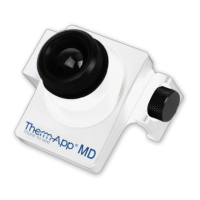
You are now the owner of a new Therm-App® MD world-class thermal imaging device which includes
hardware and software components (the “Product”).
1 Overview
Therm-App® MD is an Android-supported thermographic imaging device for elevated body temperature
(EBT) measurement, specifically calibrated to measure temperature. The Therm-App sensor is based on
α- Si bolometer 17µ 384x288 pixels.
2 Disclaimer
Therm-App MD does not detect fevers or illness in any way. It is not a medical diagnostic tool and has
not been approved by a medical professional. Any individual tested and flagged should be double-
checked using an approved medical device.
Notes:
1) The measurement should not be solely or primarily relied upon to diagnose or exclude a
diagnosis of COVID-19, or any other disease.
2) Elevated body temperature in the context of use should be confirmed using secondary
evaluation methods (e.g., an NCIT or clinical grade contact thermometer)
3 Installation
3.1 Installing the Application
Visit the Opgal website to download the latest
Therm-App MD update for free.
https://www.opgal.com/products/therm-app-
MD-customers
The operating system (OS) of the Android device
should be installed with the latest official version of
Android. The Therm-App application is compatible
with the last three official Android releases. The
device must support USB On-The-Go (OTG).


 To Next Page