User-Defined Temperature Setting
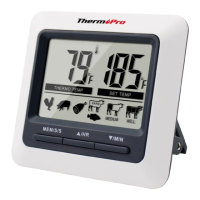
If you prefer setting your own desired cooking temperatures and not using
the preset temperatures, you can always change the setting by simply press
▲or▼ button to adjust the temperature setting to your desired one. Or you
can press MEAT/S/S button to enter User-defined setting mode and
then press ▲ or ▼to set the temperature to your desired one.
NOTE:
a) In the lower right corner of the screen, if icon shows, it means the
temperature setting is user-defined.
b) When setting temperature, press and hold ▲or▼ for fast setting.
Preset Temperature Cooking
PRESET
TYPE
HEADING
FOOD
TYPE
RECOMMENDED
INTERNAL
TEMPERATURE
FISH
BEEF RARE
Fish
Beef (roasts, steaks & chops) - Rare
63˚C/145˚F
HAM
Egg dishes
Ham (Raw) – Note: Precooked
Ham (140˚F)
71˚C/160˚F
BEEF
MEDIUM
Beef (roasts, steaks & chops) – Medium
Pork (roasts, steaks, chops, sausages) –
Medium (Pink)
Ground Meats (beef, veal, pork)
71˚C/160˚F
VEAL
PORK
Veal (steaks, roasts, tenderized or non-
tenderized cuts) – Well Done
Pork (roasts, steaks, chops, sausages) –
Well Done
77˚C/170˚F
BEEF WELL
Beef (roasts, steaks & chops) – Well
77˚C/170˚F
POULTRY
Poultry (chicken, turkey) – Whole
Duck & Goose
74˚C/165˚F
-25-
-26-
EN
EN
Timer
Your timer can be used whether the thermometer is in operation or not.


 To Next Page