29 30
English /
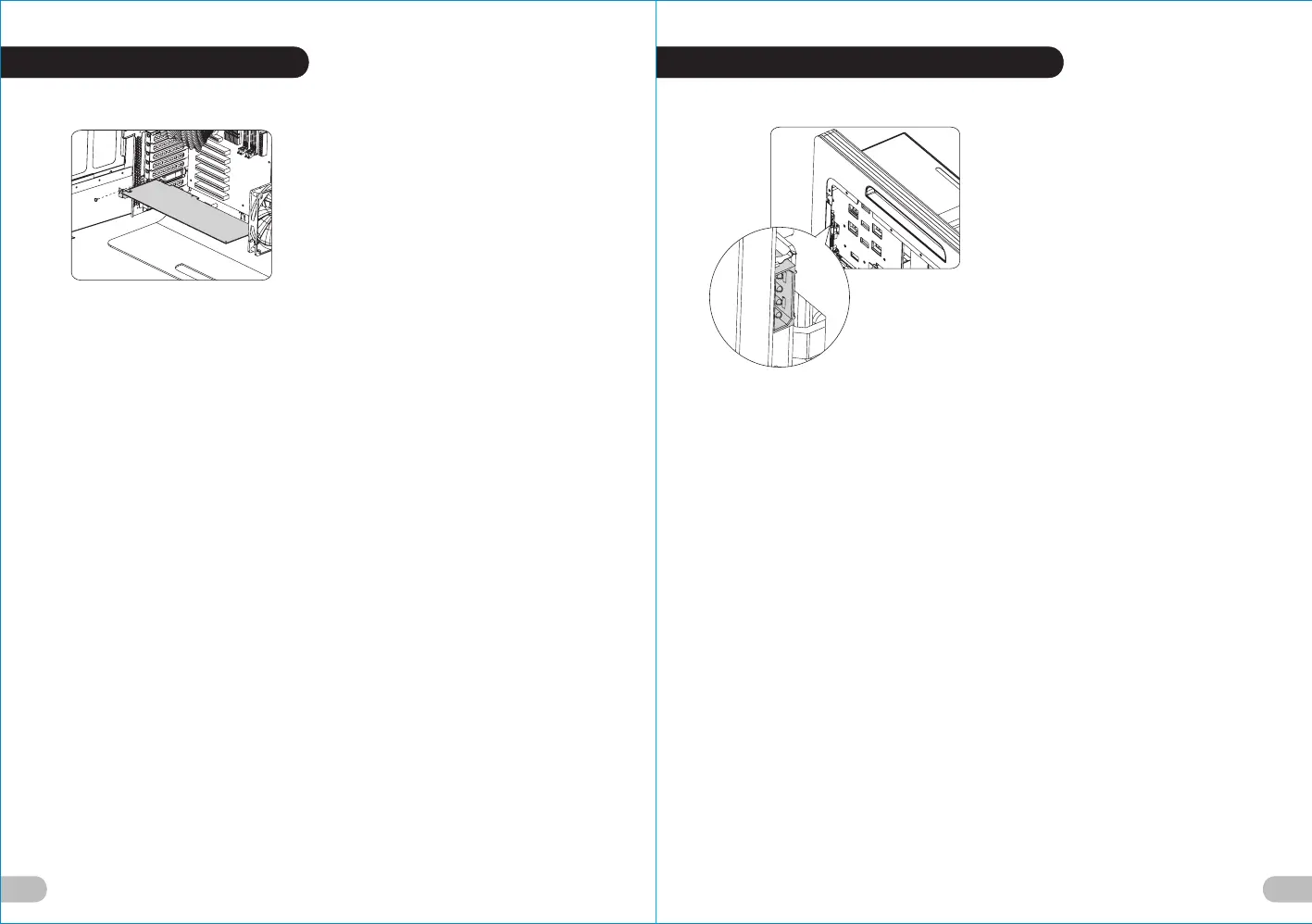
1.Unscrew the screws and remove the PCI
stops.
2.Insert the PCI device into the PCI slot.
3.Screw the device to finish the installation.
Deutsche /
1. Lösen Sie die Schrauben und entfernen
Sie die PCI-Stopper.
2. Stecken Sie die PCI-Karte in den PCI-
Steckplatz.
3. Befestigen Sie die Einheit, um die
Installation zu beenden.
Français /
1. Dévissez les vis et retirez les butoirs PCI.
2. Insérez le périphérique PCI dans le
slot PCI.
3. Vissez le périphérique pour terminer
l’installation.
Español /
1. Desatornille los tornillos y extraiga los
topes del PCI.
2. Inserte el dispositivo PCI en la ranura
para el PCI.
3. Atornille el dispositivo para finalizar
la instalación.
Italiano /
1. Svitare le viti e rimuovere i fermi PCI.
2. Inserire il dispositivo PCI
nell’apposito slot.
3. Per terminare l’installazione, avvitare
il dispositivo.
繁體中文 /
1.鬆開螺絲取下PCI檔片.
2.插入PCI裝置於PCI插槽中.
3.鎖上螺絲完成安裝.
日本語 /
1. ねじを外し、PCIスロットを取り外
します.
2. PCIデバイスをPCIスロットに差し込
みます.
3. デバイスをねじで締め付け取り付け
を完了します.
Русский /
1. Открутите винты и снимите
ограничители PCI.
2. Вставьте устройство PCI в его
разъем.
3. Закрепите устройство винтом,
чтобы завершить установку.
简体中文 /
1. 松开螺丝取下PCI檔片.
2. 插入PCI装置于PCI插槽中.
3. 锁上螺丝完成安装.
Türkçe /
1. Vidaları gevşetin ve PCI tamponlarını
çıkartın.
2. PCI cihazını, PCI yuvasının içine
yerleştirin.
3. Takma işlemini tamamlamak için
cihazı sıkıştırın.
English /
Insert the 4-pin plug of the power supply
into the 4-pin socket on the back of the
PCB board.
Deutsche /
Stecken Sie den 4-poligen Stecker vom
Netzteil in die 4-polige Aufnahme auf der
Rückseite der PCB-Platine.
Français /
Insérez la prise à 4 broches du bloc
d’alimentation dans le socket à 4 broches
situé sur l’arrière de la carte PCB.
Español /
Inserte el conector de 4 contactos (pins) de
la fuente de alimentación en el enchufe de
4 contactos de la parte trasera de la
tarjeta PCB.
Italiano /
Inserire la spina da 4 pin dell’alimentatore
nella presa da 4 pin posta nella parte
posteriore della scheda PCB.
繁體中文 /
將電源4pin接頭插在PCB版後方4pin插座上.
日本語 /
電源装置の4ピンプラグを、PCBボード背面
の4ピンソケットに差し込みます.
Русский /
Вставьте 4-контактный разъем блока
питания в 4-контактное гнездо на задней
части печатной платы.
简体中文 /
将电源4pin接头插在PCB版后方4pin插座上.
Türkçe /
Güç kaynağının 4-pinli fişini PCB kartının
arkasındaki 4-pinli sokete yerleştirin.
2.6 PCI Slot Installation 2.7 Installation of Red LED Light





 To Next Page