MLAB
www.instrument.co.th
6 Immerse the probe in the ice/water
mixture and make sure not to touch
the sides of the container. Wait till
the temperature reading drops to its
lowest value, which should be around
32°F or 0°C. If the temperature of the
ice/water mixture is not within 28°F
to 36°F (or -2°C to +2°C), the
calibration can’t be continued: you
will need to follow the above steps to
re-make the ice/water mixture;
.
8. Press the CAL button once to confirm
the calibration mode and exit the
calibration mode.
Note:
The Calibration mode will only last for
15 seconds. If you’re unable to finish
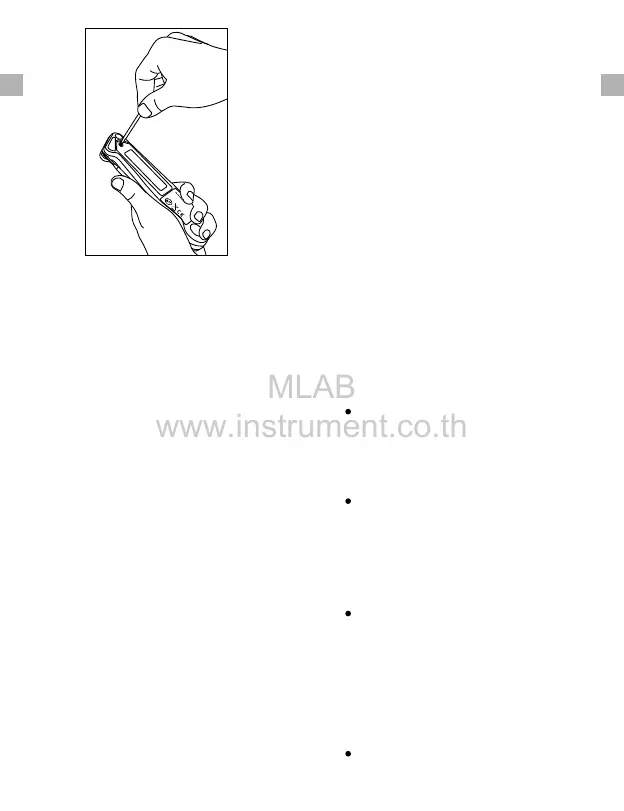
7. Press and hold the CAL button for 5
seconds to enter the Calibration
mode. CAL will display for 3 seconds
and current temperature will display
on the screen.
the calibration within 15 seconds, the
thermometer will automatically exit
Calibration mode.
6 Undo-Calibration
If you want to undo the calibration and
go back to the default calibration
setting, please follow the below steps:
1. Turn on the thermometer and press
the “CAL” button 5 seconds to enter
Calibration mode;
2. Press the lock button to undo the
calibration and it will reset to the
default setting.
7 HELPFUL HINTS
When measuring different foods or
meat, it may be desirable to cool the
probe first by rinsing the tip with
cold water.
It is recommended that you wipe the
probe tip clean between readings.
This is especially important when
taking temperature readings from
different foods or meat.
The thermometer is designed for
temporary, hand held use. Do NOT
use in an oven. Do NOT leave it in
extremely hot foods or liquid
(anything over 572°F) for more than
1 minute.
Always take your reading in the
-6- -7-
EN EN



 To Next Page