Buttons
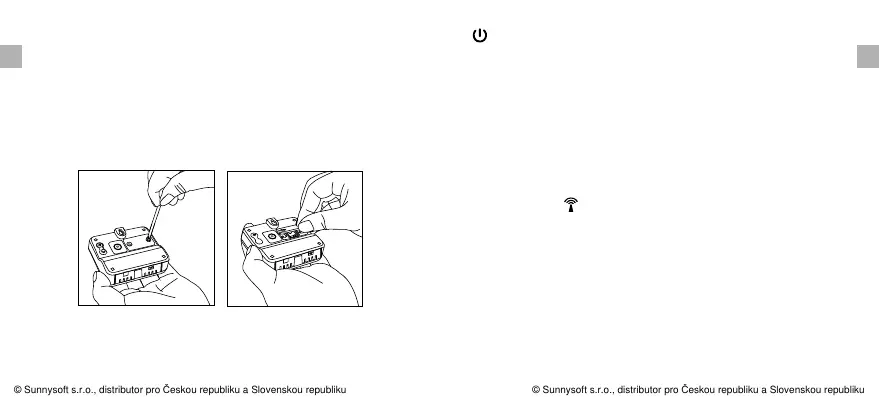
To access CHANNEL SELECTOR and RESET buttons, you
need to unscrew the cover as per Fig.
CHANNEL Selector (1,2,3): Slide to set Channel 1,2 or 3.
RESET: Press once to reset the remote sensor.
: Press and hold for 2 seconds to turn ON/OFF the unit.
(ON: Flash 1 time, OFF: Flash 3 times)
Synchronize Remote Sensors with The Base
Station
1. Bring the remote sensor near the base station;
2. Once the batteries are installed into the base station, the
RF indicator will flash for 3 minutes, indicating that
the base station is in synchronization mode and is waiting
for remote sensors to be registered.
3. Set the CHANNEL selector on the back of the remote
sensor unit to position 1 or 2 or 3. The unit is preset on
Channel 1 and you can always leave it unchanged unless
you have purchased more than 1 remote sensor.
EN EN
-8- -9-
3. Outdoor Temperature range: -31 ~158°F(-35 ~70°C). °F °C
4. Humidity range: 10% ~ 99%.
© Sunnysoft s.r.o., distributor pro Českou republiku a Slovenskou republiku
© Sunnysoft s.r.o., distributor pro Českou republiku a Slovenskou republiku


 To Next Page