25
VLC-3 rev.04
VLC-3
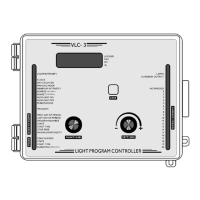
9.2 SETTING THE PERIOD MODE
Turn the function selector until the PERIOD MODE pilot light turns
on. The current state of the controller is displayed. When OFF is
displayed, the controller does not use periods (the NO PERIOD pilot
light is turned on). When ON is displayed, the controller is in period
mode (the PERIOD 1 pilot light is turned on).
Using the adjustment knob, adjust the controller state to ON.
Programming:
Turn the function selector until the PROGRAM pilot light turns on.
The message “PUSH STEP TO ENTR PROG” (PUSH STEP TO ENTER
PROGRAM) is displayed.
Press the push-button. The PROGRAM pilot light turns off and the
FIRST DAY OF PERIOD pilot light turns on. The appropriate PERIOD
pilot light flashes to indicate which period is currently being pro-
grammed.
Use the push-button to step to the different program functions.
Selecting a period: If no periods are currently programmed in the system,
the user must start with the first period starting on day 1. If periods
have been programmed, the user can step to a particular period by using
the adjustment knob on the right. The flashing PERIOD pilot lights on the
right indicate the current period being programmed. The steady PERIOD
pilot light represents the currently active period.
Périods
First day of period: This is the first day for the current period. If no
programs have been entered, this value is set to 1 and cannot be
changed. Otherwise, the first day is the day following the last day of the
previous period. Use the adjustment knob to adjust the value as re-
quired.
Pr


 To Next Page
 Loading...