6
VLC-3 rev.04
VLC-3
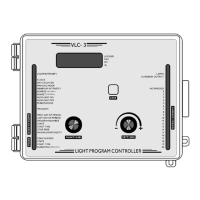
5. LOCATION OF THE CONTROLS
The pilot lights on the left indicate which function is currently active on
the digital display. When the function has a corresponding value associ-
ated to it (for example, Start Time), the value appears on the display.
The function selector changes the current function. The adjustment
knob is used to adjust the currently displayed parameter value. The Day,
PM and % pilot lights to the right of the display indicate the unit of the
value currently displayed. If no user activity is recorded after one
minute while inside a function other than CLOCK or MANUAL MODE,
the display returns to the clock time.
Internal Switches: located inside the front cover.
)81&7,21 6
6(77,1*6
&
8
5
5
(
1
7
3
(
5
,
2
'
352*5$0
'
8
6
.
7
2
'
$
:
1
3
(
$
.
6
+50,1
+50,1
0,16(&
/
'
3
'
2
$
)
#FFONO
1
DEKCOLNU
SRETEMARAP
SRETEMARAPDEKCOL
2H21EDOMKCOLCH42EDOMKCOLC
3
TNECSEDNACNI
EVRUC
EVRUCTNECSEROULF
4V01-0V01-1
5
FFO/NOLAUNAM
EDOM
EVISSERGORPLAUNAM
EDOM
6
DEMROFREPTESNUS
EMITPOTSEHTRETFA
DEMROFREPTESNUS
EMITPOTSEHTEROFEB
21-7DEVRESER


 To Next Page
 Loading...