5.10 Advanced settings
5.10.1 MIDI settings
1. Press [SETUP] to enter the settings menu.
ð
The display shows the respective submenus.
2.
Press or to select the menu item ‘MIDI’ .
ð
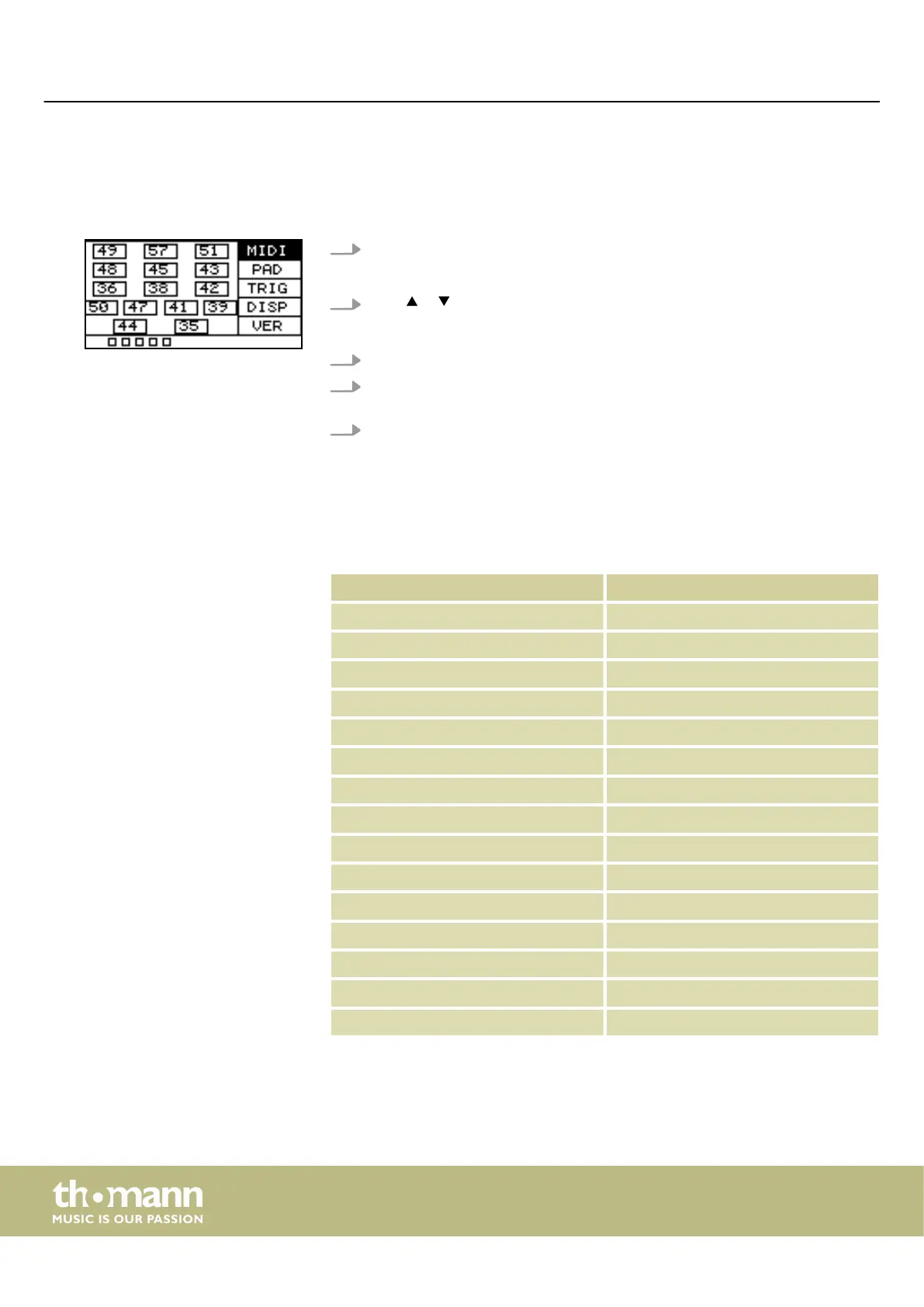
The display shows the MIDI value for each pad.
3. Hit a pad and the corresponding MIDI value will be highlighted on the display.
4. Use the rotary control or press [–/+] to set the MIDI value between ‘0’ and
‘127’ .
5. Press [OK] to conrm the new value.
ð
The display shows ‘Save successfully!’ .
The following table shows the assignment of the MIDI values to the corresponding
pads.
Pad Note
Pad 1 49 (C#3)
Pad 2 57 (A3)
Pad 3 51 (D#3)
Pad 4 48 (C3)
Pad 5 45 (A2)
Pad 6 43 (G2)
Pad 7 36 (C2)
Pad 8 38 (D2)
Pad 9 42 (F#2)
Trig 1 50 (D3)
Trig 2 47 (B2)
Trig 3 41 (F2)
Trig 4 39 (G#2)
FootSwitch 1 44 (G#2)
FootSwitch 2 35 (B1)
Operating
sampling percussion pad
22


 To Next Page