EasyManua.ls Logo

THOMSON CALI-P - User Manual

THOMSON CALI-P
28 pages
Print Icon
To Next Page IconTo Next Page
Loading...
www.mythomson.com
V2
EN
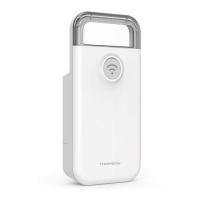
WiFi control module
For heater pilot wire
520002
CALI-P
Electrical
consumption
monitoring
Made in
France
WiFi
2.4GHz
PILOTE WIRE
24V
Solaire
OPTION
4m / 200kg
Batterie
de secours
OPTION
GarantieGarantie
ans
Google Play
Free available on
Available on the
Google Play
Free available on
Available on the
Question and Answer IconNeed help?

Do you have a question about the THOMSON CALI-P and is the answer not in the manual?

Summary

A. SAFETY INSTRUCTIONS

C. INSTALLATION

1. INSTALLING THE HEATING MODULE

Step-by-step guide for physically installing the heating module onto the radiator.

2. INSTALLING THE MOBILE APPLICATION AND CREATING AN ACCOUNT

Instructions for downloading the app, creating an account, and initial setup.

3. PAIRING THE MODULE

Procedure for connecting the heating module to your Wi-Fi network and the mobile app.

D. USING THE PRODUCT

1. USE WITH GOOGLE HOME

Control the device using Google Assistant voice commands and linking.

1.1. If you have an Android smartphone with Google Assistant.

Link Thomson At Home app to Google Assistant on Android devices.

1.2. If you have an Android smartphone without Google Assistant or n iPhone

Link Thomson At Home app to Google Assistant on iPhone/non-Assistant Android.

2.3. Google Home Voice Commands

List of voice commands for controlling devices via Google Home.

5. USE WITH AMAZON ALEXA

Instructions for integrating and controlling the device with Amazon Alexa.

Summary

A. SAFETY INSTRUCTIONS

C. INSTALLATION

1. INSTALLING THE HEATING MODULE

Step-by-step guide for physically installing the heating module onto the radiator.

2. INSTALLING THE MOBILE APPLICATION AND CREATING AN ACCOUNT

Instructions for downloading the app, creating an account, and initial setup.

3. PAIRING THE MODULE

Procedure for connecting the heating module to your Wi-Fi network and the mobile app.

D. USING THE PRODUCT

1. USE WITH GOOGLE HOME

Control the device using Google Assistant voice commands and linking.

1.1. If you have an Android smartphone with Google Assistant.

Link Thomson At Home app to Google Assistant on Android devices.

1.2. If you have an Android smartphone without Google Assistant or n iPhone

Link Thomson At Home app to Google Assistant on iPhone/non-Assistant Android.

2.3. Google Home Voice Commands

List of voice commands for controlling devices via Google Home.

5. USE WITH AMAZON ALEXA

Instructions for integrating and controlling the device with Amazon Alexa.

THOMSON CALI-P Specifications

General IconGeneral
BrandTHOMSON
ModelCALI-P
CategoryControl Unit
LanguageEnglish