18
WI-FI CONTROL MODULE FOR HEATER PILOT WIRE
EN
D - USING THE PRODUCT
One tip however: if you connect multiple modules
within the same zone, and to prevent unwanted
commands, we recommend you do not use the
group name suggested by Alexa (bedroom, ofce,
living room, etc.) when naming your control module.
In the event of problems with the Amazon Alexa
application or conguration of the device in Amazon
Alexa, contact Amazon support.
6 - PROGRAMMING WITH ALEXA (WITH OR
WITHOUT A SMART SPEAKER)
Download the Amazon Alexa app and install it.
The following information may vary depending on
updates to the Alexa app or your operating system.
Make sure that you have congured Alexa correctly,
and then launch the Alexa app.
Set up your Alexa account, even if you do not have
a speaker.
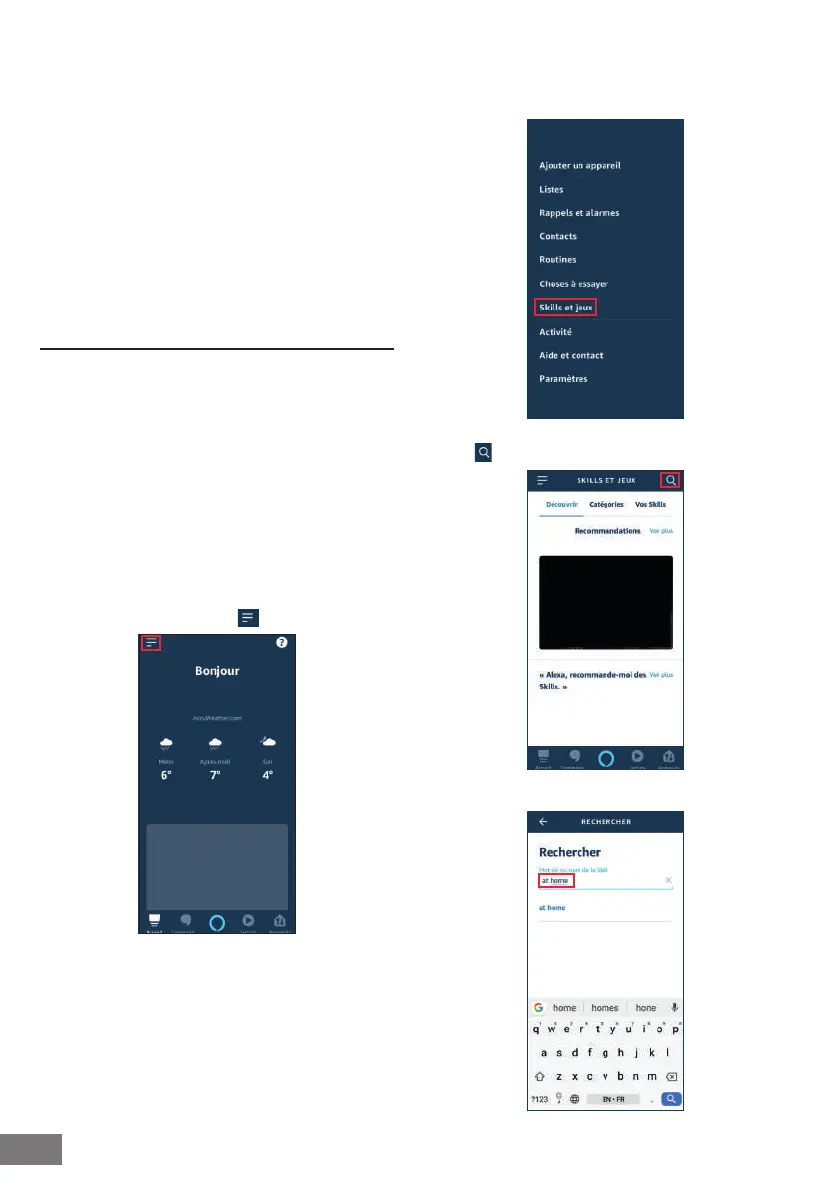
Install the Thomson At Home skill
On the main menu, click on
Click on "Skills et jeux" (Skills and games)
Select
Then you need to enter At Home in the search bar,


 To Next Page