13
EN
WI-FI CONTROL MODULE FOR HEATER PILOT WIRE
D - USING THE PRODUCT
It is recommended that a unique name such as
"Aquarium" or "Lounge light" be used, to avoid
issues with your voice command assistant.
2.2. Linking of At Home and Google Home
The following information may vary depending
on updates to the Google Home app or your
operating system.
This explanation takes the example of the set up
of a lamp. The pairing is the same for any other
device in the range.
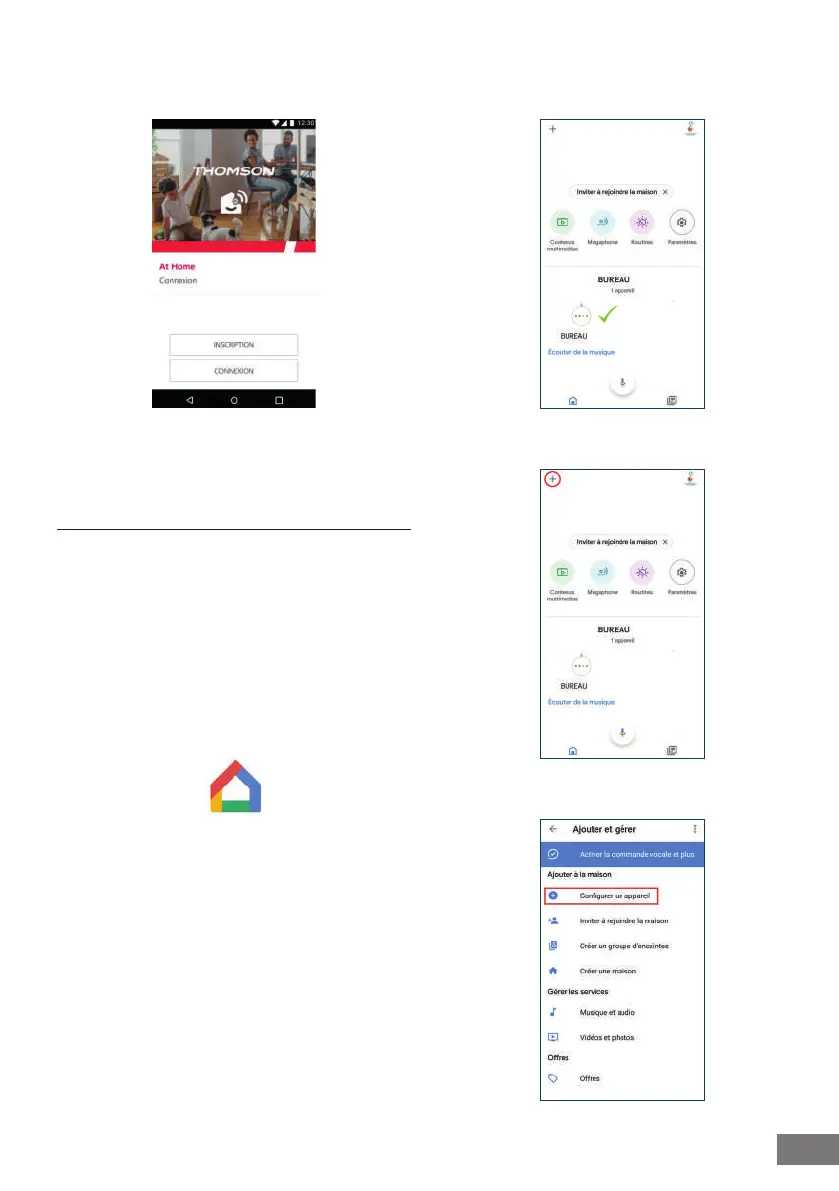
Ensure that you have congured your Google
Home correctly, then launch the Google Home
application.
Open the Google Home application and ensure
that your Google Home speaker is properly linked
to your account (if not, refer to the speaker's
Google Home user guide or contact Google Home
customer service)
Click on the + button
Press on "Congurer un appareil" (Congure a
device)


 To Next Page