16
WI-FI CONTROL MODULE FOR HEATER PILOT WIRE
EN
D - USING THE PRODUCT
To turn off exit 2, say:
- "OK Google Turn off lamp 2"
For a GUARDIAN receiver module
To open the gate, say:
- "OK Google Open the gate"
To close the gate, say:
- "OK Google Close the gate"
3 - ROUTINES
The Google Home app allows you to set up
operating routines. A routine is a voice or time
command that will direct one or more devices
linked to your Assistant.
Take note, each routine equals one command (a
lighting command for example). To reverse the
status of an accessory (for example to turn it off), a
second routine will need to be created with a suitable
command.
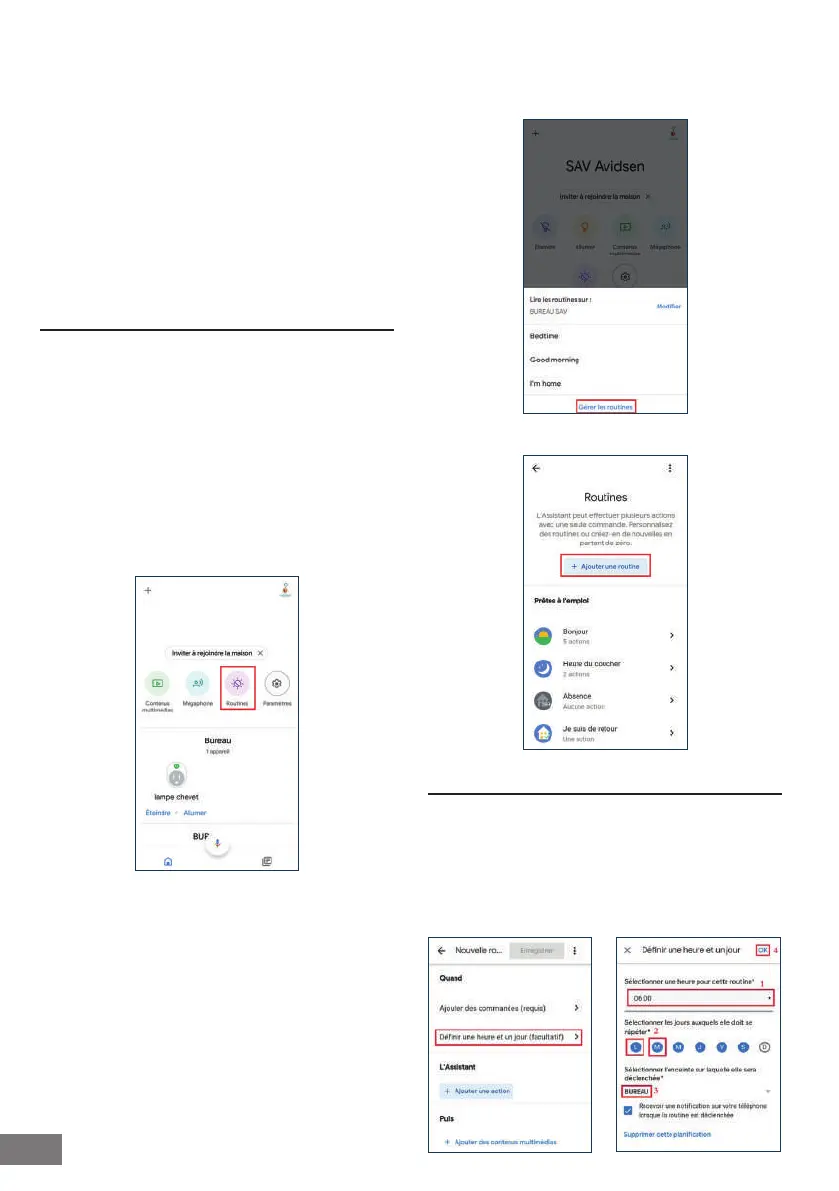
To create a routine, press on Routines
Then "Gérer les routines" (Manage routines)
Then press on + "Ajouter une routine" (Add a routine)
4 - EXAMPLE OF ROUTINES
(Switching on/Switching off at a specic time)
Click on dene a time and day. Select the desired
time (1), and then select the day of the week
affected by the command (2). Select the speaker
that is to manage the routine (3). Conrm by
pressing on OK (4).


 To Next Page