17
EN
WI-FI CONTROL MODULE FOR HEATER PILOT WIRE
D - USING THE PRODUCT
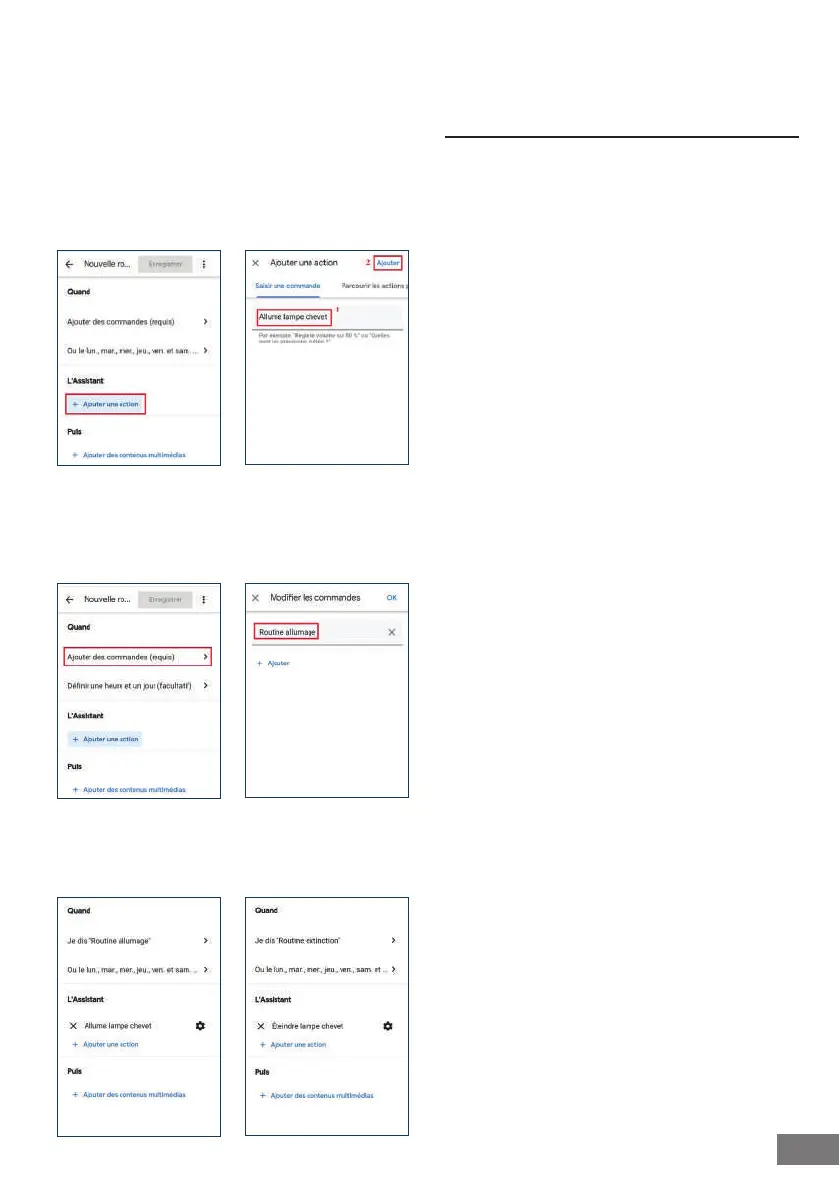
Click on "Ajouter une action" (Add an action), then
on "Saisir une commande" (Enter a command), write
down the order that you normally give orally to
your Assistant to direct the accessory. You can add
several actions to manage several different devices
at the same time. Click on "Ajouter" (Add) to conrm.
Click on "Ajouter des commandes" (Add commands).
Write down the order you want to give your assistant
orally to allow it to order the routine, without going
through the time programming schedule.
Presence simulation
You will need to create a switching on and switching
off routine at different times.
5 - USING WITH AMAZON ALEXA
The Amazon Alexa Assistant can help you control
your connected devices.
For example, you can use the following commands:
- "Alexa" Turn on the living room heating
- "Alexa" Turn off the living room heating
Download and install the Amazon Alexa app from
the Play Store or Apple store.
Your devices must be paired on the Thomson
At Home app in order to be controlled with the
Amazon Assistant. They must be connected to the
same WiFi network.
Installing the At Home skill
- In the Amazon Alexa app, press the menu at
the top left-hand side and select “Skills and
Games”
- Search for At Home in the list of skills or use
Search at the top right-hand side
- Select the At Home Skill and activate for use
- Enter the account used in the Thomson At
Home app
- Once the skill is correctly paired, press the
cross at the top left-hand side.
- The app will offer to search for devices.
Press on "DÉTECTER DES APPAREILS" (DETECT
DEVICES).
Connecting devices to Amazon Echo
• Using the guided Search to connect an automated
device
- In the Amazon Alexa app, press the menu
at the top left-hand side and select Add a
device.
- Select the type of device you want to
connect.
- Select the brand and follow the instructions
on the screen.
- Using voice commands to connect a smart device
- Once the skill is installed, say "Alexa, discover
new devices".
- After 45 seconds, Alexa will give you the
devices found.
For more information about Amazon Alexa, see
Amazon support.


 To Next Page