5
E-DOC-CTC-20051017-0147 v1.0
Chapter 1
Getting to know your SpeedTouch™
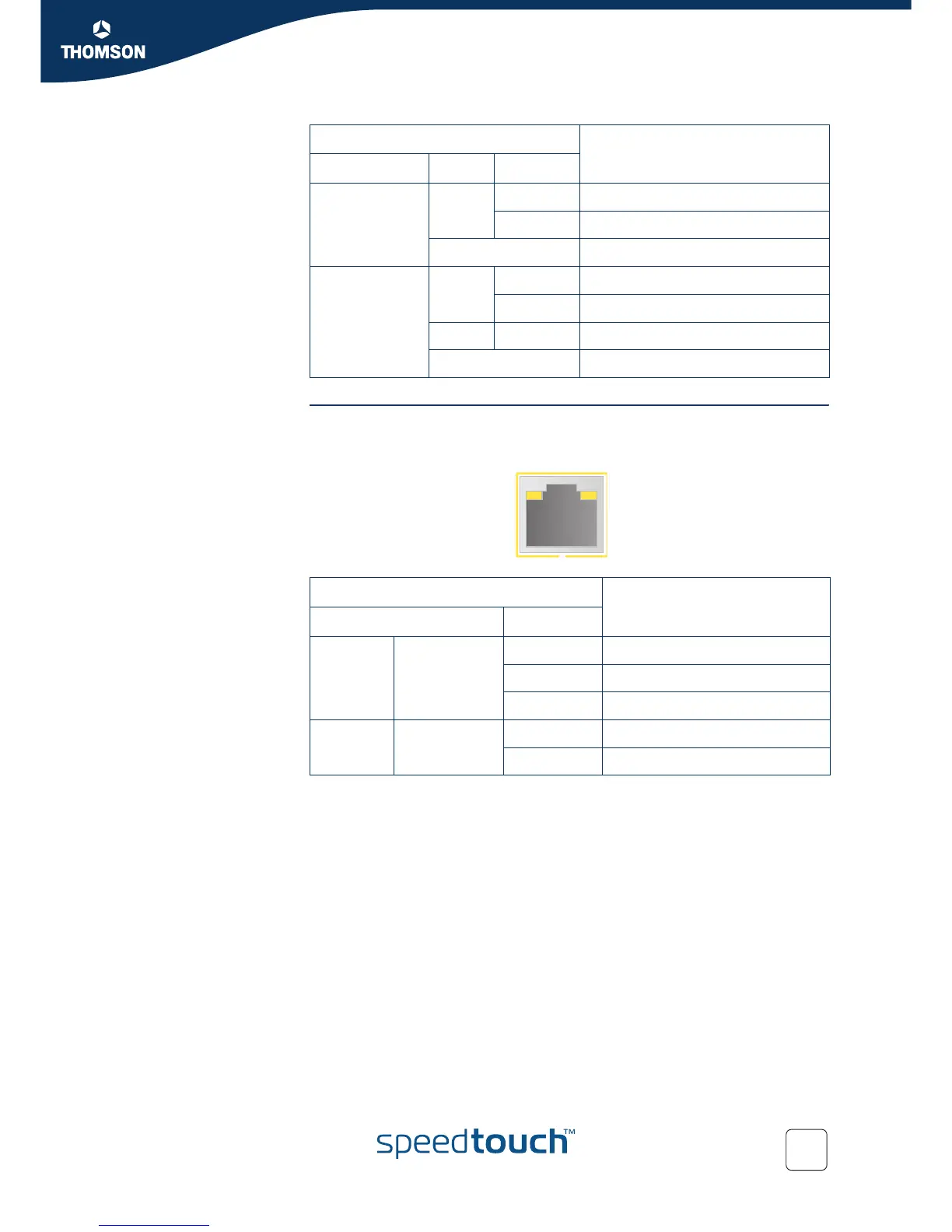
Ethernet LEDs A LED may be provided per Ethernet port to indicate link integrity (or activity).
Depending on the SpeedTouch™ product you are using, a second LED (A) may be
provided to indicate the 10/100Base-T selection:
DSL Green Blinking Pending DSL line synchronisation
Solid on DSL line synchronised
Off No DSL line
Internet Green Blinking Internet activity
Solid on Internet connectivity, no activity
Red Solid on Internet connection setup failed
Off No Internet connection
Indicator Description
Name Colour State
Indicator Description
Name LED Status
A
(Optional)
Integrity
(Activity)
Off No connection on this port
Solid on Ethernet link up
Blinking Data is flowing from/to this port
B 10/100Base-T Off 10Base-T Ethernet connection
Solid on 100Base-T Ethernet connection
AB







 To Next Page