18
19
h p://www.ovh.co.uk/telephony/ Mon - Fri: 9am to 6pm
020 7357 6616
h p://www.ovh.co.uk/telephony/ Mon - Fri: 9am to 6pm
020 7357 6616
OVH Limited - 3 Southwark street - London - SE1 1RQ - Registration number: 5519821 - VAT number GB 918 7594 74.
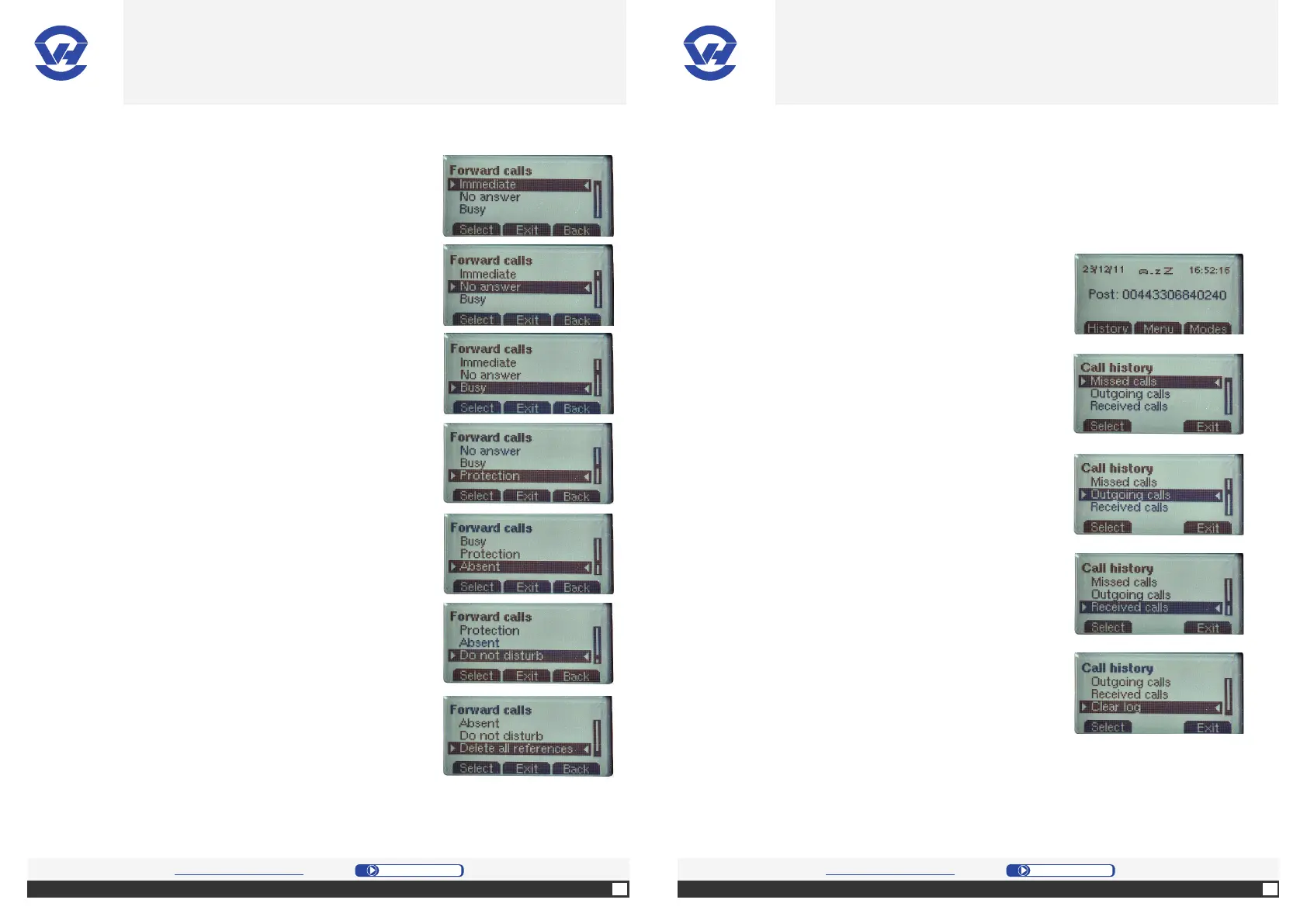
1. Press “Menu” [center selec on bu on (4)] and choose
your method of forward in “Forward calls”:
: forward calls to a number.
forwards calls to a number a er a set
period of me.
: forward calls to a number if you are on a call.
: block the internal forwarding and
the redirec ons to other posi ons.
: allow you to specify that you are not
available.
: indicate that you don’t want to be
disturbed.
: allows the phone to be
available again.
2. Press “Modes” [right selec on bu on (4)] and choose
the modes of incoming/outgoing calls by pressing:
-”Do not disturb”;
-”Anonymous”;
- ”Forward calls”: choose Ac ve, press the number to
forward to and validate;
-”Lock”;
-”Absent”.
NB: it is not possible to activate two methods of
reference simultaneously.
To enable or disable call forwarding, press “Mode”
[right selection button (4)], choose “Forward calls”
and “Activate/Deactivate” from the menu.
Note: when a call is added to the list of missed calls, a message will appear on the
home page of your phone. To clear this warning, you have two options:
-Go to “Clear log” in the “History” menu to reset your list.
-Go to “Missed calls” in the “History” menu.
C. Call history
1. Press “History” [le selec on bu on (4)] to access
the calls menu.
2. On the screen, select “Missed calls” on the menu
for a list of missed calls on your phone, and press
the OK bu on (1).
3. Select “Outgoing calls” on the menu for a list of
outgoing calls from your phone, and press the OK
bu on (1).
4. Select “Received Calls” in the menu for a list of
incoming calls to your phone, and press the OK
bu on (1).
5. Select “Clear log” in the menu to reset all call lists
(missed, ougoing and received), and press the
bu on OK (1).
OVH.CO.UK OVH.CO.UK
OVH Limited - 3 Southwark street - London - SE1 1RQ - Registration number: 5519821 - VAT number GB 918 7594 74.


 To Next Page