14
15
h p://www.ovh.co.uk/telephony/ Mon - Fri: 9am to 6pm
020 7357 6616
h p://www.ovh.co.uk/telephony/ Mon - Fri: 9am to 6pm
020 7357 6616
OVH Limited - 3 Southwark street - London - SE1 1RQ - Registration number: 5519821 - VAT number GB 918 7594 74.
C. Change the ringtone
Your phone has several ringtones in memory that you
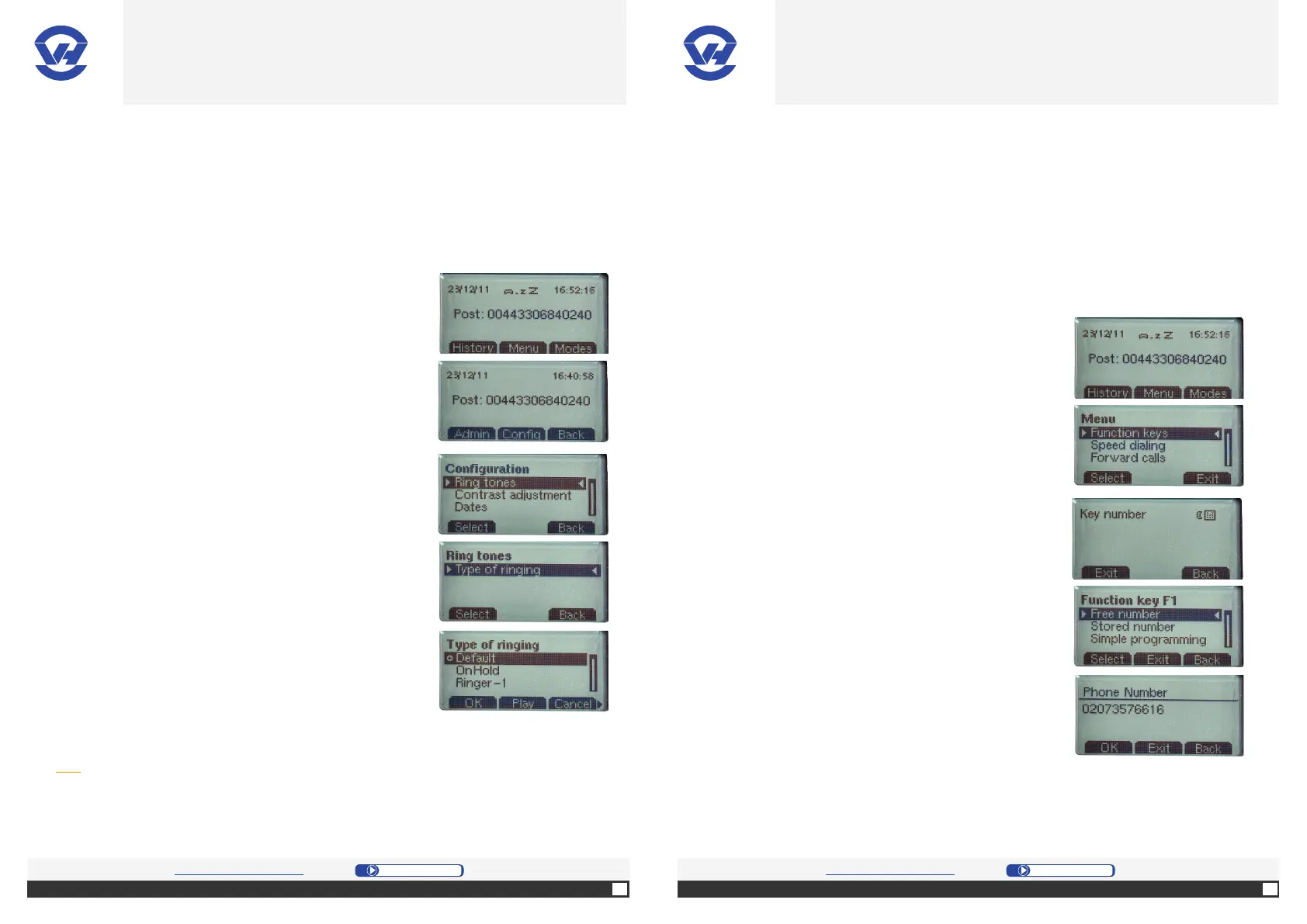
1. Press the Menu (7).
2. Select “Confi g” [middle selec on bu on (4)].
3. On the screen, select “Ringtones” in the menu by
pressing “Select” [le selec on bu on (4)].
4. On the screen, select “Type of ringing” in the drop-
down submenu by pressing “Select” [le selec on
bu on (4)].
5. Confi rm your selec on with the OK bu on (1).
Tip: Use the “Play” to listen to the ringtone before
validation.
Basic phone has 11 hot keys: F1 to F10 (11) and the key 99 (9). Op onally, one (or
more) extension modules can be connected to increase this capacity. A func on can
be assigned to each key (e.g. call the last number dialed, dial the last caller back, put
on hold a call, ...).
Note : the key 1 on the numeric keypad corresponds to F1, 2 key to F2 and so on.
1. Press “Menu” [middle selec on bu on (4)].
2. On the screen select “Func on Keys” in the menu
by pressing “select” [le selec on bu on (4)].
3. The display tells you to enter the “key number”
corresponding to the shortcut key: for this
example, press “1”.
4. On the screen, select “Free number” by pressing
“Select” [le selec on bu on (4)].
5. Enter the number you want: here
“020 7357 6616” and “OK” [le select bu on (4)].
The principle of programming keys is the same for
other features
OVH.CO.UK OVH.CO.UK
OVH Limited - 3 Southwark street - London - SE1 1RQ - Registration number: 5519821 - VAT number GB 918 7594 74.


 To Next Page