20
21
h p://www.ovh.co.uk/telephony/ Mon - Fri: 9am to 6pm
020 7357 6616
h p://www.ovh.co.uk/telephony/ Mon - Fri: 9am to 6pm
020 7357 6616
OVH Limited - 3 Southwark street - London - SE1 1RQ - Registration number: 5519821 - VAT number GB 918 7594 74.
D. Post supervision
You can view the status of other posi ons and/or intercept their calls with the help of the
lights and sounds of the telephone and the shortcut keys F1 to F10 (11). Thanks to this
supervision func on, you can know whether the other posts are on a call.
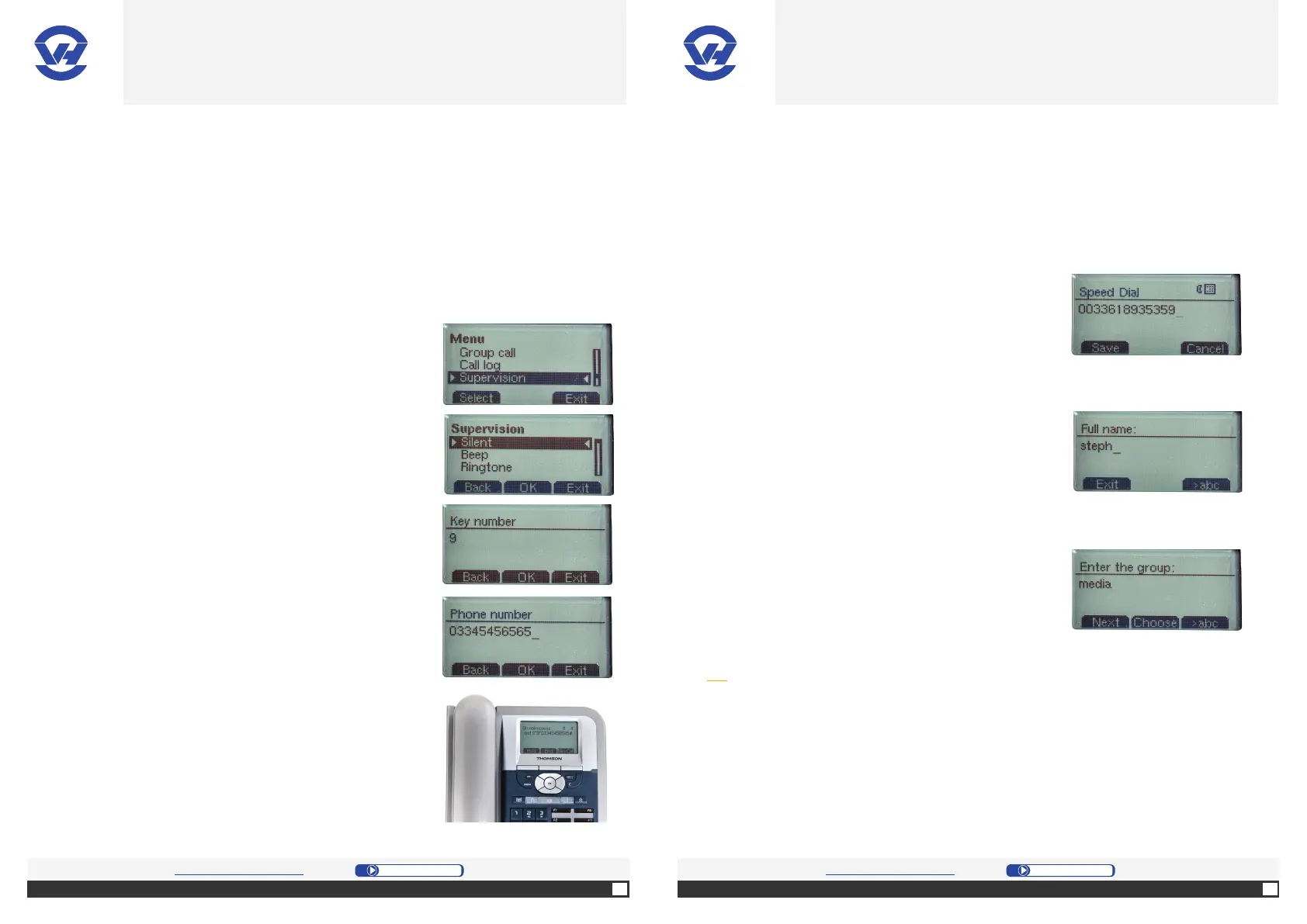
1. Press “Menu” [middle selec on bu on (4)].
2. On the screen, select “Supervision” in the menu,
and press the OK bu on (1).
3. Puis choisissez le mode de supervision :
-”Silent” for a light indicator
-”Beep” for a sound indicator.
-”Ring” for a ring indicator.
4. Validate the supervision mode with “OK” (1) and
enter the number of the key to link to the telephone
number.
5. Enter a phone number in your billing account, then
press “OK” [central selec on bu on (4)].
6. A voice no fi ca on will confi rm that supervision has
been setup. Press “End”.
If the programming is correct, a call to 033 4545 6565 will
trigger the light or sound indicator on the func on key.
If you want to intercept the call, simply press the
corresponding key.
E. The phone book
1. Dial your number using the numeric keypad (13).
2. Press “Save” [le selec on bu on (4)] and enter the
name for the number.
Note: the name cannot contain spaces.
3. Enter the name of a group and press “Next”.
Tip: The function key “>abc” toggles entering lowercase to uppercase or to enter
numbers. The function key “Choose” at the time of a group creation displays the
list of existing groups and lets you select the correct directory. You can also share
your contact with all phones of your group. Similarly, recording a contact in the
“OVH Manager” is copied directly on the phone).
OVH.CO.UK OVH.CO.UK
OVH Limited - 3 Southwark street - London - SE1 1RQ - Registration number: 5519821 - VAT number GB 918 7594 74.


 To Next Page