8
9
h p://www.ovh.co.uk/telephony/ Mon - Fri: 9am to 6pm
020 7357 6616
h p://www.ovh.co.uk/telephony/ Mon - Fri: 9am to 6pm
020 7357 6616
OVH Limited - 3 Southwark street - London - SE1 1RQ - Registration number: 5519821 - VAT number GB 918 7594 74.
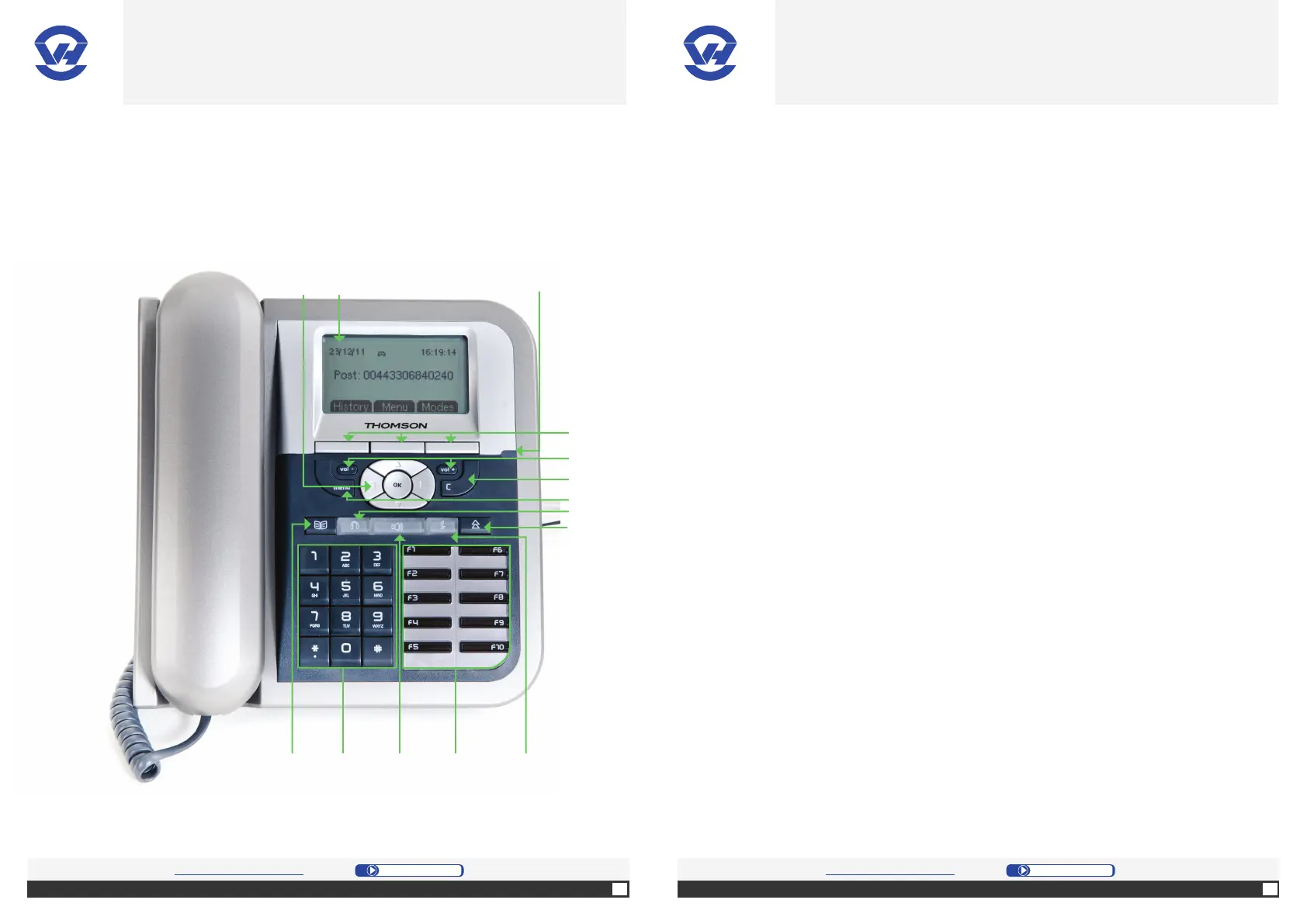
B. Familiarize yourself with the device
(1) 4 arrow keys to
move through menus, and an “OK”
bu on to confi rm the choice made.
(2) The display gives you the following
informa on:
• date;
• me;
• post number.
(3)
- fl ashing green: incoming call
- solid green: online
- fashing red: no network connec on.
(4) to select on
the naviga on tab (func ons at the
bo om of the display).
(5)
to adjust the ringer volume or the
other person’s volume during a
communica on.
(6) to clear an entry
or go back to the previous level of a
menu.
(7) to access the
phone personalisa ons (ringtones,
language, ...)
(8) to ac vate the
handsfree headset.
(9) to pogram
a func on.
(10) to mute the
microphone of your telephone.
(11) pre-programmed
for specifi c func ons (e.g. to record
a number on a key). They can also
be used for supervision of other
posi ons.
(12) to
communicate without using the
telephone set.
(13) for numbering.
(14) to access the
directory of phones or the last 10
numbers dialed.
(4)
(5)
(6)
(7)
(8)
(14) (10)
(9)
(3)
(12) (11)(13)
(2)(1)
OVH.CO.UK OVH.CO.UK
OVH Limited - 3 Southwark street - London - SE1 1RQ - Registration number: 5519821 - VAT number GB 918 7594 74.


 To Next Page