EasyManua.ls Logo

THUNDER TIGER KT8 - Charging the Battery Pack; INSTALLATION of BATTERY PACK P

THUNDER TIGER KT8
14 pages
Print Icon
To Next Page IconTo Next Page
To Previous Page IconTo Previous Page
Loading...
las
1.1
CHARGING
THE
BATTERY
PACK
(Battery
&
charger
are
not
included)
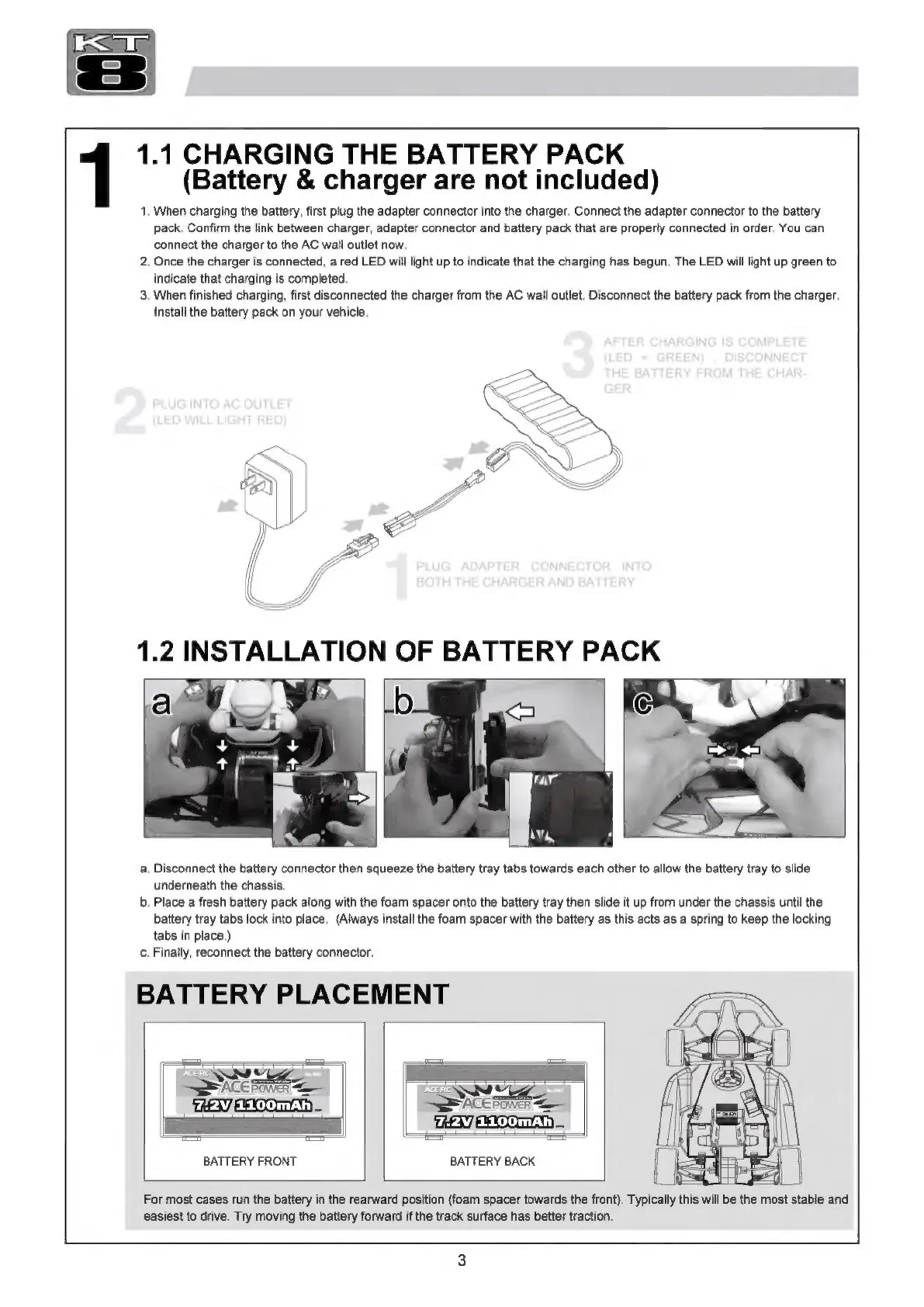
1.
When
charging
the
battery,
first
plug
the
adapter
connector
into
the
charger.
Connect
the
adapter
connector
to
the
battery
pack.
Confirm
the
link
between
charger,
adapter
connector
and
battery
pack
that
are
properly
connected
in
order.
You
can
connect
the
charger
to
the
AC
wall
outlet
now.
2.
Once
the
charger
is
connected,
a
red
LED
will
light
up
to
indicate
that
the
charging
has
begun.
The
LED
will
light
up
green
to
indicate
that
charging
is
completed.
3.
When
finished
charging,
first
disconnected
the
charger
from
the
AC
wall
outlet.
Disconnect
the
battery
pack
from
the
charger.
Install
the
battery
pack
on
your
vehicle.
a.
Disconnect
the
battery
connector
then
squeeze
the
battery
tray
tabs
towards
each
other
to
allow
the
battery
tray
to
slide
underneath
the
chassis.
b.
Place
a
fresh
battery
pack
along
with
the
foam
spacer
onto
the
battery
tray
then
slide
it
up
from
under
the
chassis
until
the
battery
tray
tabs
lock
into
place.
(Always
install
the
foam
spacer
with
the
battery
as
this
acts
as
a
spring
to
keep
the
locking
tabs
in
place.)
c.
Finally,
reconnect
the
battery
connector.
BATTERY
PLACEMENT
TA
AO.
d
]
BATTERY
FRONT
BATTERY
BACK
is
{
|
Li
|
|
For
most
cases
гип
the
battery
in
the
rearward
position
(foam
spacer
towards
the
front).
Typically
this
will
be
the
most
stable
and
easiest
to
drive.
Try
moving
the
battery
forward
if
the
track
surface
has
better
traction.

Related product manuals