EasyManua.ls Logo

THUNDER TIGER KT8 - Binding Process

THUNDER TIGER KT8
14 pages
Print Icon
To Next Page IconTo Next Page
To Previous Page IconTo Previous Page
Loading...
las
BINDING
PROCESS
A
binding
feature
is
included
in
the
ACE
RC
Cougar
2.4GHz
spread
spectrum
system
to
ensure
the
transmitter
and
receiver
bind
properly
and
prevent
interference
from
other
controllers.
To
manually
bind
Tx/Rx,
please
proceed
as
per the
following
steps:
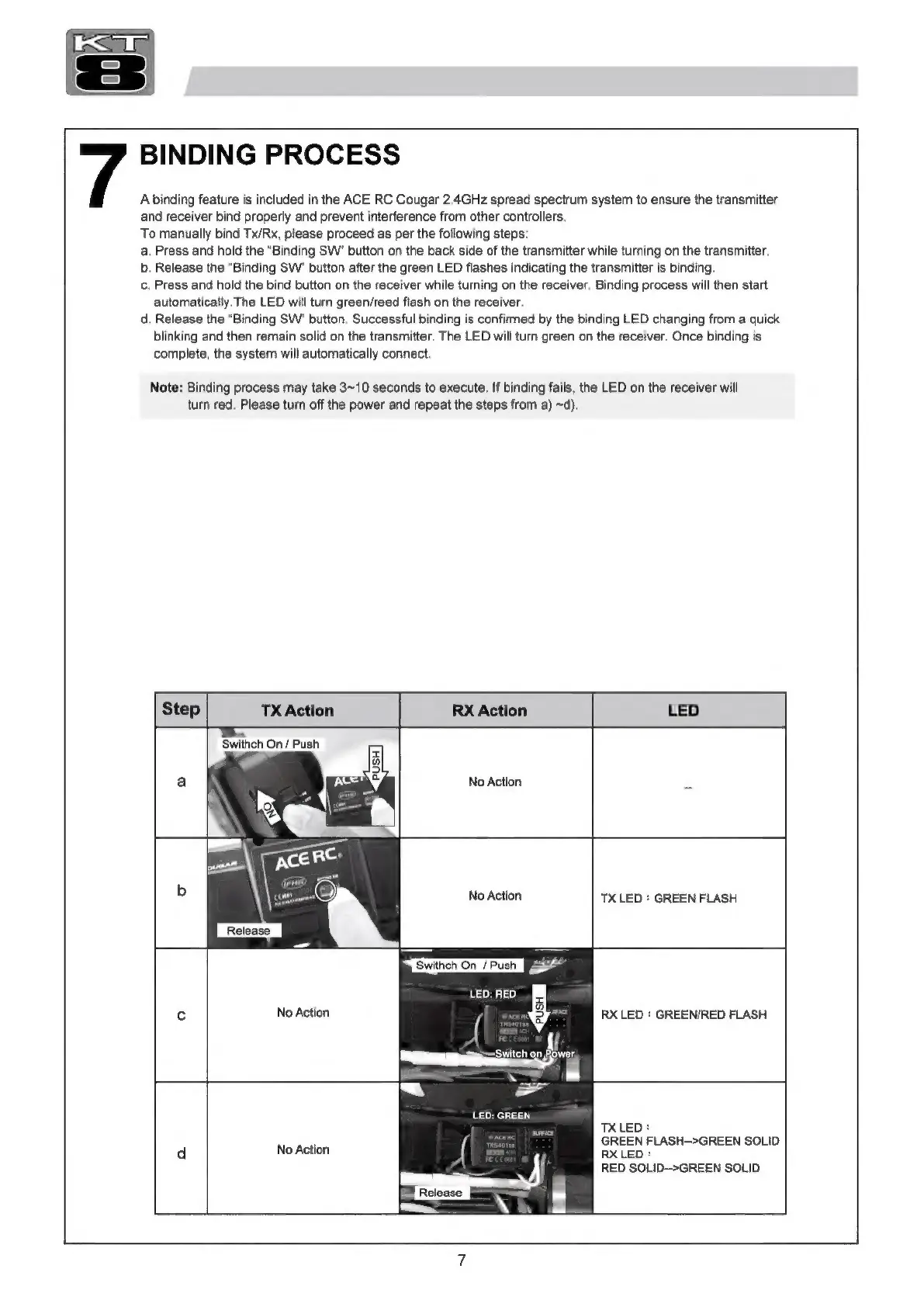
a.
Press
and
hold
the
“Binding
SW"
button
on
the
back
side
of
the
transmitter
while
turning
on
the
transmitter.
b.
Release
the
“Binding
SW"
button
after
the
green
LED
flashes
indicating
the
transmitter
is
binding.
C.
Press
and
hold
the
bind
button
on
the
receiver
while
turning
on
the
receiver.
Binding
process
will
then
start
automatically.
The
LED
will
turn
green/reed
flash
on
the
receiver.
d.
Release
the
"Binding
SW'
button.
Successful
binding
is
confirmed
by
the
binding
LED
changing
from
a
quick
blinking
and
then
remain
solid
on
the
transmitter.
The
LED
will
turn
green
on
the
receiver.
Once
binding
is
complete,
the
system
will
automatically
connect.
Note:
Binding
process
may
take
3~10
seconds
to
execute.
If
binding
fails,
the
LED
on
the
receiver
will
turn
red.
Please
turn
off
the
power
and
repeat
the
steps
from
a)
~d).
Step
TX
Action
RX
Action
LED
Swithch
On
/
Push
No
Action
No
Action
LED:
RED.
No
Action
LED:
GREEN
d
No
Action
[
н
аны
ез»
|
\
TX
LED
:
GREEN
FLASH
RX
LED
:
GREEN/RED
FLASH
TX
LED:
GREEN
FLASH->GREEN
SOLID
RX
LED
:
RED
SOLID-->GREEN
SOLID

Related product manuals