EasyManua.ls Logo

Tiandy S6 - Page 22

Default Icon
54 pages
Print Icon
To Next Page IconTo Next Page
To Previous Page IconTo Previous Page
Loading...
22
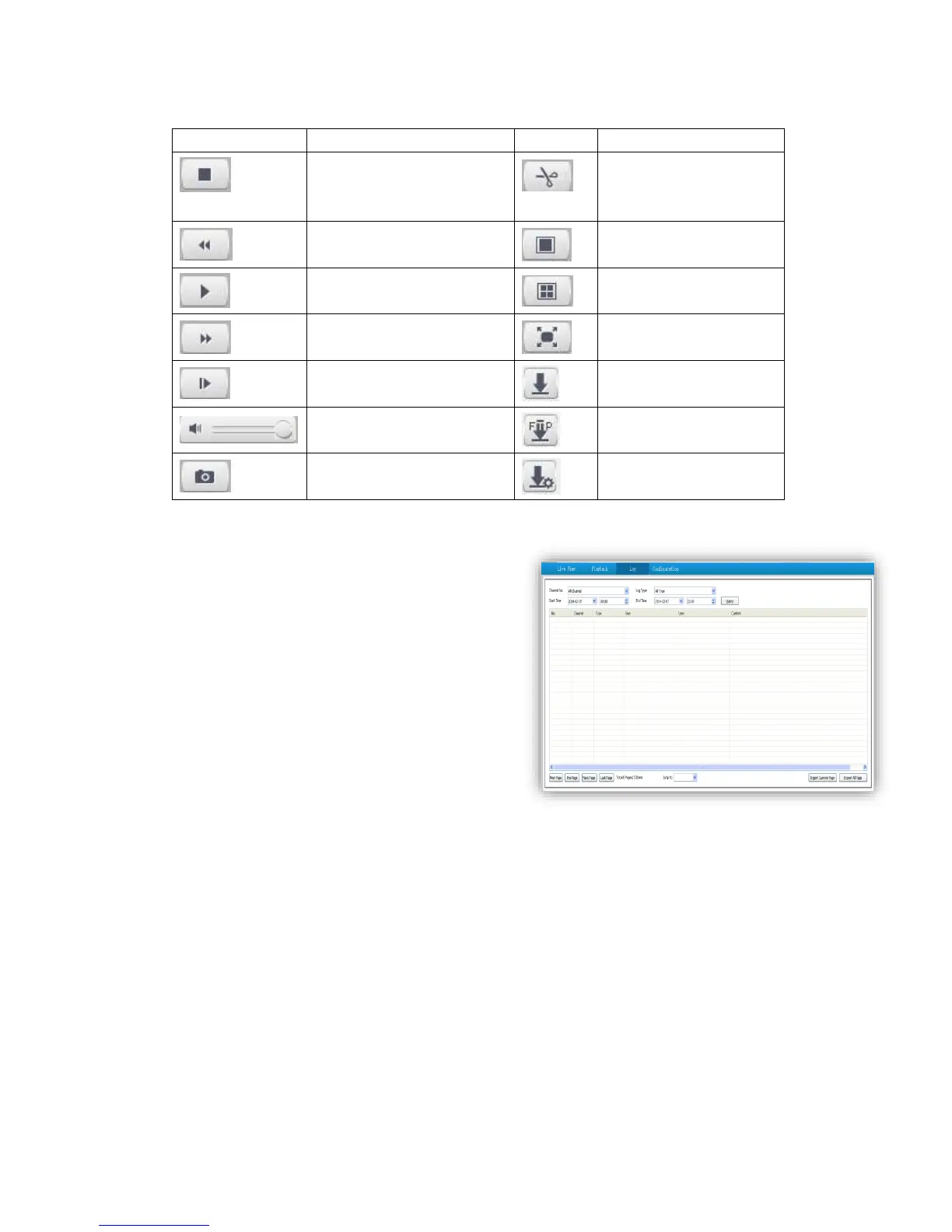
5.5.2 Descriptions of playback toolbar
con
Description
Icon
Description
Stop recording
Clip video files, and default
storage path is
D\NetVideoBrowser\
Speed down in
1/2X,1/4X,1/6X and 1/8X
Single screen
Play
Playback in 4 screen at the
same time
Speed up in 2X,4X,6X and 8X
Full Screen
Playback by frame
Download recording files
Audio on, volume adjustment
and mute
Download files into FTP
server
Capture, and default storage
path is D\NetVideoBrowser\
Preview download status
5.6 Log
(1)<Channel No> Select target channel
(2) <Log type>
All/system/warning/alarm/operation/user/others
(3) <Start time> Select start date and time.
(4) <End time> Select end date and time.
(5) <Query> Get a log list.
(6) Check logs by <First page><Pre page><Next
page><Last page> and <Jump to>target page.
(7)<Export current page> to export logs, and default
save path is D\NetVideoBrowser.
(8)<Export all page> to export all the pages query,
and default save path is D\NetVideoBrowser.

Related product manuals