EasyManua.ls Logo

TMC MCI mc-9 - Remote Control Panel

Default Icon
57 pages
Print Icon
To Next Page IconTo Next Page
To Previous Page IconTo Previous Page
Loading...
Disconnecting Booster
Battery
&
Jumper
Cables
( l ) Toking core
thot
clomps
from
one
jumper
co
ble
do
not
in
odverten
t-
ly
tou
ch
clomps
on
the
other
j
um
per
cob
l
e,
disconnect jumper
leod
from
ground
locotion
on
the
vehic
le
being
sto
ried
.
DO
NOT
leon
over
t
he
bottery
when
disconnecting
this
le
od
.
(2) Remove r
emo,ning
end
of
negot
iv
e
(-)
jumper
coble
from
the
booster
bottery
.
(3)
Remove
one
end
of
the
remo
ini
ng
jumper
coble
from
posi
tive
term
in
ol
of
the
dischorged
bottery
,
then
remove
the
other
end
of
the
some
coble
from positive
terminol
of
the
boo
s
ter
botte
ry.
(4) Remove cloths
from
open
vent
we
lls
of
eoch
bottery
. Discord cloths
os
they
moy
hove
corrosive o
ci
d
on
them
. lnsto
ll
vent
cops
on
both
the
boos
te
r
ond
t
he
disch
arged
botte
ry.
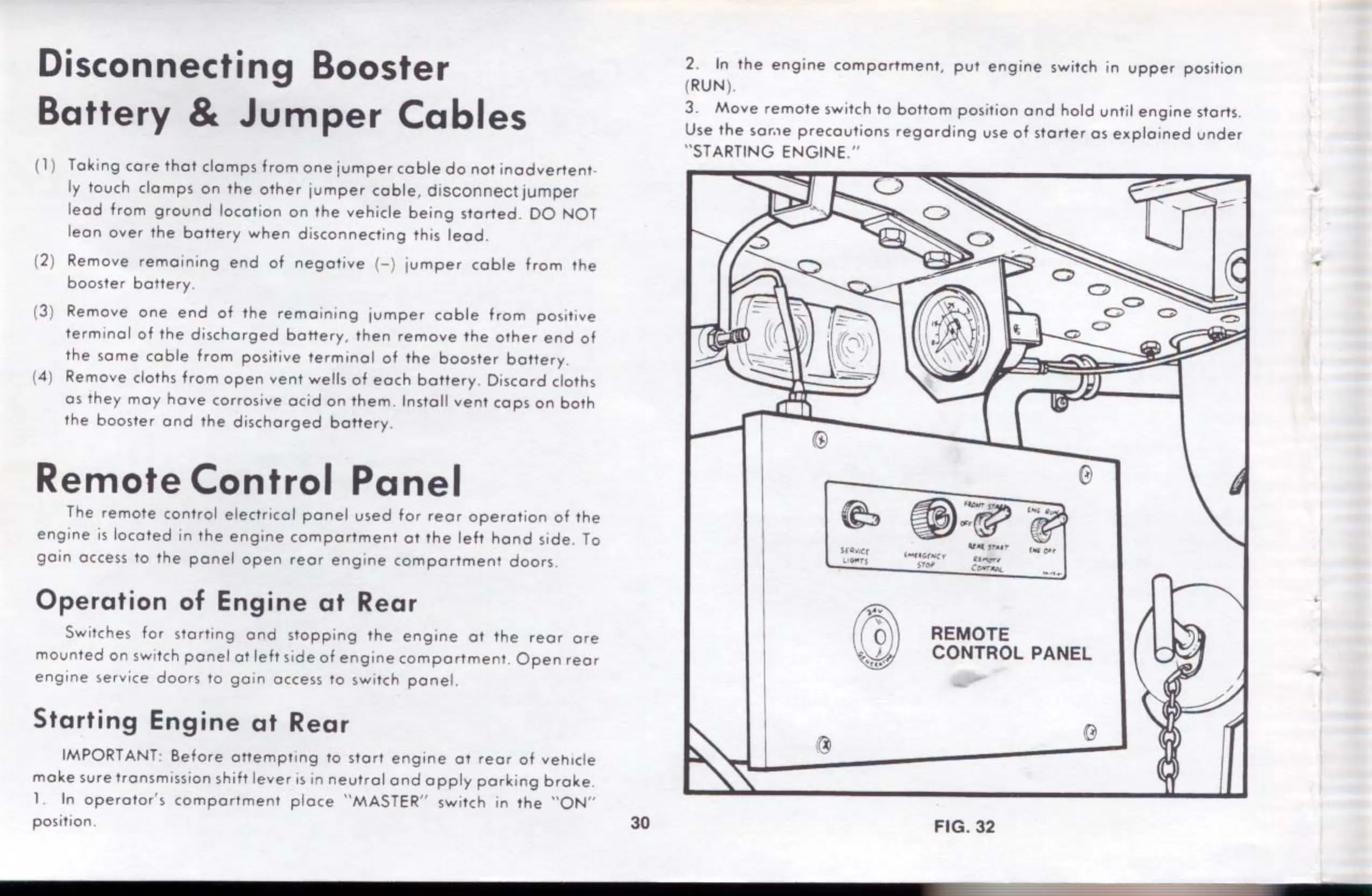
Remote
Control
Panel
T
he
remote
cont
ro
l electricol
pone!
used
for r
eor
opero
tion
of
the
engine
is locot
ed
in
the
engine
comportment
or
the
left
hond
side.
To
go
in
occess
to
the
po
ne
!
open
reor
eng
ine
comportment
doors.
Operation
of
Engine
at
Rear
Switches for
srorting
ond
sto
pp
ing
the
engine
ot
the
r
eo
r
ore
mounted
on
sw,tch
ponel
ot
left
s,de
of
engine
comportmenL
Open
reor
engine
se
rvice
doors
to
go
in
occess
to switch
po
ne!.
Starting
Engine
at
Rear
IMPORTANT:
Before
oMempti
ng
to
stort
engine
01
reor
of
vehicle
mo
ke
sure
tronsm,ssion
shih
lever
is
in
neutrol
ond
opply
por
ki
ng
broke
.
1.
In
operotor's
comportment
ploce
" MASTER'' swit
ch
in
the
"ON"
position.
30
2.
In
the
eng
ine
comportment,
put
engine
switch in
upper
position
(
RUN
).
3.
Move
re
mo
te
switch to
bottom
position
ond
hold until
engine
storts.
Use
the
sor,,e
precoutions
regording
use
of
storter
os
exploined
under
"STARTING ENGINE
."
u
I~
't)\
·
.-...=-.
~
~;:w
'tAl
t•ur
0
0
oo
0
S(O"','C(
t.-
en
L<
o.-T
j
,
....
~,w.c'I'
t,~,
.,.,
,
__
..
.
.....
REMOTE
CONTROL PANEL
FIG. 32
c;,