3
Before attempting to set up the control board, always make sure that the power switch is turned
OFF.
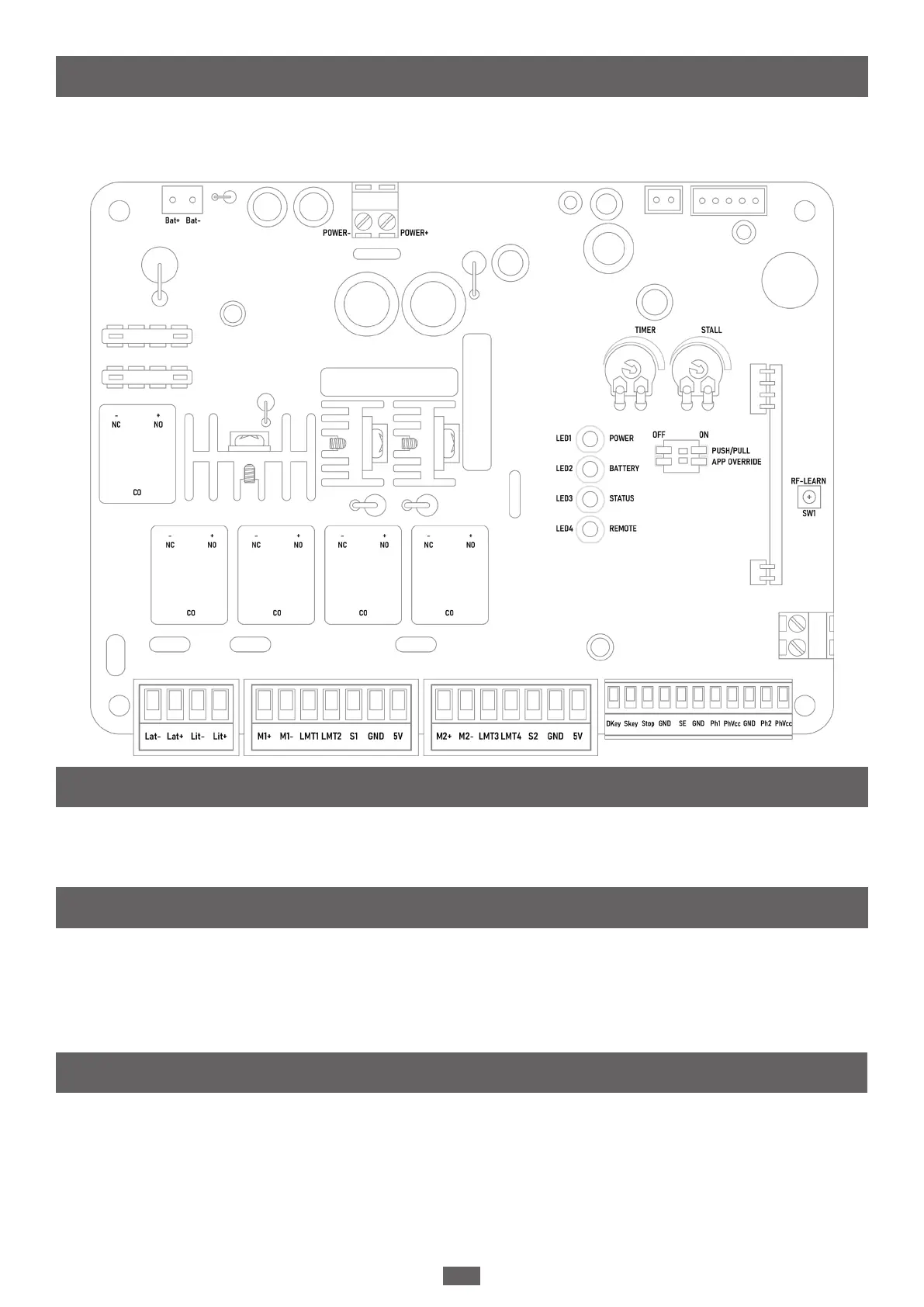
Below is a diagram of the control board.
The PUSH/PULL DIAL controls the direction in which the gates open. If you have set your gates
to being PUSH-to-OPEN, set the dial to the OFF position; if you have set your gates to being
PULL-to-OPEN, set the dial to the ON position.
The APP OVERRIDE SWITCH allows you to control all the setting through the Chow! App. If you
have the dial set to the ON position, the Chow! App will have priority over all settings.
Any conicts in setting will revert to the settings in the app. Any changes made on the control
board will not affect the settings unless the position of the APP OVERRIDE SWITCH has been
changed.
The STALL FORCE DIAL allows you to determine the force required to trigger the stall mechanism
in the operator. Insert a slot head screwdriver into the potentiometer and turn to adjust the stall
force, as seen in the diagram below. By turning the dial to the left, you can set the stall force to
the minimum (requiring the least amount of force met for the gate operator to stop working);
by turning the dial to the right, you can set the stall force to the maximum (requiring a high
amount of force resisted for the gate to stall).
I. Control Board Setup
1. Push/Pull Switch
2. APP Override Switch
3. Stall Force Dial


 To Next Page