7
The remote is capable of resetting the system. To do this, you can hold Button 3 and Button 4
simultaneously for 10 seconds. When the system is restored to the factory setting, the POWER
LED will flash for 5 seconds before returning into the blinking state to indicate that system
learning has yet to be completed.
7. System Reset Via Remote
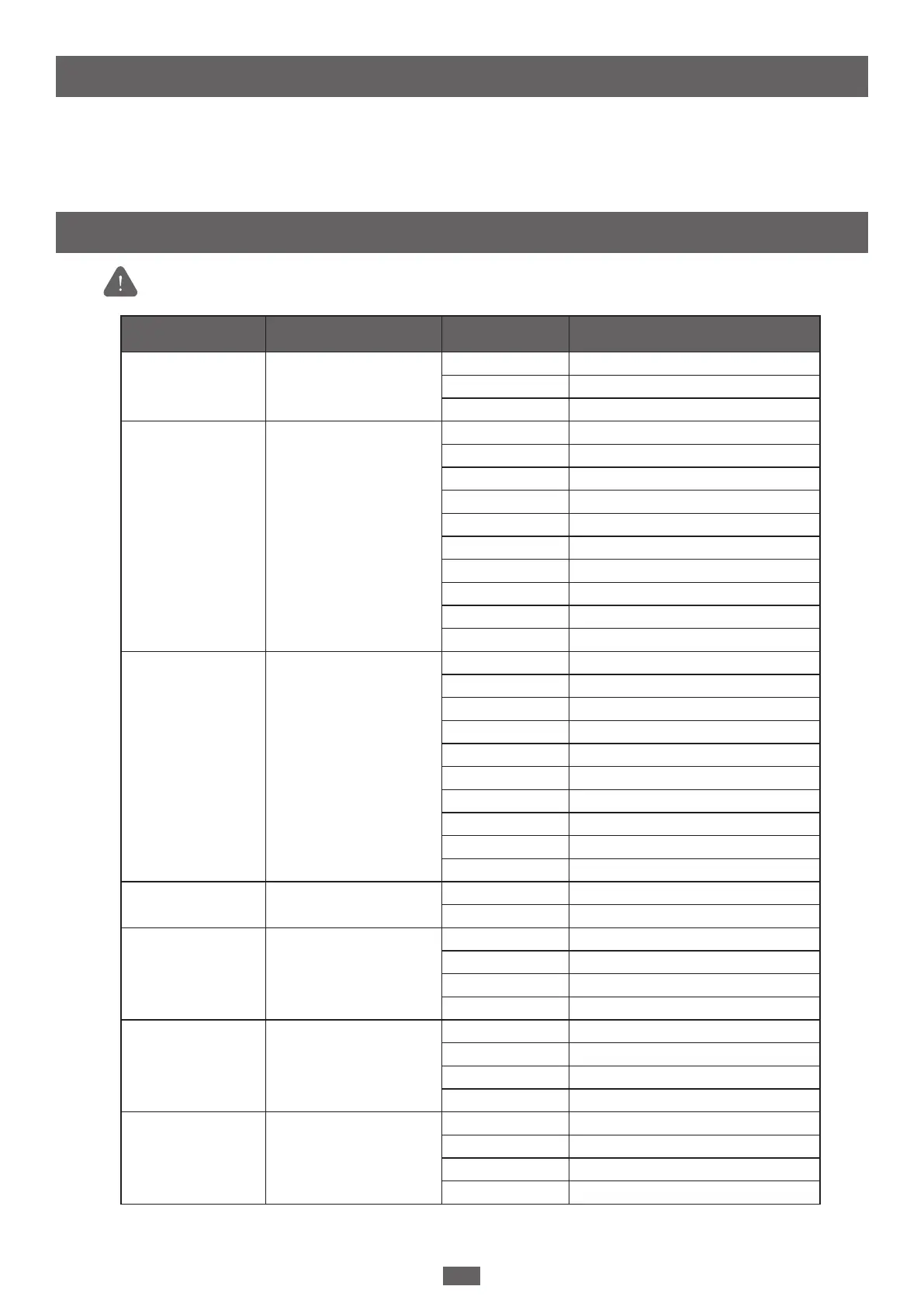
Setting Function Parameters Description
F1
Motor Type
F1-1 Overcurrent (Default setting)
F1-2 Limit Switch
F1-3 Hall Sensor
F2
Overcurrent for gate
opening
F2-1 0.5A
F2-2 1A
F2-3 1.5A
F2-4 2A
F2-5 2.5A
F2-6 3A (Default setting)
F2-7 3.5A
F2-8 4A
F2-9 4.5A
F2-10 5A
F3
Overcurrent for gate
closing
F3-1 0.5A
F3-2 1A
F3-3 1.5A
F3-4 2A
F3-5 2.5A
F3-6 3A (Default setting)
F3-7 3.5A
F3-8 4A
F3-9 4.5A
F3-10 5A
F4
Operation Direction
F4-1 Open outward
F4-2 Open inward (Default setting)
F5
Motor speed for opening
F5-1 40%
F5-2 50%
F5-3 75%
F5-4 100% (Default setting)
F6
Motor speed for closing
F6-1 40%
F6-2 50%
F6-3 75%
F6-4 100% (Default setting)
F7
Deceleration Speed
F7-1 40%
F7-2 50% (Default setting)
F7-3 60%
F7-4 70%
8. Parameter Table
Below parameters can only be adjusted with Chow! App. Please turn on the
APP Override Switch to activate the Chow! App function.


 To Next Page