41
ALL zones (Marking a check bypasses the
external attenuator on all-zone broadcast.)
*
2
24. BROADCAST GROUP/ZONE SETTING
24.1. Routing Assignment
24.1.1. Zone-to-Group assignment
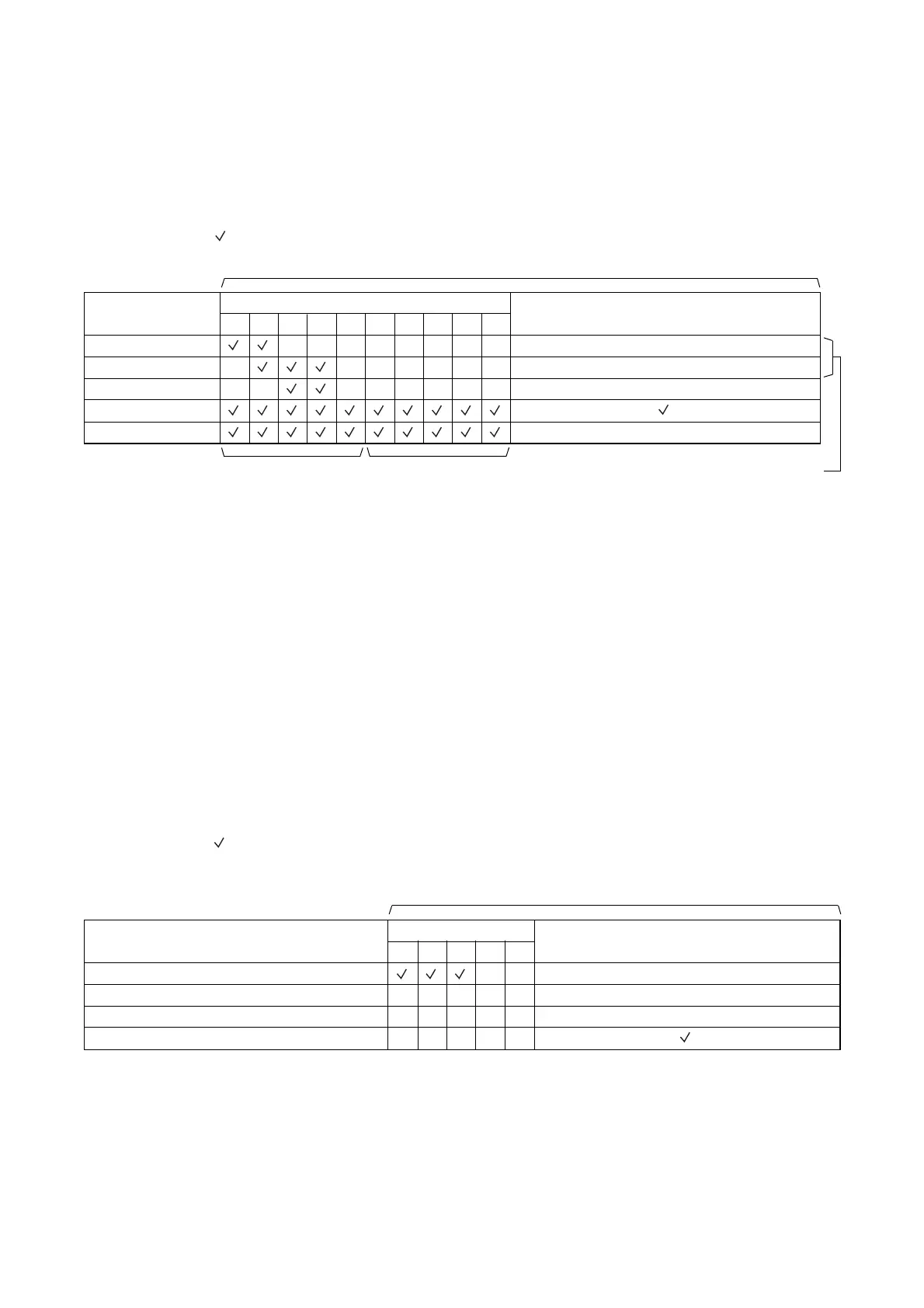
Desired broadcast zones (1 – 10) can be combined into one broadcast group (Groups 1 – 5). (See p. 43
"Zone-to-Group Assignment Operation.")
Setting example ( mark indicates "Set" state.)
1 2 3 4 5 6 7 8 9 10
Broadcast Group
(Setting item)
Group 1
Group 2
Group 3
Group 4
Group 5
Broadcast Zone 1 – 10
Master unit zone
Setting content
Sub-unit zone
For Remote Microphone operation*
1
*
1
The Remote Microphone can select broadcast zones by pressing the GROUP 1 or GROUP 2 key instead
of individual zone selector keys 1 – 10.
*
2
The broadcast zone settings (zones 1 – 10) cannot be changed unless the ALL zones setting is canceled
(i.e. "Not Bypassed").
If the ALL zones (attenuator bypass) item is set to "Bypassed," as seen in Group 4 in the above example.
Setting "Bypassed" shorts the "N1" terminal to "C" terminal on the rear-mounted ATTENUATOR CONTROL
when an all-zone broadcast is made.
[Default setting]
Only the zone with the same number as the group number is assigned to each group. (Example: Zone 1 is
assigned to Group 1, and Zone 5 to Group 5.)
24.1.2. Control input/Telephone paging-to-Group assignment
When control inputs 1 – 3 or telephone paging is activated, broadcast is made to their respectively assigned
groups 1 – 5. (See p. 46 "Control Input/Telephone Paging-to-Group Assignment Operation." )
Setting example ( mark indicates "Set" state.)
Broadcast is made to the zones selected in the above Zone-to-Group assignment.
[Default setting]
Only "All zones" is assigned to each setting item from Input 1 to TEL paging. (Example: TEL paging setting in
the above table)
ALL zones (Marking a check bypasses the
external attenuator on all-zone broadcast.)
51 2 3 4
Control Input/Telephone
Paging
(Setting item)
Input 1
Input 2
Input 3
TEL paging
Broadcast Group
Setting content



 To Next Page