47
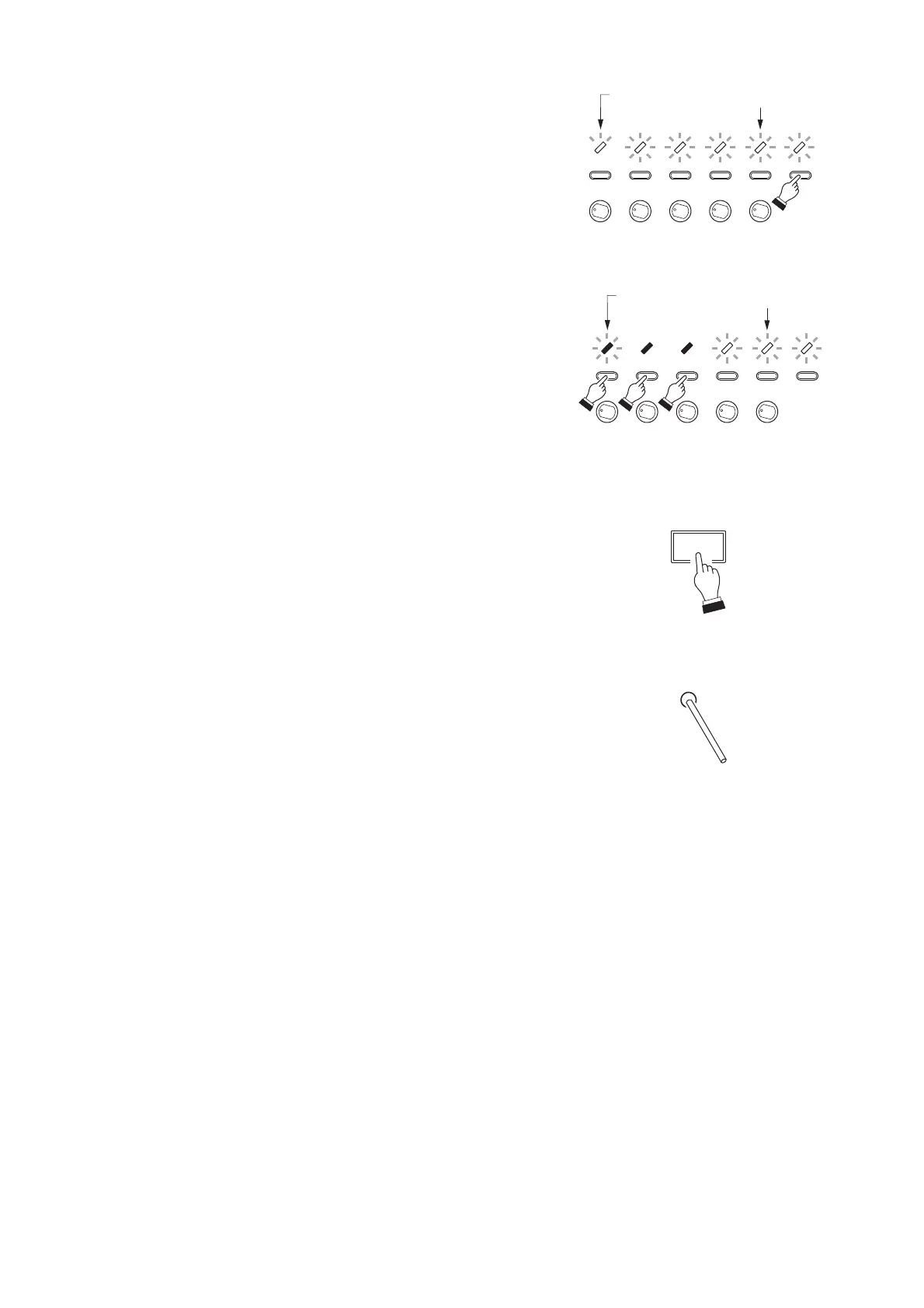
Step 4. Group number setting (Example: Groups 1, 2, and 3)
4-1. Pressing the ALL key will cancel the "ALL zones"
setting, causing the ALL indicator and the indicators for
ZONES 2 – 5 to flash. The ZONE 1 indicator changes
from "slow flashing" to "quick flashing," indicating that
Input 1 was selected but Group 1 was not.
Note: The setting returns to the situation before the
"ALL zones" was set.
4-2. Press the ZONE 1, ZONE 2, and ZONE 3 keys to select
the Groups 1 through 3.
• The ZONE 1 indicator changes from "quick flashing" to
"slow flashing*," indicating that Input 1 was selected
and that Group 1 was set.
• Indicators for ZONE 2 and ZONE 3 become steadily
on. (This represents that Groups 2 and 3 are
selected.)
• Indicators for ZONE 4, ZONE 5, and ALL remain
flashed. (This represents that Groups 4 and 5 were not
selected.)
Step 5. Programming of the group number setting
Press the POWER switch.
The Groups 1, 2, and 3 will then be programmed,
automatically returning the procedure to Step 2.
According to the instructions in Step 2, set the next
setting item. (Repeat Steps 2 through 5.)
Step 6. Setting completion
After completing all item settings, press the Reset key
using a pointed object.
This completes the setting mode, returning the unit to
broadcast standby mode.
* See p. 45 Indicator status.
[Message setting contents check]
Complete Steps 1, 2, and 3, then jump to Steps 5 and 6 without executing Step 4 (group number setting).
[Operation for group selection and its cancellation]
• Pressing a currently flashing or quickly flashing zone key for any group not selected will select that group
(the zone indicator then remains steadily lit or slowly flashes).
• Conversely, if a currently selected zone key is pressed, that group will then be deselected. ("Selected" and
"deselected" states are alternately changed with each press of the key.)
[Dual indication of setting item and group selections]
The indicators for set groups remain steadily on, while those for unset groups flash. However, if a group to
which the setting item is assigned as in the figure of Step 2 is selected, the corresponding indicator slowly
flashes*. (This provides a dual indication of Setting item and Group selection.) When that group is not
selected, the indicator quickly flashes*. (This provides a dual indication of Setting item selection and Group
deselection.)
* See p. 45 Indicator status.



 To Next Page