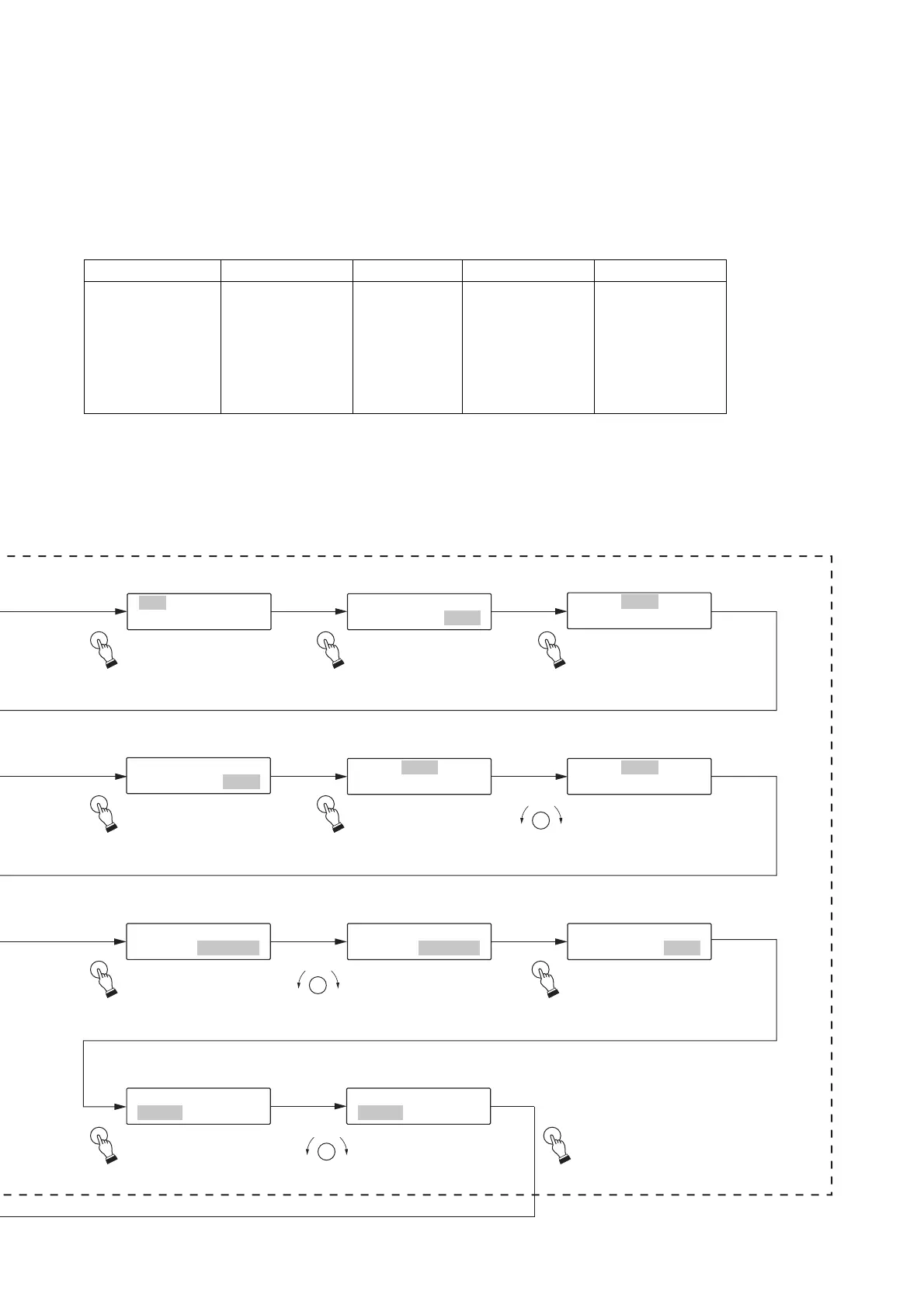
[Program No. selection]
[Sentence No. setting for Step 1]
[Selection of Input, Erasure or Insertion]
[Output setting]
[Selection of “Register”,
“Do not register” or “Initial value”]
1
[
-
P
1
00
P
1
RO
]
G
P
I
0
N
0
P
1
UT
1
[
-
E
1
ND
PRO
]
GINPUT
[
ST
00
E
1
P
][
A
001
]
[
I
P
N
0
P
0
T
1
]
[
ST
00
E
1
P
][
A
001
]
[
I
P
N
0
P
0
T
1
]
[
ST
00
E
2
P
][
E
ND
]
[
I
P
N
0
P
0
T
1
]
[
ST
00
E
1
P
][
A
001
]
[
I
P
N
0
P
0
T
1
]
[
ST
00
E
2
P
][
A
001
]
[
I
P
N
0
P
0
T
1
]
[
ST
00
E
2
P
][
A
005
]
[
I
P
N
0
P
0
T
1
]
P
001
OUT
[
P
A
U
L
T
L
]
P
001
OUT
[
P
O
U
U
T
TPUT
1
]
CAHNGEPROG
[
R
Y
A
E
M
S
?
]
SELECT
SELECT SELECT
SELECT SELECT
SELECT SELECT
SELECT SELECT
SELECT
SELECT
SELECT
Step 17.
Press the Selection
dial, and Program
001 will be displayed.
Step 18.
Turn the Selection dial
to choose [END].
Step 16.
Press the Selection dial,
and a confirmation
message for the change
in program will be displayed.
Step 11.
Turn the Selection dial to
choose Sentence A005.
Step 19.
Press the Selection dial
to return to the menu
screen.
Step 10.
Press the Selection
dial, and Sentence
A001 will flash.
Step 9.
Press the Selection dial,
and Step input will flash.
Step 4.
Press the Selection dial,
and Step 001 will be
displayed.
Step 5.
Press the Selection dial,
and Step input will
flash.
Step 6.
Press the Selection dial,
and Sentence A001
will flash.
Step 15.
Turn the Selection
dial to choose Output 1.
Step 14.
Press the Selection
dial, and Output ALL
will be displayed.
Playback Method
Continuous Program
Playback
Program Title
P001-P256
(Same as program
numbers)
Step No.
001 only
Sentence No.
A001 for P001
:
A128 for P128
B001 for P129
:
B128 for P256
(1 sentence only
for each program)
Output
Output 1 and Output 2
[Program Initial Setting Value]
If the program input is not executed, the playback operates in accordance with the initial settings preset at the
factory.


 To Next Page