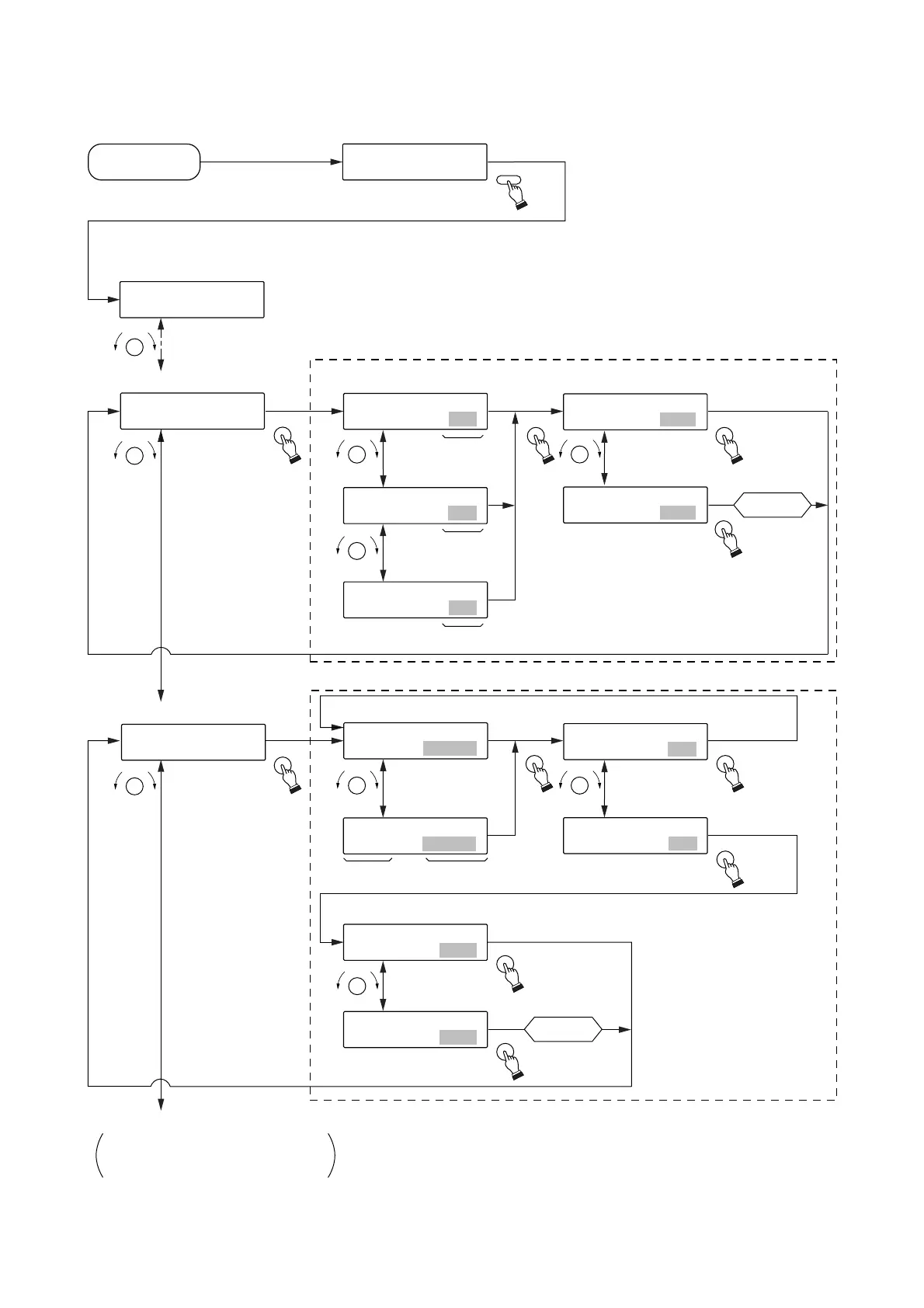
Program input
[Initial screen]
[Menu screen]*
1
Card optimization
Optimization is
not executed.
Selection of both card slots A/B
Selection of card slot A/B
Execute protect change?
Execute card optimization?
Selection of Protect on-off.
Optimization
is executed.
To other menu screen
8-1 PROGRAM COPYING
9-1 AUTOMATIC LEVEL ADJUSTMENT
Software protect
Not changed.
Changed.
Protect OFF
Protect ON
Card slot A
Card slot B
Card slots A and B
Card slotCard name
Power on
Card optimization*
2
Software protect*
2
MODE
SELECT
SELECTSELECT
SELECT
SELECT
SELECT
SELECT
SELECT
SELECT
SELECT
SELECT
SELECT
SELECT
SELECTSELECT
SELECT
SELECT
SELECT
SELECT
Execution of
optimization
Execution of
change
7
7
.
-
C
3
A
C
R
A
D
R
D
O
P
T
I
M
I
Z
7
-
3
C
A
R
D
O
P
T
I
[
M
I
A
Z
]
7
-
3
C
A
R
D
O
P
T
I
[
M
I
B
Z
]
7
-
3
C
A
R
D
O
P
T
I
[
M
A
I
L
Z
L
]
O
P
T
I
M
I
Z
E
C
A
[
R
N
D
O
A
?
]
O
P
T
I
M
I
Z
E
C
A
[
R
Y
D
E
S
A
?
]
7
7
.
-
C
4
A
S
R
O
D
F
T
W
A
R
E
W
P
7-4S
O
FT
W
ARE
W
P
CARD - A [ CARD A ]
7-4S
O
FT
W
ARE
W
P
CARD - B [ CARD B ]
C
A
R
D
A
P
R
O
T
C
[
T
O
F
S
F
W
]
C
A
R
D
A
P
R
O
T
C
[
T
O
N
S
W
]
CARD
APR
O
TCT S
W
CHAN
G
E? [YES ]
CARD
APR
O
TCT S
W
CHAN
G
E? [N
O
]
to
P
R
L
E
A
C
Y
→
→
R
P
E
L
C
A
Y
K
E
K
Y
EY
1
1
.
-
P
1
R
O
P
G
R
R
O
A
G
M
I
N
P
U
T
*
1
Pressing the [STOP] key while the menu screen is displayed returns
the display to the initial screen.
*
2
Pressing the [STOP] key while the function setting screen is displayed
returns the display to the previous menu screen.
Note: When the function setting is completed, the screen returns to the
menu screen. To terminate all setting operations, further press
the [STOP] key to return to the initial screen.


 To Next Page