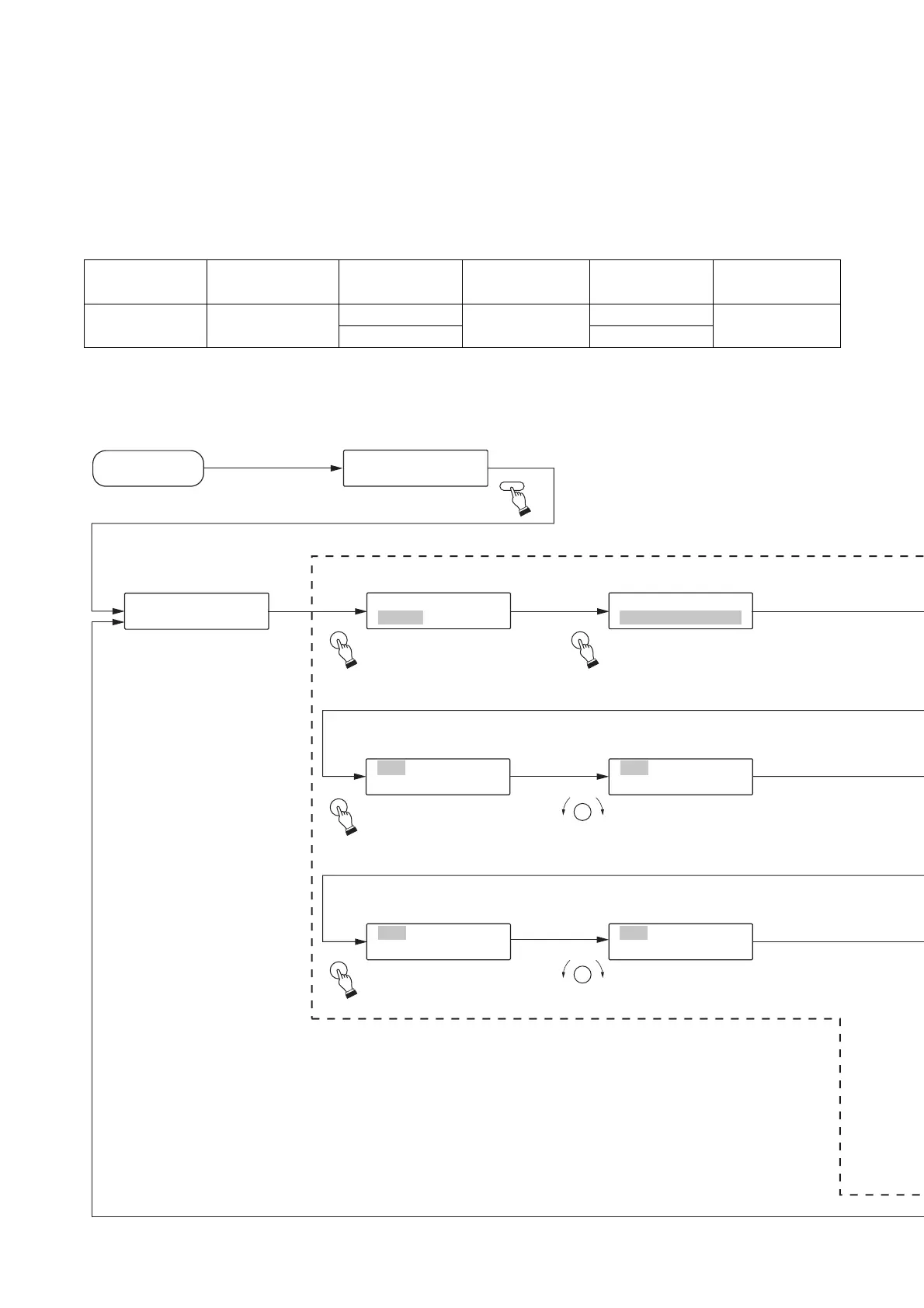
Program input setting*
2
[Initial screen]
[Program No. selection] [Playback method setting]
[Sentence No. setting for Step 2]
[Menu screen]*
1
Power on
P
R
L
E
A
C
Y
→
→
R
P
E
L
C
A
Y
K
E
K
Y
EY
1
1
.
-
P
1
R
O
P
G
R
R
O
A
G
M
I
N
P
U
T
[Menu screen]
1
[
-
P
1
00
P
1
RO
]
G
P
I
0
N
0
P
1
UT P
[
1
00
.
1
C
P
O
L
N
A
T
Y
IN
M
U
ET
P
H
R
1
O
-
G
4
]
[
ST
00
E
1
P
][
A
001
]
[
I
P
N
0
P
0
T
1
]
[
ST
00
E
2
P
][
END
]
[
I
P
N
0
P
0
T
1
]
[
ST
00
E
2
P
][
A005
]
[
I
P
N
0
P
0
T
1
]
[
ST
NE
E
D
P
][ ]
[
INPT
]
SELECT SELECT
SELECT
SELECT
SELECT
SELECT
MODE
Step 3.
Press the Selection dial,
and the Continuous
Program Playback
method will be displayed.
Step 2.
Press the Selection dial,
and Program 001 will be
displayed.
Step 7.
Press the Selection dial,
and Step 001 will be
displayed.
Step 12.
Press the Selection dial,
and Step 002 will flash.
Step 13.
Turn the Selection
dial to choose [END].
Step 8.
Turn the Selection dial
to choose Step 002.
Step 1.
Press the Mode key
How to make settings is explained here referring to an example of the "1-1 PROGRAM INPUT"
(See p. 33 and 54.).
In this example, the sentence Nos. A001 and A005 are assigned to the program No. P001. Moreover the
Playback method and Output channel are set as shown below.
Program No. Playback method
P001
Continuous
program playback
Step No. Editing
001
002
Step input
Sentence No. Output
A001
A005
Output 1
*
1
Pressing the [STOP] key while the menu screen is displayed returns the display to the
initial screen.
*
2
Pressing the [STOP] key while the function setting screen is displayed returns the display
to the previous menu screen.
Note: When the function setting is completed, the screen returns to the menu screen. To
terminate all setting operations, further press the [STOP] key to return to the initial
screen.


 To Next Page