1. Switch off the amplifier power.
2. Unscrew the output terminal cover.
3. Connect speaker cables to the output terminals.
4. Fit the output terminal cover in place.
[Precautions] Be sure to fit the output terminal cover in place.
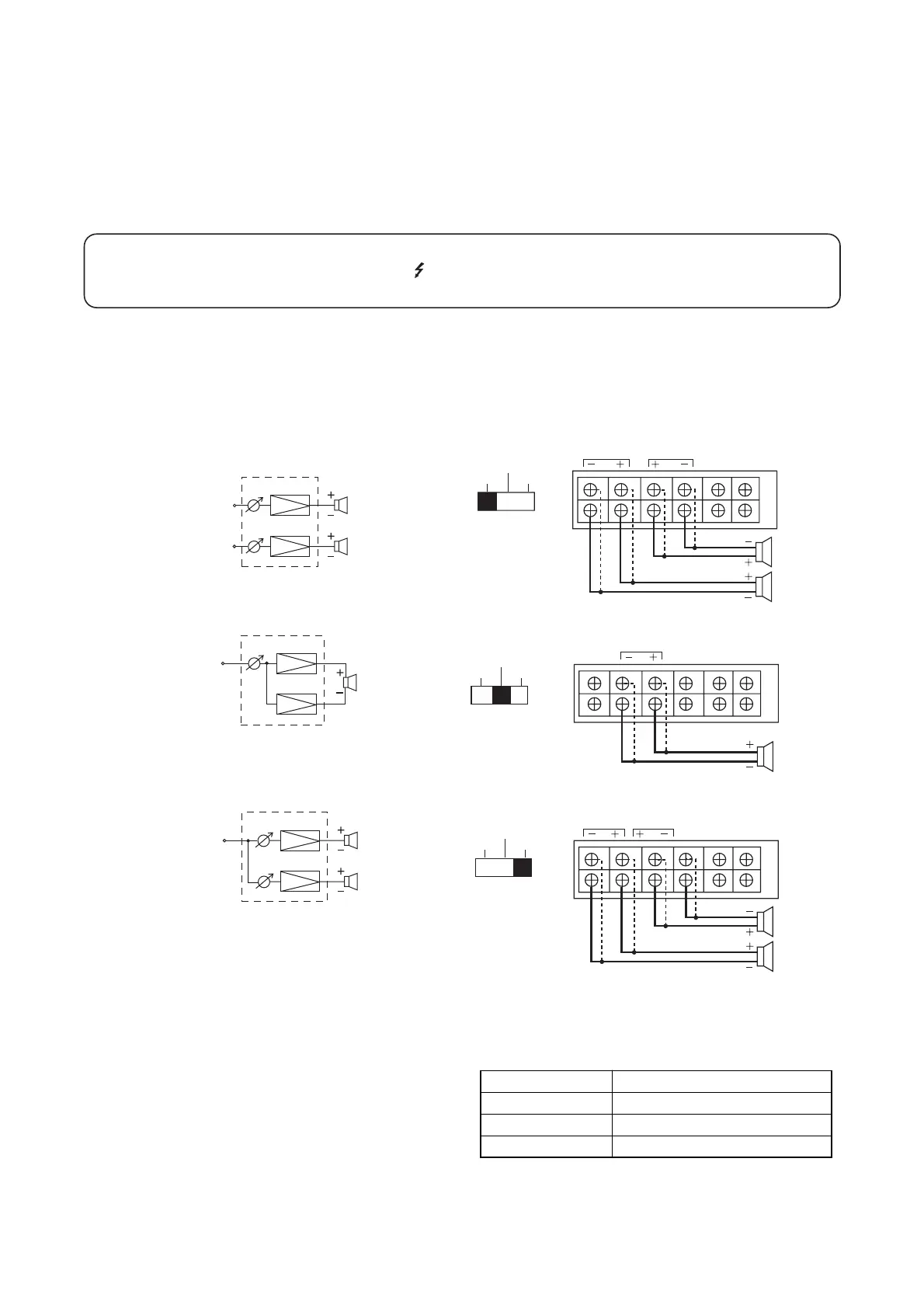
Refer to the figures below for connections for each output mode.
Since the upper output terminals are connected in parallel with the lower terminals, both terminals can be
used simultaneously.
• STEREO mode
• BTL mode
• PARALLEL mode
[Precautions] The total impedance of the connected speakers must be over 4 Ω (STEREO and PARALLEL
modes) or over 8 Ω (BTL mode). If the impedance of the connected speakers is smaller than
those stated above, equipment failures may result.
Refer to the table at right when using
an optional output transformer.
[Precautions] Do not connect the output transformer under any circumstances when in BTL mode. Both the
amplifier and transformer may fail.
WARNING
The TERMINALS marked with the symbol are HAZARDOUS LIVE.
The external wiring to these terminals requires installation by an INSTRUCTED PERSON.


 To Next Page