6
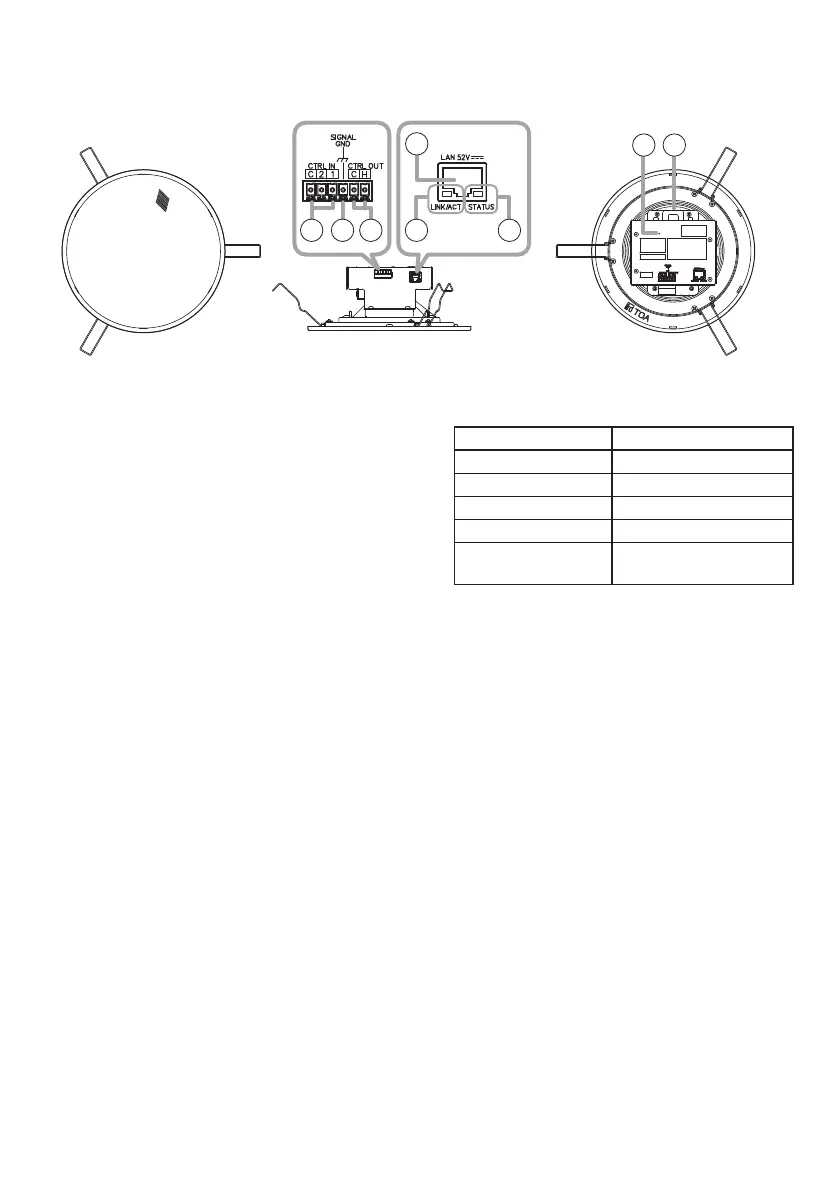
5. NOMENCLATURE AND FUNCTIONS
[Front] [Side] [Rear]
1
2 3
4
5 6
7 8
1. Control input terminals
Allows input of control signals from connected
external equipment to enable actions set in
the Event settings.
2. Functionalgroundterminal
If excessive noise is produced when the
speaker is connected to external equipment,
connect this terminal to the external
equipment’s functional ground terminal,
potentially minimizing the noise level.
Note
This terminal is not for protective ground.
3. Control output terminals
Allows control of external equipment in
synchronization with speaker operation.
4. LAN port
Connect to a PoE switching hub using a LAN
cable.
Tip
Amplier rated output is 8 W.
5. LINK/ACTindicator(green)
Flashes when data is being sent or received
over a network.
6. Statusindicator(orange)
Indicates the speaker’s operating status.
Speaker Operation Status Indicator
System startup Flashing twice
Broadcast standby Continuously lit
Broadcasting Continuously lit
System mute* Flashing quickly
Initialization or
rmware updating
Flashing slowly
* System mute is a state in which this
speaker is muted by the control from the
transmitting device.
7. Reset key
The speaker begins to restart when this key
is clicked.
Hold down this key until the Status indicator
(6) ashes slowly to initialize the speaker’s
settings.
8. Safetywireattachmenthole
Used as an attachment point for safety wire
to prevent the speaker from accidentally
falling.
See "INSTALLATION PRECAUTIONS" on
p. 7.
6. HANDLING PRECAUTIONS
• Please apply the latest rmware version to this product. The latest version is available at the TOA
DATA Library (https://www.toa-products.com/international/).
• As this product is IP-based, a slight time lag between actual and broadcast may happen.
• Broadcast audio may sometimes break up due to packet loss or network failure.
• Periodic inspection and manual rebooting are needed to extend the product life.
•
This product may reboot automatically to keep the stable operation.


 To Next Page