9
9.2. RemovableTerminalPlugConnections
Please note the following points when making connections to the control input or output terminals
using the supplied removable terminal plugs:
• Do not tin stripped wire ends with solder.
Soldered wire ends will be crushed when the terminal plug screws are tightened, leading to
higher contact resistance and potentially resulting in an abnormal rise in the temperature of the
connected parts.
• Use AWG 28 – 22 wire (ø0.32 – 0.64 mm solid wire or multi-stranded wire with a cross-sectional
area of 0.08 – 0.32 mm
2
).
• Strip the wire end back about 7 mm (0.28").
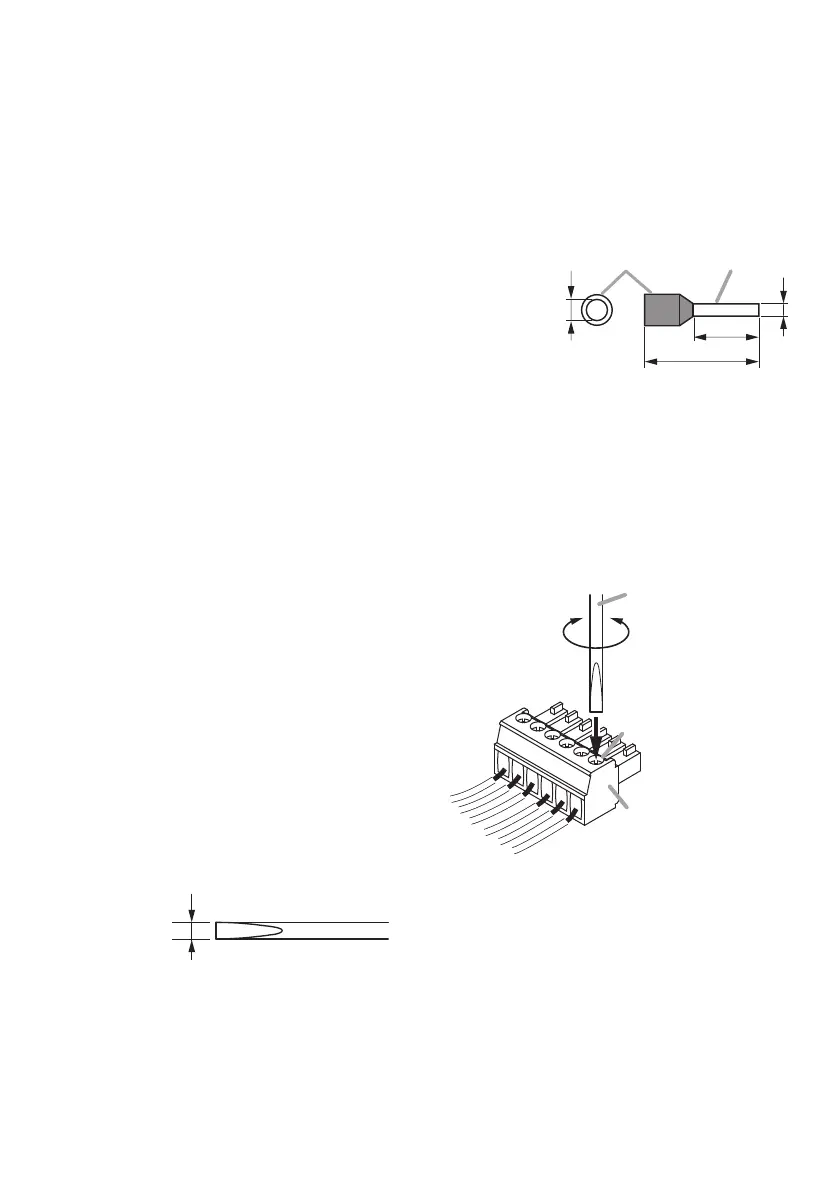
• When connecting 2 wires or a signal cable to a single
terminal, crimp them in an insulated (twin) wire ferrule to
prevent their core wires from being separated from one
another. Use a ferrule of the dimensions shown in the gure
at right.
[PlugConnectionProcedure]
Step 1. Remove the plug from the terminal.
Step 2. Loosen the terminal screw and insert a wire.
Step 3. Tighten the screw rmly.
Note
Pull on the wire to ensure that it does not
come off.
Step 4. Insert the plug into either the control input
terminal or control output terminal.
Tip
Recommended slotted screwdriver is as follows.
Blade width: about 2.5 mm (0.1")
2.5 mm (0.1")
Shape of bit
b: 0.8 – 1.1 mm (0.03" – 0.04")
l
2: 8 mm (0.31")
Note
Select dimensions “a” and “l1”
depending on the wires to be used.
a
b
l
2
l
1
Contact
Wire ferrule
2
2
3
Removable terminal plug
(accessory)
Terminal screw
Tighten Loosen
Slotted screwdriver


 To Next Page