11
8.2. ConnectionstoControlInputandOutputTerminals
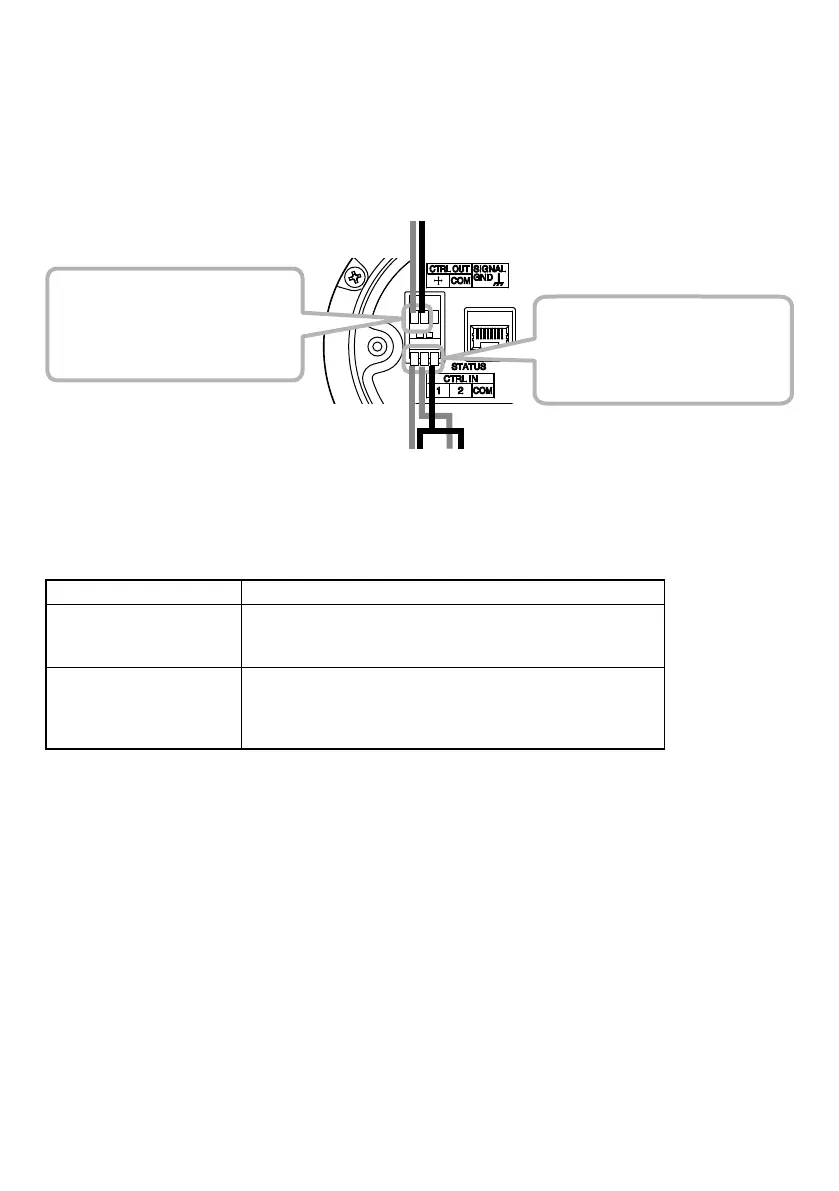
Use the supplied removable terminal plugs (3 pins) for connection. Connect a control line from the
external control device to the speaker’s control input or control output terminal. For connection of
the removable terminal plugs, see "Removable Terminal Plug Connections" on the next page.
[Control input (2 channels)]
Removable terminal block (3 pins)
No-voltage make contact input
Open circuit voltage: 5V DC
Short-circuit current: 2 mA or less
From external
control device’s
(Rear panel)
control device’s
control input terminals
[Control output (1 channel)]
Removable terminal block (3 pins)
Open collector output
Withstand voltage: 30V DC
Allowable current: 10 mA or less
The following functions can be assigned to the control input and control output terminals by browser
settings:
Terminals Assignable Functions
Control input terminals • SIP device calls
• Internal sound source broadcasts
• Change the speaker volume (Mute or volume offset)
Control output terminals • SIP broadcast in progress output
• VMS broadcast in progress output
• Multicast broadcast in progress output
• Internal sound source broadcast in progress output
For settings, please refer to the separate setup manual.
The latest version of the setup manual is available on the TOA DATA Library (https://www.toa-
products.com/international/).



 To Next Page