15
10. INITIALIZATION OF SETTINGS
Follow the procedure below to return all speaker settings to their default:
Tip
When initialized with the Reset key, the speaker’s sound source les are left in "Media," not deleted.
Initialization to factory defaults, including deletion of sound source les, should be performed using
the browser settings menu.
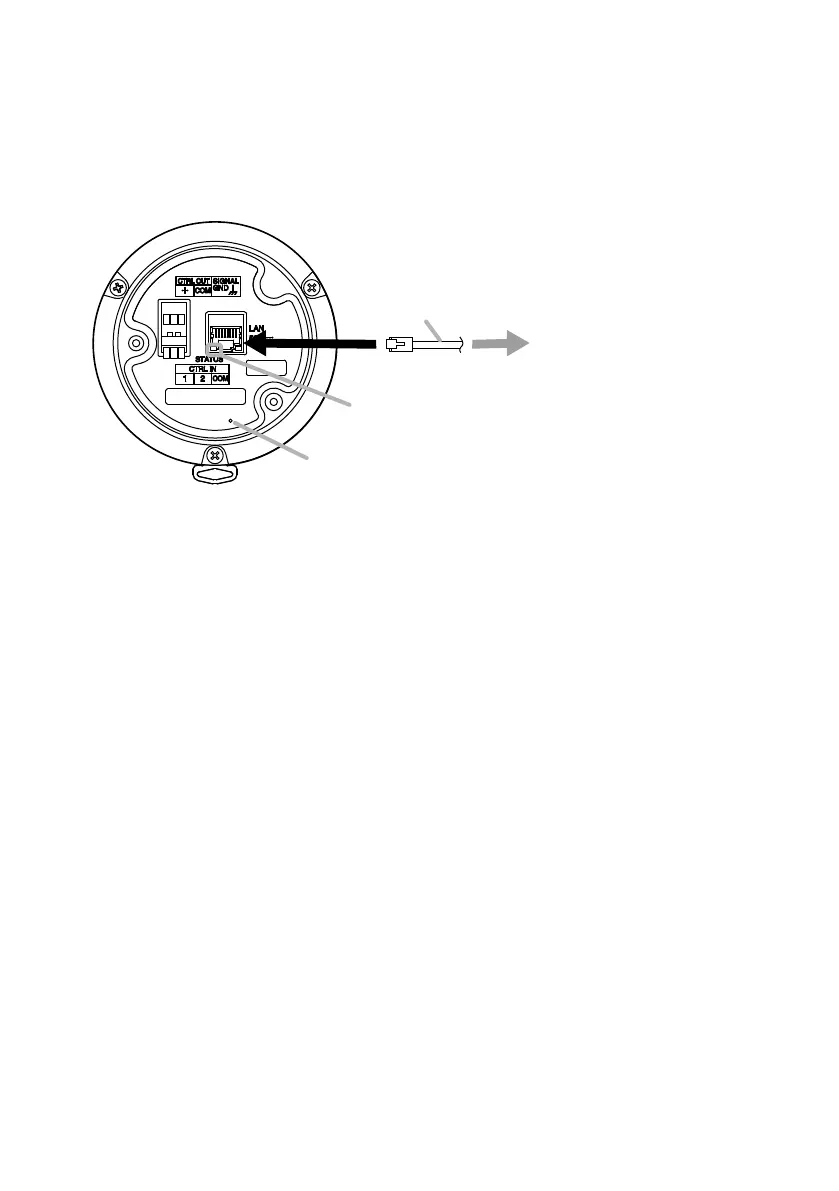
Step 1. Connect the speaker PoE+ or PoE switching hub using a LAN cable.
The speaker will be started.
Step 2. Hold down the Reset key located on the rear panel using a pointed tool.
The speaker automatically restarts and settings initialization begins.
Hold down the Reset key while the status indicator ashes quickly.
Tip
Clicking on the Reset key causes the speaker to be restarted.
If pressure on the Reset key is released part way through the initialization process, only
speaker restart will be performed, and the settings will not be initialized.
To click on the Reset key, use a tool that is thinner than ø1.5 mm (0.06") and longer than
15 mm (0.59").
Step 3. When the status indicator ashes slower, release the reset key.
When initialization is complete, the status indicator lights and all settings will be initialized
to their default settings.
[Default Settings]
Username: admin
Password: guest
IP ad dress: 192.168.14.1
Subnet mask: 255.255.255.0
Default gateway: 0.0.0.0
1
3
Status indicator
2
Reset key
or
PoE switching hub
LAN cable



 To Next Page