19
9.4. Making Fine Acoustic Adjustment
When finer acoustic adjustment is required, different ARC filters can be set for individual output channels.
[Setting example in a gymnasium where the unit's output channels are assigned as follows]
Set different ARC filters to the MONO OUT 1 channel and STEREO OUT channel.
Press in (ON).
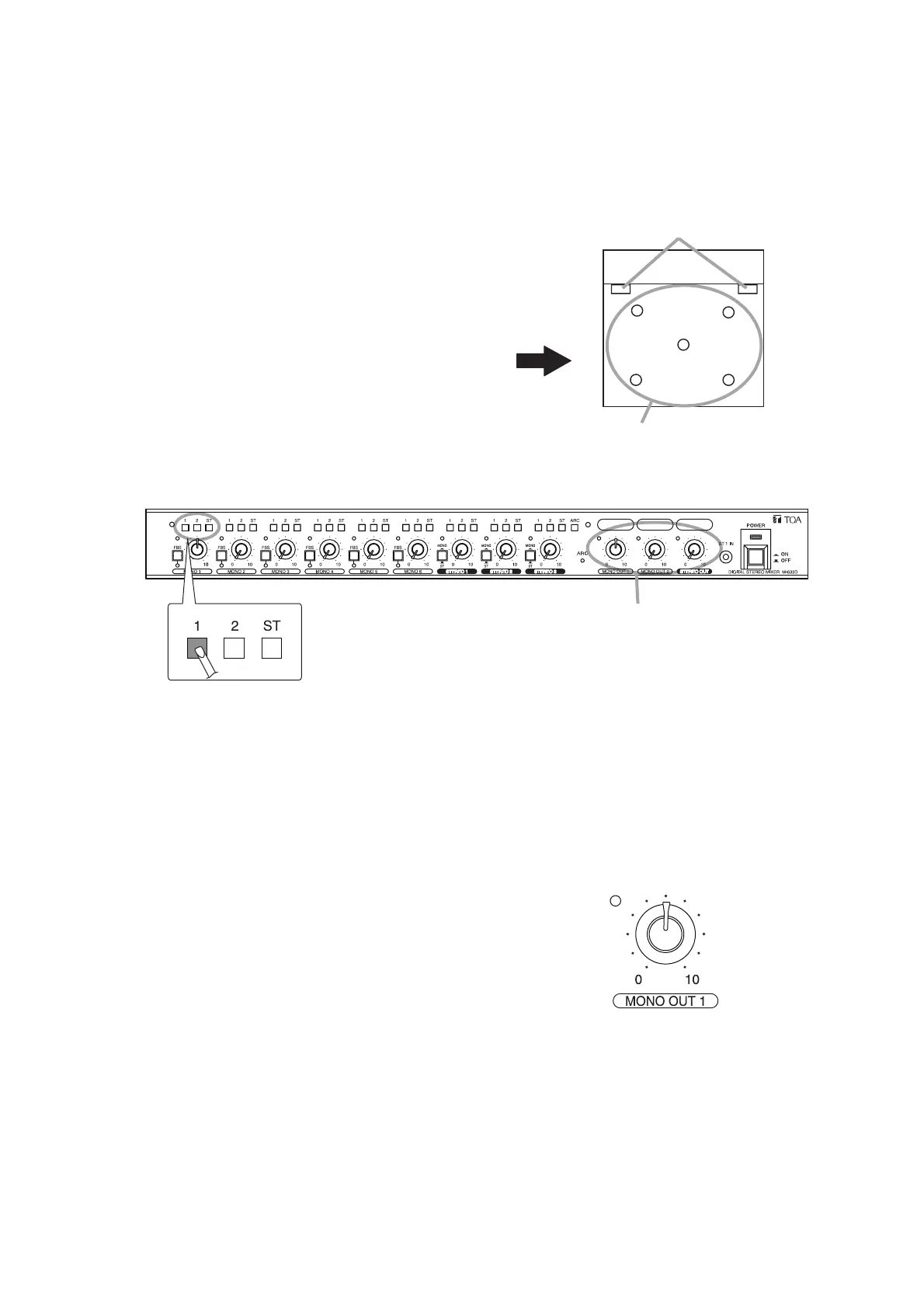
1-1. Turn the MONO 1's input level control knob to the 12
o'clock position.
1-2. Press in only the MONO 1’s Assignment switch "1" to
turn it ON.
1: ON
2: OFF
ST: OFF
1-3. Turn the MONO 1's output level control knob to the 12
o'clock position.
1-4. Adjust the volume level of the output amplifier
connected to the MONO OUT 1.
1-5. Conduct ARC measurement. (See Step 7 on p. 17.)
The ARC filter is assigned to the MONO OUT 1 channel.
Cable wiring example
• MONO OUT 1 channel: Ceiling speakers
• MONO OUT 2 channel: No connection
• STEREO OUT channel: Stereo speakers installed at
both sides of the stage
Step 1. Set the ARC filter only to the MONO OUT 1 channel (ceiling speakers).



 To Next Page