EasyManua.ls Logo

Toa M-633D - 15 Connection; Connection Example; Phantom Power Supply

Toa M-633D
32 pages
Print Icon
To Next Page IconTo Next Page
To Previous Page IconTo Previous Page
Loading...
26
15. CONNECTION
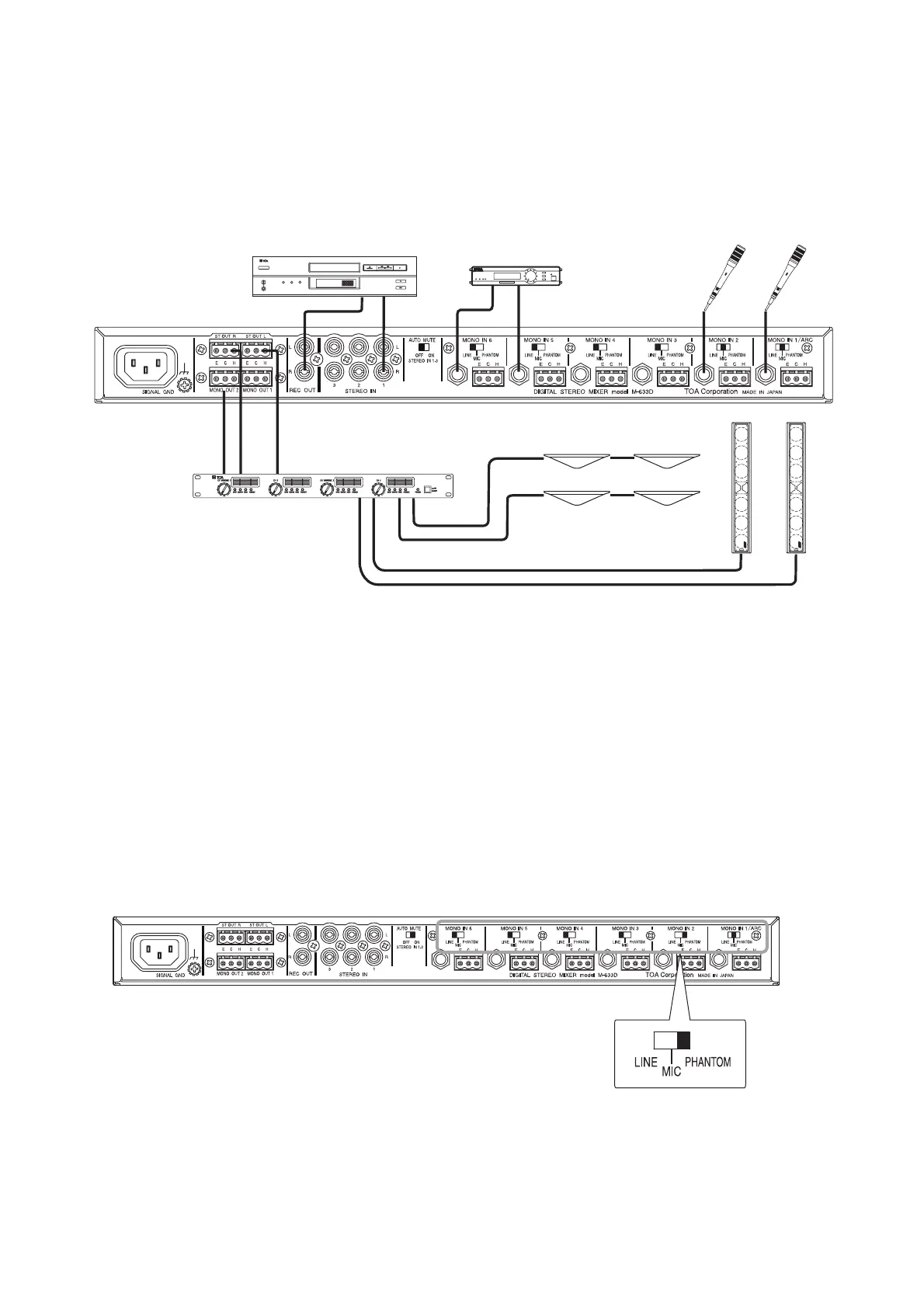
15.1. Connection Example
Playback devices (such as cassette deck,
CD player, or MD player)
Wireless equipment
Microphones
Power amplifier
Speakers
Speakers
M-633D
DIGITAL POWER AMPLIFIER DA-250F
DOWN
DOWN
15.2. Phantom Power Supply
Set the rear-mounted Input level selector switch to "PHANTOM" position only when connecting a
microphone which requires phantom power (+24 V, 10 mA) to the corresponding input terminal. Connecting
an equipment other than this type of microphone to the input terminal set to PHANTOM may cause the unit
to malfunction or may generate hum noise.
• Phantom power is not supplied to the phone jacks (MONO IN 1 – 6).


Related product manuals