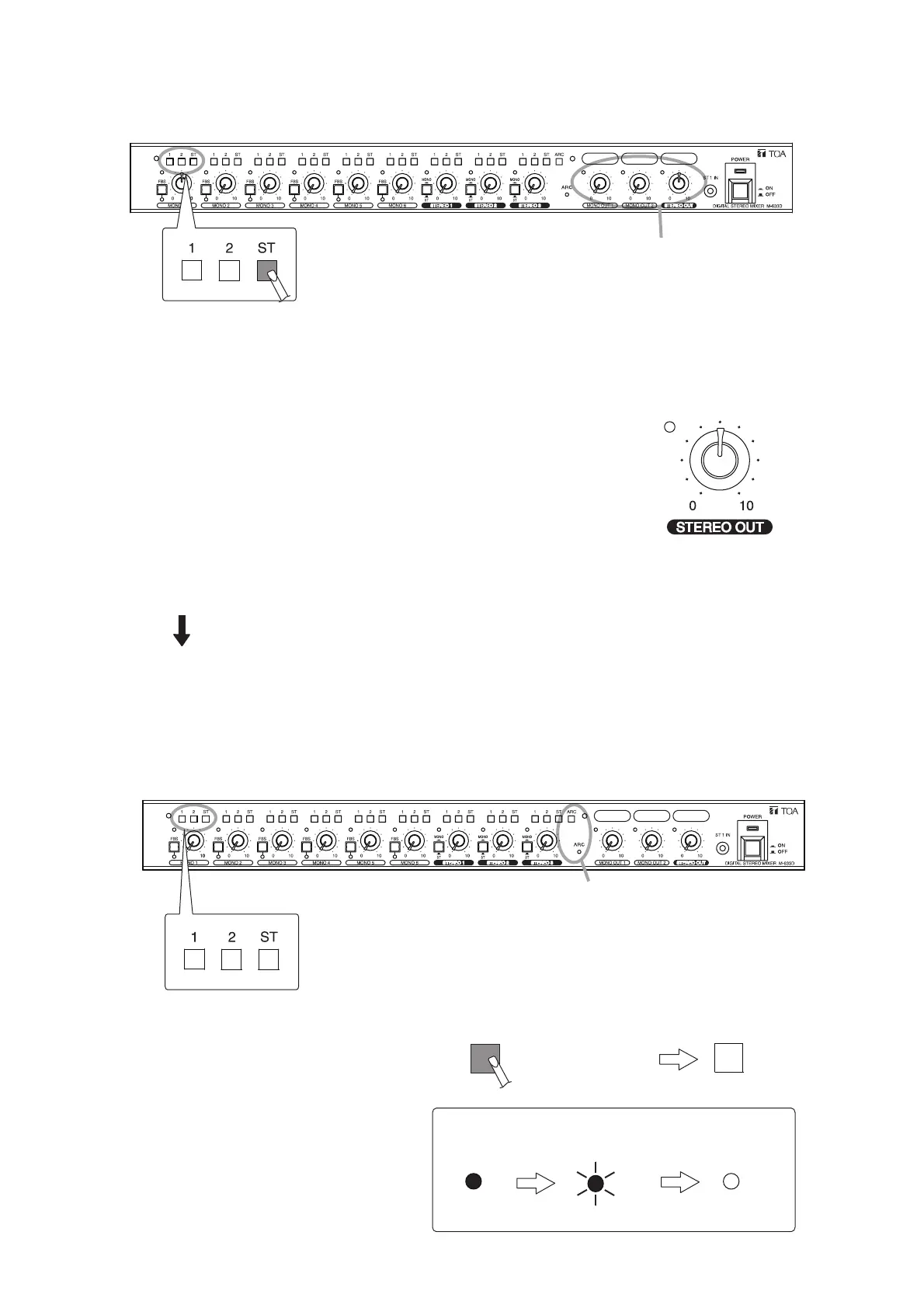
Press in (ON).
8 seconds.
it goes off.
2-1. Press in only the MONO 1’s assignment switch "ST" to turn it ON.
1: OFF
2: OFF
ST: ON
2-2. Turn the output level control knobs as follows.
MONO OUT 1: To the "0" position
STEREO OUT 2: To the 12 o'clock position.
2-3. Adjust the volume level of the output amplifier connected to the
STEREO OUT.
2-4. Conduct ARC measurement. (See Step 7 on p. 17.)
The ARC filter is assigned to the STEREO OUT channel.
Different ARC filter settings are complete to each output of the MONO OUT 1 channel and STEREO OUT
channel.
The ARC filter data is automatically saved, and remains effective even after power is cycled.
9.5. Disabling the ARC Function
Step 1. Place the MONO 1’s all 3 assignment
switches in unpressed state.
Step 2. Hold down the ARC switch for 8
seconds.
The ARC operation indicator flashes
rapidly after 3 seconds.
Continue to hold it down for 5 seconds.
The ARC operation indicator goes off,
disabling the ARC function.



 To Next Page